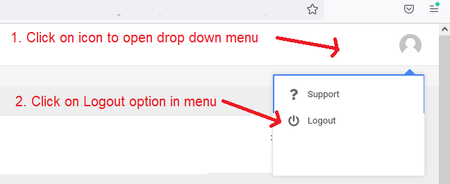
ContributionsMost RecentMost LikesSolutionsRe: Unable to run scripts using Edge as a TestedApps in TestComplete Thank you so much. That worked! I've been banging my head for weeks on this. Re: Unable to run scripts using Edge as a TestedApps in TestComplete I tried an experiment: I navigated to google.com in Edge and tried the Object Spy on it. It was able to recognize objects on the page so I think the culprit is the html page itself. The html page is a file on my desktop e.g. the URL to open the file in the Edge browser looks something like this: file://C:/Users/form.html This html page contains a POST form method to pass data from the input fields to a web application that is online. If I access the web application I am able to access the objects on the page. It is the objects on the html file I am not able to access. Re: Unable to run scripts using Edge as a TestedApps in TestComplete Yes - I mentioned that in my initial post. It is enabled. Re: Unable to run scripts using Edge as a TestedApps in TestComplete Furthermore to my comment above, the web page itself is a HTML page with html tags. Not sure if that helps. Re: Unable to run scripts using Edge as a TestedApps in TestComplete It works fine in Chrome and IE browsers for all TC projects. The Object Spy is also able recognize objects for those browsers for any project. It is Edge that is not recognizing objects at all - for any TC project - I believe this is because Edge is a Chromium browser and I read the documentation/comments in the SB community that you need to add Edge as a TestedApp. It did work for a little while but now it is no longer working. The error logs reports the following: Unable to find the following object when executing the SetText command: Re: Unable to run scripts using Edge as a TestedApps in TestComplete I do not have multiple instances of Edge open. The test script opens the browser using the following line of code in the script: Browsers.Item[btEdge].Run(url); However when it gets to this line in the code where it tries populate the object with data, it fails to recognize the object: browser = Aliases.browser page = browser.pageLogIn page.Wait() page.txtPersonID.SetText("12345") <--- fails on this line because it does not find the txtPersonID object Using the Object Spy on the web application also does not recognize any individual object. It used to be able to put a red border around each field. It does work in Chrome and IE but not Edge. I removed msedge from the TestedApps and ran the test again - still does not recognize object. There is only one instance of the browser open. Any other ideas? Unable to run scripts using Edge as a TestedApps in TestComplete Hi, I have some scripts to run a web application in Edge chromium web browser however when I run the test it throws a "The object xxxx does not exist." The application contains 4 input fields and a button. The script attempts to populate each field with data and click the button however it does not recognize the objects. When I try to use the Object Spy, it does not recognize the objects either - just shows a red border to the browser window instead of the fields. I have added Edge as a TestedApps, Edge does contain the TestComplete extension and I have ticked * option in the List of accepted windows in Current Project Properties > Open Applications > MSAA section. All other suggested settings for Edge in the TC documentation has been set. TestComplete version = 15.44 Edge version = 106.0.1370.52 I used to be able to access the objects and spy the objects a while ago but now something has changed and I'm unable to run any tests using Edge. Any suggestions appreciated! Thanks. Solved"There was an attempt to perform an action on a zero-sized window." error message in FF only I am getting an "There was an attempt to perform an action on a zero-sized window." error message in Firefox 98 in my python script. This script has been run in Chrome, IE and Edge without any issues. I am using TestComplete to version 15.40 and Firefox version 98 (with the patch). I have narrowed down the issue to a scenario where I click on a user icon on the top right corner of a webpage which opens a dropdown menu and then I click on "Logout" option. It fails on the step where it clicks on the "Logout" option. See screenshot below. If I step through the code on those two lines after the wait method (see code below), it does not trip the error so I'm wondering if this is due to the "txtUser.linkLogout" object not being ready/visible during execution. I am at a loss what to do to fix this as it seems specific to Firefox only. The (python) code is this: browser = Alias.browser page = browser.pageHomePage page.Wait() page.linkButton.imgUserProfile.Click() page.txtUser.linkLogout.Click() <---- fails on this line The Name Mapping looks like this > pageHomePage > linkButton - imgUserProfile > txtUser - linkLogout Any suggestions/advice appreciated. Thanks! Re: Unable to run script using Firefox - get error "Unable to find the object Sys.Browser("*)" Thank you! Re: Unable to run script using Firefox - get error "Unable to find the object Sys.Browser("*)" Thank you, I'll get FF rolled back to FF98. Is there a plan to create a patch for FF100?