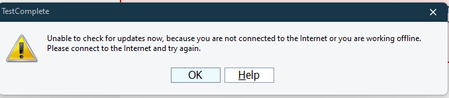
gshaikhOccasional Contributor2 years agoSolvedUnable to update TestComplete to latest version from Help option I want to update TestComplete to latest version. Currently i am on 15.40.421 .When we go to 'Help' -> 'Check Updates' it is giving error How can i update to latest version? Show Morerraghvani2 years agoYou might be sitting behind a firewall which is preventing access to SmartBear Update. Check with your IT. See How to Check for Available Updates for more information.
rraghvani2 years agoYou might be sitting behind a firewall which is preventing access to SmartBear Update. Check with your IT. See How to Check for Available Updates for more information.
rraghvani2 years agoYou might be sitting behind a firewall which is preventing access to SmartBear Update. Check with your IT. See How to Check for Available Updates for more information.
Recent Discussionspage.PagePicture - Screenshot duplicationcapture variable from the popup in Desktop applicationUnable to run Keyword Tests after 15.80
Related ContentUnable to install TC/TE version 15.79TestComplete Version-15.75 : Unable to Launch and interact with Chrome version-137.Unable to install TestComplete Trial Version