bafageehNew Contributor4 years agoSolvedHow to test multi functionsHow to test multi functions without stop test steps .look to snap file .Capture.PNG8 KBMarsha_R4 years agoSet your error handling options to "Continue running" https://support.smartbear.com/testcomplete/docs/working-with/managing-projects/properties/playback.html
Marsha_R4 years agoSet your error handling options to "Continue running" https://support.smartbear.com/testcomplete/docs/working-with/managing-projects/properties/playback.html
Marsha_R4 years agoSet your error handling options to "Continue running" https://support.smartbear.com/testcomplete/docs/working-with/managing-projects/properties/playback.html
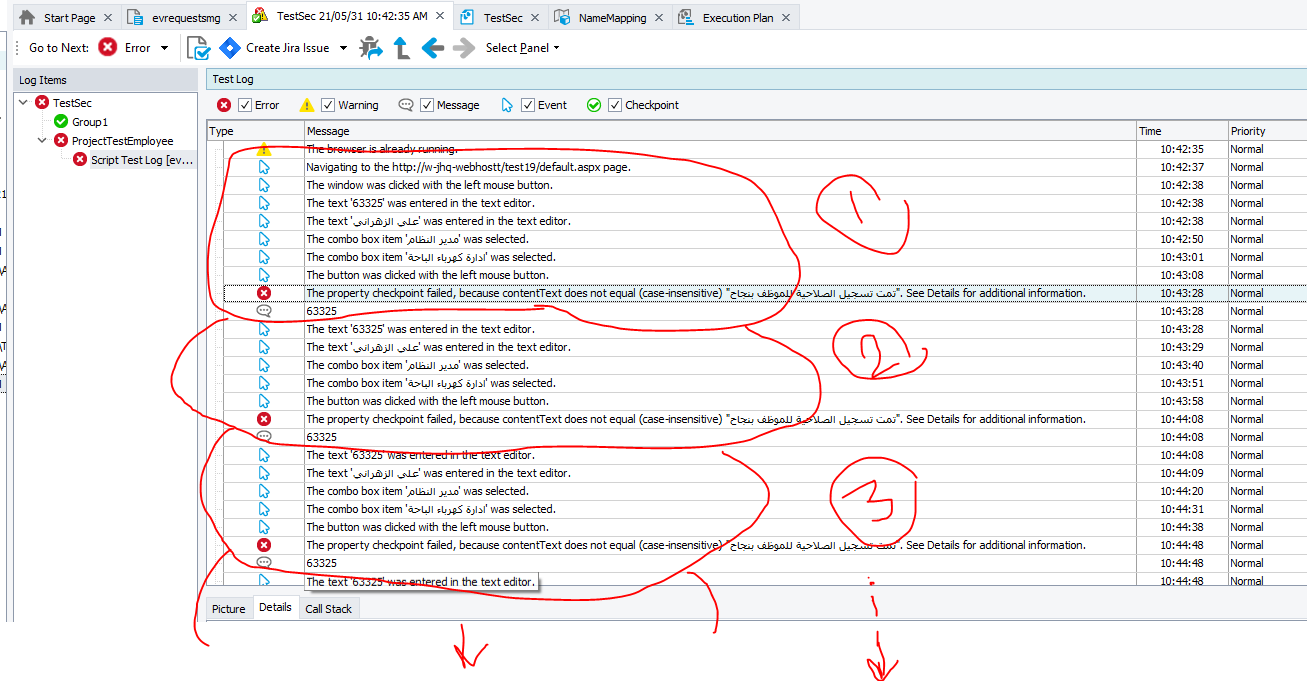
5 RepliesReplies sorted by Most LikedMarsha_RChampion Level 34 years agoSet your error handling options to "Continue running" https://support.smartbear.com/testcomplete/docs/working-with/managing-projects/properties/playback.htmlbafageehNew Contributor to Marsha_R4 years agoWhen a error, and I have chosen to continue, it will repeat as shown in the attachment .634643636.PNG98 KBAlexKarasCommunity Hero to bafageeh4 years agoHi, Can you show us how execution of this piece is organized (test item settings, code that calls some function in a loop, etc.) ? Show MoreShow More
Marsha_RChampion Level 34 years agoSet your error handling options to "Continue running" https://support.smartbear.com/testcomplete/docs/working-with/managing-projects/properties/playback.html
bafageehNew Contributor to Marsha_R4 years agoWhen a error, and I have chosen to continue, it will repeat as shown in the attachment .634643636.PNG98 KB
AlexKarasCommunity Hero to bafageeh4 years agoHi, Can you show us how execution of this piece is organized (test item settings, code that calls some function in a loop, etc.) ?
Recent Discussionscapture variable from the popup in Desktop applicationUnable to run Keyword Tests after 15.80"Simplified WPF object tree" setting