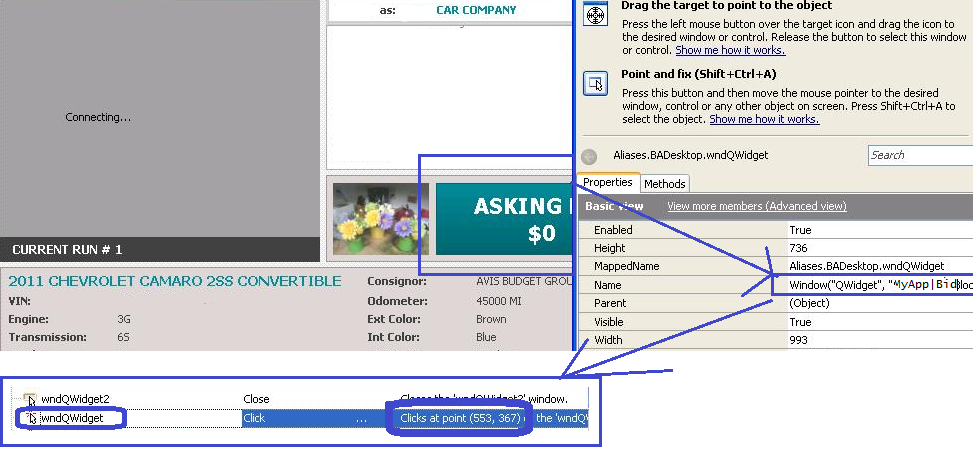
sumith_kmenonOccasional Contributor12 years agoWeb Application Object identification Issue - wndQWidget- onlyHiI have to click on an image button in a window. (Please Find the attachment.)But the Test Complete identifies this as wndQWidget only.The Image/Button object is not identified.The script can only click on the image by X,Y coordinates only.I need to get the exact object and I need the current label displayed in that object using Run time property (In my case i have to get Asking Bid $0)RegardsSMITHwndQWidget.png219 KB
1 ReplyReplies sorted by Most LikedTanyaYatskovskaAlumni12 years ago Hi Smith, I've replied to you [url= http://smartbear.com/forums/f74/t86589/object-identification-issue-wndqwidget-only/]here[/url]. Please don't duplicate your question.
TanyaYatskovskaAlumni12 years ago Hi Smith, I've replied to you [url= http://smartbear.com/forums/f74/t86589/object-identification-issue-wndqwidget-only/]here[/url]. Please don't duplicate your question.
Recent DiscussionsTestComplete – “Token Expired” Error Occurring RepeatedlyHow to Configure Relative Filepath for Stores|Tables Excel Sheet Import?OCR is not detecting zero numbers
Related ContentOCR in UI Test Automation: Extending Coverage Where Traditional Identification Breaks DownObject Identification issues in windows forms application.Object identification Issue - wndQWidget- only