We are building a new experience for our SmartBear Community.
This site is now read-only. You can still browse and search as usual. Learn More
This site is now read-only. You can still browse and search as usual. Learn More


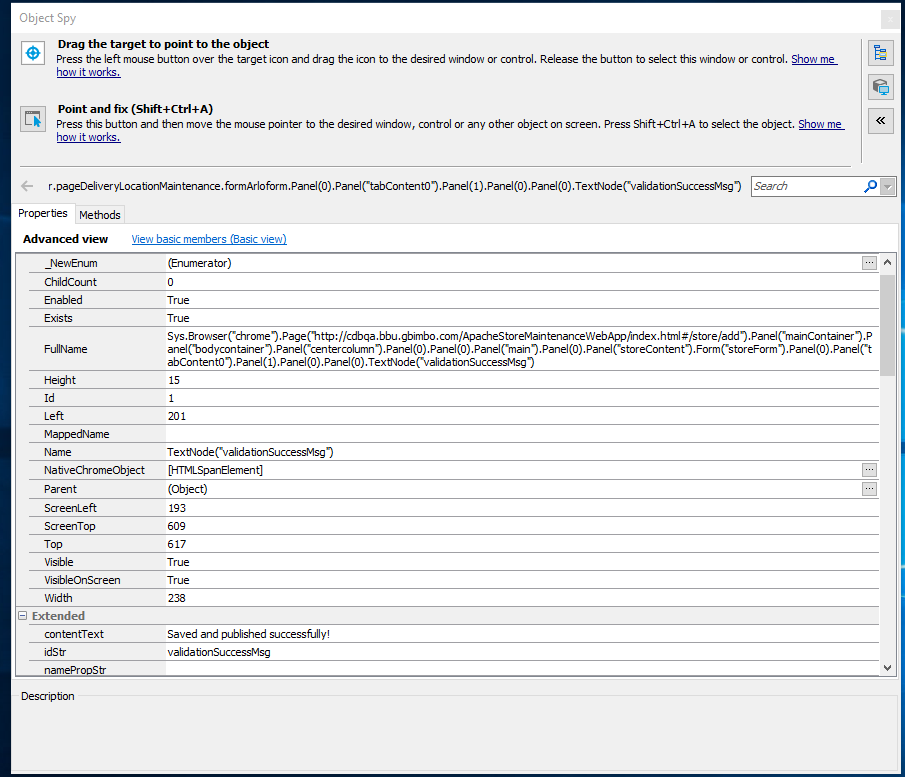
Would you mind posting a screenshot of your object tree. What error message does TC give you ?
Your 'Name' Property of 'TextNode("ValidationSuccessMsg")' doesn't look right.
Perhaps you are looking at something like
var props = ['ObjectType','ObjectIdentifier'];
var vals = ['TextNode','validationSuccessMsg'];
containerObj.FindChild(props,vals,20);
What is objPages() ? It is possible that it's not something valid for performing a Find on

objPages() is intialize browser and page.as requested I attached screenshot my object tree.
Tc doest not shows proper messages.
The find method can only be applied to a TC "object". I assume objPages() is a method ? Could you show us what it returns ? Is it Page object ? Does objPages().Exists return true or false ? e.g.
var returnedObject = pageObj();

if(returnedObject.Exists)
{
 Log.Message("It Exists, you can do a find");
}
else
{
Log.Error("The returned object doesn't exist");
}
You can change your "ObjectIdentifier" property to an idStr property. The Value is still the same "validationSuccessMsg"
showing page object method
function objPages() {
var page = Sys.Browser("*").Page("*");
return page;
}
Urmikhan wrote:
var page = Sys.Browser("*").Page("*");
return page;
Thats a risky bit of code. You have no guarantee that you will even be looking at the page you are intending to find. It's efectively saying bring me any page you can find - no matter what it's called.
Have you tested the .Exists property on the returned value yet ?