We are building a new experience for our SmartBear Community.
This site is now read-only. You can still browse and search as usual. Learn More
This site is now read-only. You can still browse and search as usual. Learn More


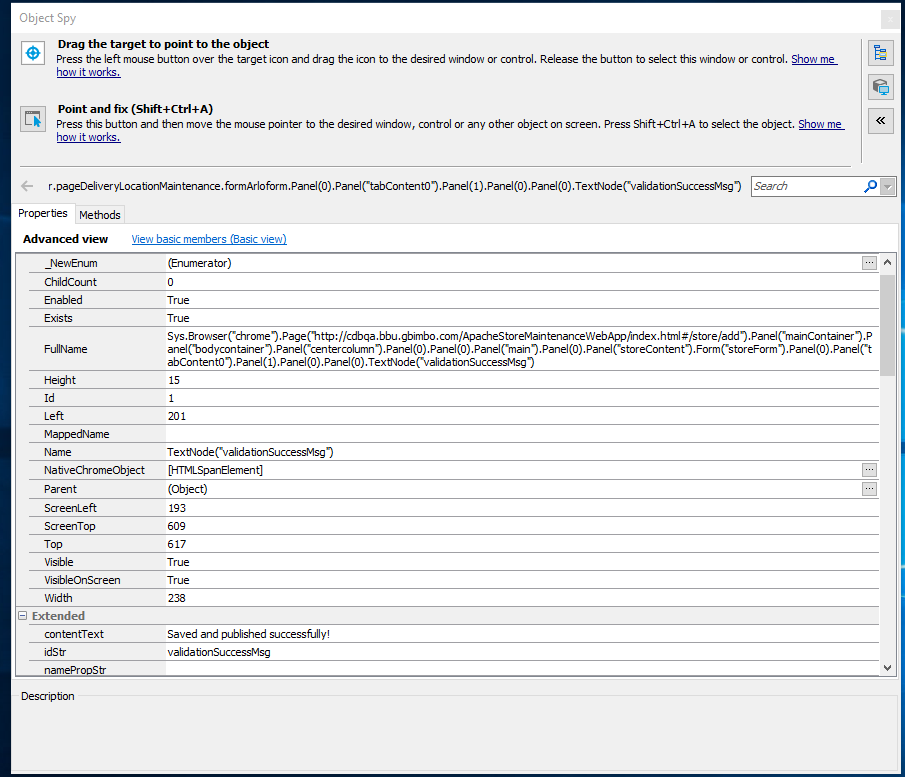
Would you mind posting a screenshot of your object tree. What error message does TC give you ?
Your 'Name' Property of 'TextNode("ValidationSuccessMsg")' doesn't look right.
Perhaps you are looking at something like
var props = ['ObjectType','ObjectIdentifier'];
var vals = ['TextNode','validationSuccessMsg'];
containerObj.FindChild(props,vals,20);
What is objPages() ? It is possible that it's not something valid for performing a Find on
Would you mind posting a screenshot of your object tree. What error message does TC give you ?
Your 'Name' Property of 'TextNode("ValidationSuccessMsg")' doesn't look right.
Perhaps you are looking at something like
var props = ['ObjectType','ObjectIdentifier'];
var vals = ['TextNode','validationSuccessMsg'];
containerObj.FindChild(props,vals,20);
What is objPages() ? It is possible that it's not something valid for performing a Find on

objPages() is intialize browser and page.as requested I attached screenshot my object tree.
Tc doest not shows proper messages.
The find method can only be applied to a TC "object". I assume objPages() is a method ? Could you show us what it returns ? Is it Page object ? Does objPages().Exists return true or false ? e.g.
var returnedObject = pageObj();

if(returnedObject.Exists)
{
 Log.Message("It Exists, you can do a find");
}
else
{
Log.Error("The returned object doesn't exist");
}
You can change your "ObjectIdentifier" property to an idStr property. The Value is still the same "validationSuccessMsg"