Forum Discussion


endorium
7 years agoFrequent Contributor
I am using Javascript.
No matter the case sensitivity I use I get the same message : "Object doesn't support this property or method"

tristaanogre
7 years agoEsteemed Contributor
Interesting. One option is to do a check of "VisibleOnScreen'. If that returns false, send a PageDown keystroke to your page object.
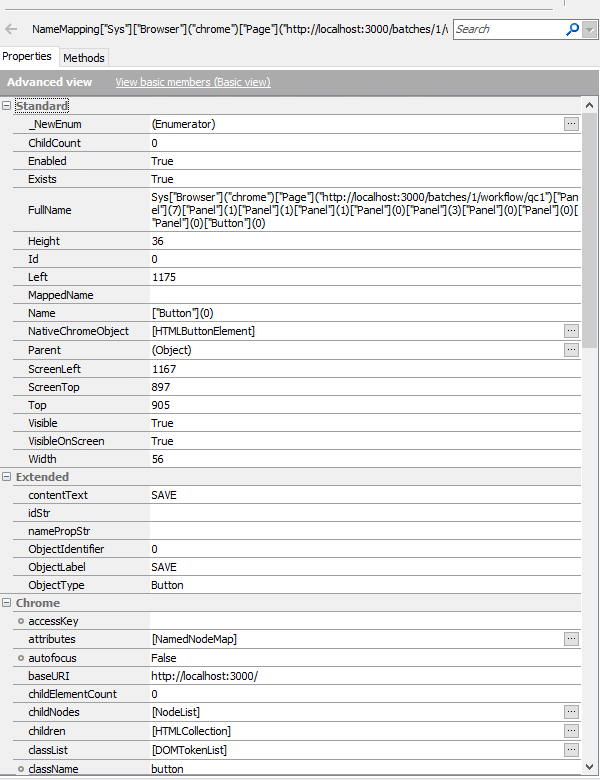
I'm curious, though... as mentioned, scrollIntoView is pretty globally supported for any UI elements on a web page. Can you post a) the code that you're attempting to execute the scrollIntoView on and b) screenshots of the Advanced properties and methods on your object?
- endorium7 years agoFrequent Contributor
function ClickByXpath(xPathTemp)
{
/* convert String to object */
var xPath = ConvertToObject(xPathTemp);
//Waits upto 10 seconds for page to load
Sys.Browser("*").Page("*").Wait("10000");
xPath.scrollIntoViewIfNeeded()
waitUntilObjectIsVisible(""+ xPath + "");
Sys.Browser("*").Page("*").FindChildByXPath(xPath).Click();- tristaanogre7 years agoEsteemed Contributor
Methods Advanced View too, please? scrollIntoView is not a "Standard" method or an Action.
I THINK I might know what's going on but I'm not sure... it has to do with finding objects by xPath... you're not necessarily going to find exactly the object that is an onscreen component which means it might not fully support everything that would typically be supported.
What if you change that link where you're calling "Click" to assign the result of the "find" to a variable. Drop a breakpoint then, in your code, and investigate that result to see what it actually returns.
- endorium7 years agoFrequent Contributor
Attached the advanced property which does say it supports scrollintoview.
The xPath i use only finds the one object on the page which is unique.
You think finding it by class or another way may work?