Forum Discussion


AlexKaras
5 years agoCommunity Hero
Download Chrome installer and run it.
Well, you may not delete Update folder but stop Google Update services and rename executable called something like CromeUpdate.exe from the Update folder to something else and rename it back when needed.
However, I remember the cases when somehow Chrome restored this executable and updated unexpectedly. So my preference after that is to stop all Google services and delete all Update folders that I can find on my box.

nisgupta
5 years agoValued Contributor
Thanks for the Updates . Right now I have rename the folder from Update to Update 1. I will keep other point in mind.
Here is another questions
I do not see first and second options on my machine. I do not see google update Under Policies ?
Thanks
NG
- nisgupta5 years agoValued Contributor
Oh my mistake , I am now looking at this docs . Seem like I have to download template and then i can see the options.
Manage Chrome updates (Windows) - Google Chrome Enterprise Help
- Marsha_R5 years ago
Champion Level 3
Here's some information about cross-browser testing.
https://support.smartbear.com/testcomplete/docs/app-testing/web/general/cross-browser/about.html
- AlexKaras5 years agoCommunity Hero
Hi,
> we are just copying the scripts and Name mapping .
In general, copying is not required and only browser name should be provided as a parameter.
However, depending on your tested web application and test code, script adjustments might be required to match browser specific.
- Marsha_R5 years ago
The error messages are usually pretty targeted. What ever that line is looking for didn't happen fast enough for the test to see it.
You can test this by putting a Delay right before the line that failed. If that seems to fix it, then take the Delay out and adjust the failed line with the appropriate Wait
- AlexKaras5 years agoCommunity Hero
Hi,
> It appear randomly.
I have a guess that the error appears when the test is started when the tested site is opened in the browser. Can you confirm this? (Or, maybe, the opposite - the error appears when the test is started when the tested site is not opened in the browser.)
Scenario that I am guessing:
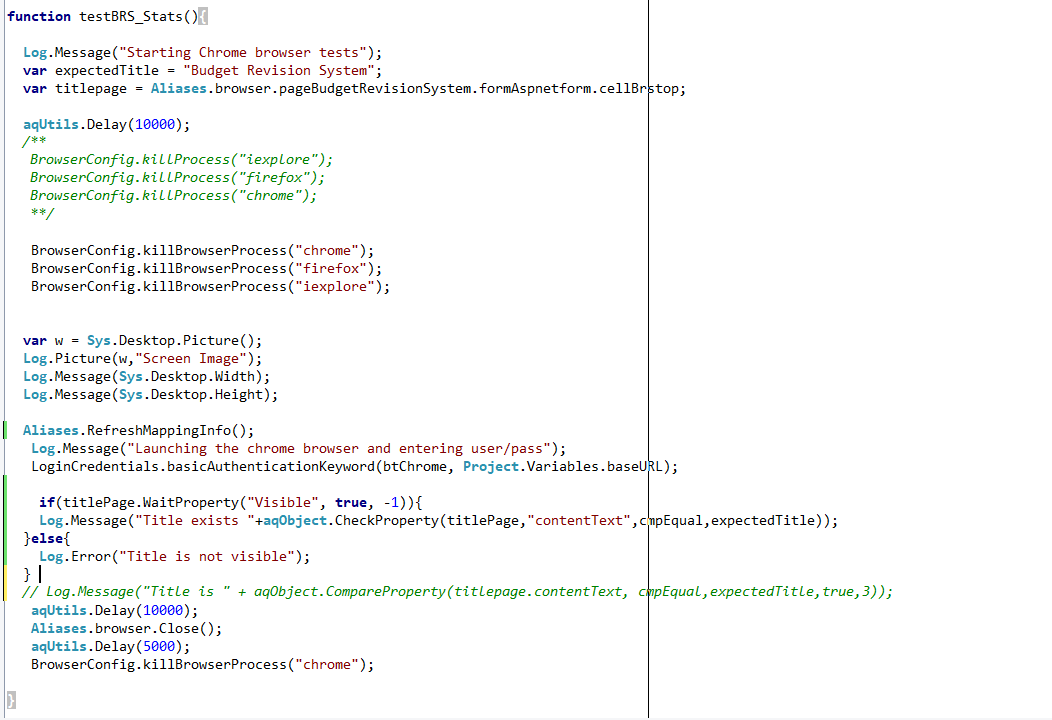
> var titlepage = Aliases.browser...
> ...
> BrowserConfig.killBrowserProcess(...)
> ...
> titlePage.WaitProperty(...);
As it is documented, Aliases uses late binding, resolves referenced object at first use and tries to cache it.
I think that titlePage variable keeps the reference been set initially and this reference becomes invalid when the browser is closed and reopened. Obviously, when test code tries to wait for the Visible property to become true for the empty object, this never happens.
My suggestion will be to:
a) Comment out the .RefreshMappingInfo() line;
b) move the var titlepage = Aliases... line of code to follow the LoginCredentials.basicAuthenticationKeyword(...) line.
Does this help?
P.S. BTW, JScript is a case-sensitive language, but you have titlepage and titlePage variables in your test code. Is this really so?
- Marsha_R5 years ago
One thing from our side, if you don't give us all the details up front, then we have to keep guessing and you keep telling us no that can't be it. It works better for everyone if you give us lots of details first and then we can give a better answer. Thanks!
- Marsha_R5 years ago
If what AlexKaras and I have suggested is not working for you, then contact Support directly with your question. Here's their link:
https://support.smartbear.com/testcomplete/message/
- AlexKaras5 years agoCommunity Hero
Hi,
> I do not see google update Under Policies ?
Have you downloaded and installed the template as described in the Google document referenced in the article?
As for the second option, the key must be created manually if the key is absent in the registry.
- nisgupta5 years agoValued Contributor
We have now started building Chrome tests.
We already have firefox tests. For chrome tests we are just copying the scripts and Name mapping . We make changes in script where we are launching browser just replacing firefox with chrome .
Is it the right way to do this ? Do we need to create name mapping again for chrome browser ?
Please update
Thanks
NG
- AlexKaras5 years agoCommunity Hero
Hi,
Any more details?
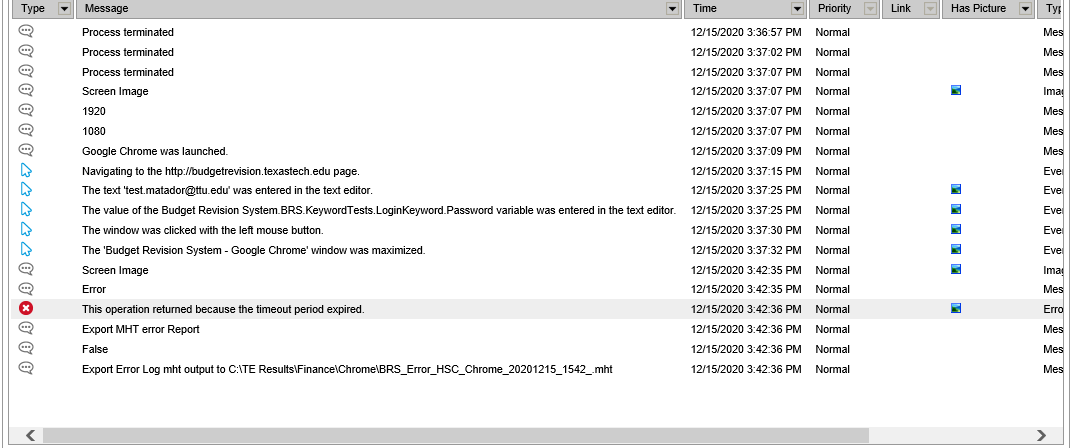
What operation failed? Anything in the Details log pane? Can you post screenshot of the test? Why 'error' message was manually logged just before?
- nisgupta5 years agoValued Contributor
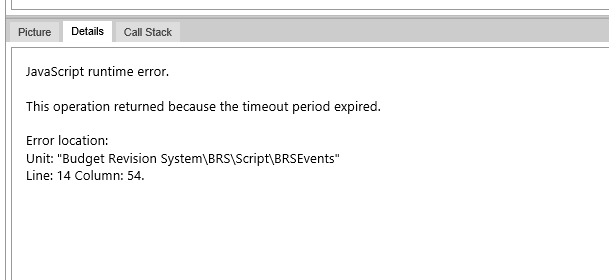
Attached the Detail Panel
javaScript runtime error.
The Operation returned because the timeout period expired.
- Marsha_R5 years ago
So the error comes where you are waiting on Visible?
I would still put a really long Delay in front of that, just for testing purposes. I'd go up to a full minute. It's difficult to see what's happening some times unless you really slow things down.
- nisgupta5 years agoValued Contributor
Intially I put only aqUtils.Delay(3000)
Now I have changed to
if(titlePage.WaitProperty("Visible", true, -1)){
Log.Message("Title exists "+aqObject.CheckProperty(titlePage,"contentText",cmpEqual,expectedTitle));
}else{
Log.Error("Title is not visible");
}Autowait timeout is set to 5 minutes i.e. 300000 ms
- AlexKaras5 years agoCommunity Hero
Hi,
> Now I have changed to
And? Does your code work? What is the error if it does not? What line throws the error?
P.S. Side note:
> if(titlePage.WaitProperty("Visible", true, -1)){
Are you sure that titlePage object exists at that moment of time? Wasn't it recreated by chance?
Note, that if the object does not exist, .WaitProperty() will not work and Visible property will never appear regardless of wait timeout.
- Marsha_R5 years ago
Since it's a random error, I would put the Delay back in and set that one to 5 minutes. If that works properly for a while, then you'll know it's a timing problem and you can cut the Delay down to 3 minutes and try again.
I would be that there's something in the environment that's getting hung up occasionally and you are seeing the effects of that. Once you get the timing of it down, there may be system logs you can check to see what's going on.
- nisgupta5 years agoValued Contributor
what details you need ?
Here are other details. We are using window task scheduler. We create a batch script to invoke the projectsuites/Project and they are running in sequence on TestExecute machine. We first run our firefox Project Suits/Project and then chrome ProjectSuites/Project.
Let me know if you need more information.
- nisgupta5 years agoValued Contributor
Has any one successfully running Testcomplete tests on chrome browser tests ?
I am getting this error This operation has been time out .
I have also increased method invoke time out to 10000 under the open applications - Under Project current properties.
Let me know if more information is required.
Thanks
NG
- AlexKaras5 years agoCommunity Hero
> Has any one successfully running Testcomplete tests on chrome browser tests ?
I am. (Though not on the latest Chrome)
- nisgupta5 years agoValued Contributor
I was working with Support on this issue.
I have submitted all the information
1. project containing the error log.
2.report generated using Report generator command utility.
But they told me as following
We have researched the bat file you sent: it looks like when you use this command: START "" "C:\Program Files (x86)\SmartBear\TestExecute 14\x64\Bin\ReportGenerator.exe" --chrome --generate-report "C:\TE Results\Work", you just save reports (memory dumps are not saved). The only possible way we can see here is to reproduce the issue manually (I mean running the test manually until the test hangs). It is very important to create dumps when the test "hangs", and only this way allows collecting dumps at the needed moment (to click the "Generate memory dump" button when TestComplete hangs).
I have a question is there any way that we can generate memory dumps automatically?
Please advise
Thanks
Nishchal
- nisgupta5 years agoValued Contributor
Support has not find any solution for the issue .