Solved
Forum Discussion


shenyusun
9 years agoContributor
yes, I checked it, and it looks good to me.
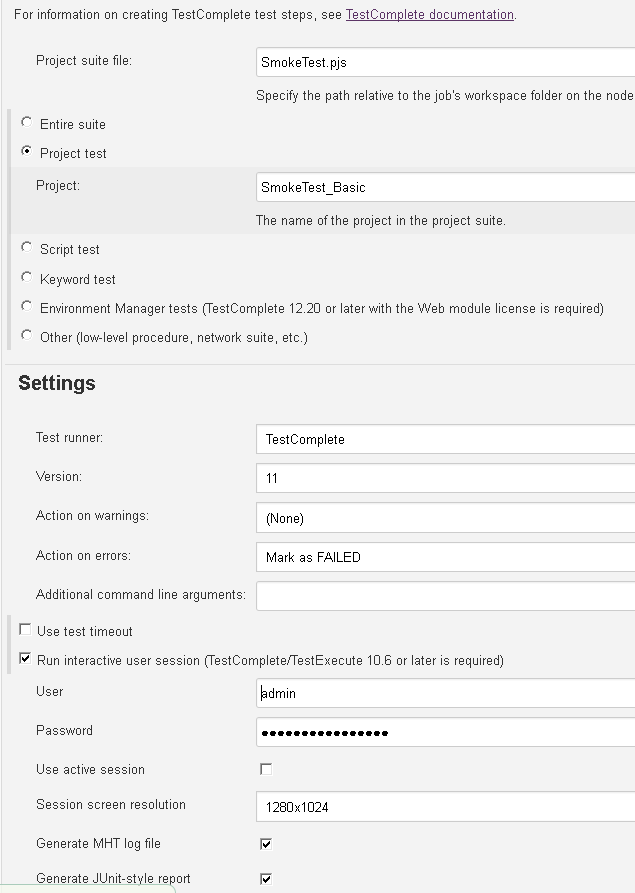
Please see the screenshot below:
I also get project file from SVN. That part should be fine because TestComplete launched without issue when I manually paste the command to cmd.
But it would not launch when jenkins does it.
I researched the warning, and then apparently that warning is normal.

shankar_r
9 years agoCommunity Hero
Few you can try to identify the issue,
- Have you verified this Build is triggering in the slave machine which you configured and manually tried? If not use below option to do it.
- Try triggering the build when you have your slave opened by yourself
- Try triggering the build after the disconnecting the slave
- Try with Entire suite option
I guess you will find some issues with above tries.
- shenyusun9 years agoContributor
Thank you for the suggestions.
Unfortunately, TC still wouldn't launch.
- Have you verified this Build is triggering in the slave machine which you configured and manually tried? If not use below option to do it. ----- Yes, and then I see the correct slave is running when I click Build.
- Try triggering the build when you have your slave opened by yourself
------ I monitor the slave from vSphere console, and then once I click 'Build', I see TestComplete.exe showed up in Processes, and then it's by jenkins user. However, TestComplete UI does not show up.
- Try triggering the build after the disconnecting the slave
------- Nothing happen, no remote section from TC.
- Try with Entire suite option
-------- Same behavior, I see TestComplete.exe showed up in Processes, and then it's by jenkins user. However, TestComplete UI does not show up.
I would think if TestComplete.exe is in Window Task Manager, then UI should launch, but it just hung there.
- shenyusun9 years agoContributor
I am also seeing this error in jenkins-slave.err log, not sure if that's the root cause though...
Aug 21, 2017 9:05:35 AM hudson.Util getWin32ErrorMessage
WARNING: Failed to find resource bundle
java.util.MissingResourceException: Can't find bundle for base name /hudson/win32errors, locale en_US
at java.util.ResourceBundle.throwMissingResourceException(Unknown Source)
at java.util.ResourceBundle.getBundleImpl(Unknown Source)
at java.util.ResourceBundle.getBundle(Unknown Source)
at hudson.Util.getWin32ErrorMessage(Util.java:628)
at hudson.util.jna.JnaException.<init>(JnaException.java:37)
at hudson.util.jna.RegistryKey.check(RegistryKey.java:124)
at hudson.util.jna.RegistryKey.open(RegistryKey.java:223)
at com.smartbear.jenkins.plugins.testcomplete.TcInstallationsScanner$ScannerCallable.scanForInstallations(TcInstallationsScanner.java:82)
at com.smartbear.jenkins.plugins.testcomplete.TcInstallationsScanner$ScannerCallable.call(TcInstallationsScanner.java:70)
at com.smartbear.jenkins.plugins.testcomplete.TcInstallationsScanner$ScannerCallable.call(TcInstallationsScanner.java:58)
at hudson.remoting.UserRequest.perform(UserRequest.java:153)
at hudson.remoting.UserRequest.perform(UserRequest.java:50)
at hudson.remoting.Request$2.run(Request.java:336)
at hudson.remoting.InterceptingExecutorService$1.call(InterceptingExecutorService.java:68)
at java.util.concurrent.FutureTask.run(Unknown Source)
at java.util.concurrent.ThreadPoolExecutor.runWorker(Unknown Source)
at java.util.concurrent.ThreadPoolExecutor$Worker.run(Unknown Source)
at hudson.remoting.Engine$1$1.run(Engine.java:94)
at java.lang.Thread.run(Unknown Source)- shankar_r9 years agoCommunity Hero
This could be a problem,
I hope you went the thru the below link step by step if not please do.
https://support.smartbear.com/testcomplete/docs/working-with/integration/jenkins/preparing.html
if you still see the problem, i would recommend to raise a support ticket using https://support.smartbear.com/message/?prod=TestComplete