Forum Discussion


Josh_147
5 years agoContributor
Hi AlexKaras ,
Those  symbols are added by the TestComplete itself. Those symbols are there as I directly open the tc.Tbl files using Notepad++ after I saved the changes of the table in TestComplete. Same result if I'm using Notepad to open the tc.Tbl file.

AlexKaras
5 years agoCommunity Hero
> Those  symbols are added by the TestComplete itself.
Hm-m-m, interesting...
What if you delete them in Notepad++, save file (backup first! 😉 ) and try to open it in TestComplete. If table is opened fine in TestComplete (you will see expected table data) you may try to execute your test(s) to check if the problem appears again. Do you think this is something that is worth trying?
BTW, don't you (occasionally) have enabled setting to update table with actual data? In this case it might be that those symbols are present in the database data (but just are not displayed on screen), so TestComplete saves them into table and then fails to open the table because those data corrupt expected internal file structure.
- Josh_1475 years agoContributor
Hi AlexKaras ,
Yes, I tried the exactly same thing to manually delete those symbols but in the end Table Checkpoint failed after I execute the test.
I have go through the Tools>Options>Engines>Stores, the 'Update Table elements' checkbox is unchecked.
- AlexKaras5 years agoCommunity Hero
Hi,
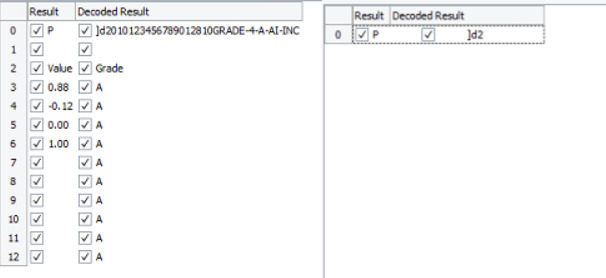
Checkpoint result reports visually same values for the stored and actual data. (Unless I overlooked something)
This makes me think that actual data in the database contain some non-printable symbols which are not displayed but are considered during comparison and cause compare to fail.
What if you try to query data from the database just for this problematic row and cell and also query length of cell's data. If the returned length differs from the length of displayed data this will mean that cell data indeed contain some non-printable symbols.
Whether this is correct for your tested application/database will be a question to you.
Whether this is expected behavior for the checkpoint will be a question to Support.
If the returned data length matches the length of displayed data then I have no better idea at the moment but to create Support ticket via the https://support.smartbear.com/testcomplete/message/ form.
- Josh_1475 years agoContributor
Hi,
I have tried the following steps to check the length of the string:
1. Using table checkpoint to retrieve the table data and copy the string in Preview tab.
2. Select all the string, right click and checked on the 'Show Unicode control characters'.
3. There is no new character showing.
4. Copy the whole string and paste into a C++ online compiler. This is the result.
5. The total string length is 41, included the 2 red dots. While pointing on the red dot, it shows /u1d
By referring to here, HTML Entity (decimal) is  (similar to what TestComplete saved in tc.Tbl) while C++ is "\u1D" (quite similar compare to \u1d, the red dot).
So, it should be a non-printable character and considered during the comparison with the tc.Tbl file that I manually edited.