Sending Email with attachment from script is just forwarding another system generated email


Hi Colin,
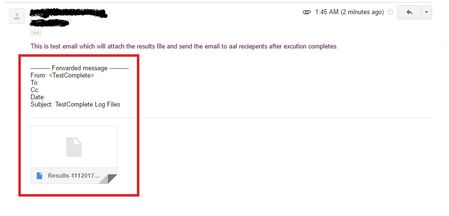
No errors, Email was sent successfully but with the format showed in the screenshot.
I couldn't able to find the attachment in the received mail.
Please find the code below which I was used.
Function SendEmailResults(mFrom, mTo, mSubject, mBody, mAttachment)
Dim smtpServer, smtpPort, userLogin, userPassword
Dim authenticationType, useSSL, connectionTimeout
Dim schema, mConfig, mMessage
smtpServer = "smtp.gmail.com"
smtpPort = 25
userLogin = "******" ' e.g. "abc" if the address is abc@gmail.com
userPassword = "******"
authenticationType = 1 ' cdoBasic
connectionTimeout = 30
' Required by Gmail
useSSL = True
Err.Clear()
On Error Resume Next
schema = "http://schemas.microsoft.com/cdo/configuration/"
Set mConfig = Sys.OleObject("CDO.Configuration")
mConfig.Fields.Item(schema & "sendusing") = 2 ' cdoSendUsingPort
mConfig.Fields.Item(schema & "smtpserver") = smtpServer
mConfig.Fields.Item(schema & "smtpserverport") = smtpPort
mConfig.Fields.Item(schema & "sendusername") = userLogin
mConfig.Fields.Item(schema & "sendpassword") = userPassword
mConfig.Fields.Item(schema & "smtpauthenticate") = authenticationType
mConfig.Fields.Item(schema & "smtpusessl") = useSSL
mConfig.Fields.Item(schema & "smtpconnectiontimeout") = connectionTimeout
mConfig.Fields.Update()
Set mMessage = Sys.OleObject("CDO.Message")
Set mMessage.Configuration = mConfig
mMessage.From = mFrom
mMessage.To = mTo
mMessage.Subject = mSubject
mMessage.HTMLBody = mBody
If 0 < Len(mAttachment) Then
mMessage.AddAttachment(mAttachment)
End If
mMessage.Send()
If Err.Number > 0 Then
Call Log.Error("E-mail cannot be sent", Err.Description)
SendEMail = False
Err.Clear()
Else
Log.Message("Message to <" & mTo & "> was successfully sent")
SendEMail = True
End If
End Function

Hmmm. I use CDO to send mail via script and it works fine.
BUT .... I'm using our internal SMTP server, not Gmail. It may be a Gmail thing why they come through as forwarded. I got a mail sent to me via script overnight last night and it came through as a normal e-mail. Same as always. Attachments were present and correct.
One thing that does jump out at me:
RajTC wrote:
If 0 < Len(mAttachment) Then
mMessage.AddAttachment(mAttachment)
End If
What are you sending it?
Attachments are supposed to be file paths (so it can find the relevant file to attach to the mail). Are you giving it a valid file path?
As per: https://support.smartbear.com/testcomplete/docs/scripting/sending-email-from-scripts.html#CDO
If you are using a modified version of the example code in the above link (I suspect you are), it normally uses a list. You're not treating it as a list so I presume are sending a single, valid (hopefully!) file path + name instead?
Hi Colin,
I can able to see the valid file attached to the mail in Sent Mail list of gmail (as you can see in the screenshot). Above the file attachment did you observed the forwarded message note?
I'm thinking this must be down to Gmail.
Like I say, I send using the same method as you, but using the company SMTP server. And it all works fine. They come through looking like standard emails, and all the attachments are fine. I can open them no problem. I know there are a lot of posts online about using Gmail and CDO. People often seem to run into problems with it.
eg. Going by this post: http://stackoverflow.com/questions/28605803/can-not-send-mail-using-smtp-gmail-com-port-587-from-vbs-script
... the port number you're using is not valid. But then, you are getting something through? So I'm not sure. I use port 25, but that SO post, says you should be using a different port with Gmail. It also mentions some security settings in Gmail itself. As I don't use Gmail with CDO though, these are all news to me!

Couple of thoughts:
1) What is the address to which you are sending the e-mail? Is it possible that it's a distribution list which then forwards received e-mails?
2) Concerning opening the attachment. Can you download the attachment locally and then open it? Looking at your screenshot, for some reason, the attachment seems to be getting recognized as a Google doc and not as an MHT. Try downloading it and opening it locally. Note, also, that MHT only really works well in IE.. so, if you're reading your GMail using Chrome, it's possible that you just can't open the file in Chrome.