We are building a new experience for our SmartBear Community.
This site is now read-only. You can still browse and search as usual. Learn More
This site is now read-only. You can still browse and search as usual. Learn More

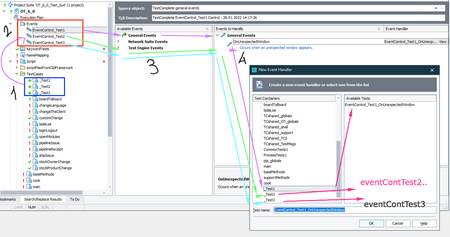

Since it's all the same response, I would use one event handler for all three. I think that will get you one response per test and only from the tests that are running.
I don't believe that TestComplete understands that you mean those three event handlers to line up with the tests. It is just seeing an unexpected window and oh look here are the events I need to do when that happens and you get three messages no matter what.

Thank you, Marsha!
Hi mustafayol, does this help?
 Alumni
Thank you, Marsha!
Hi mustafayol, does this help?

It is not a solution, but yes answer is enough for me, I will try to find another workaround, thank you Marsha,
Regards
Mustafa
 Champion Level 3
It is a solution, just maybe not the one you hoped to get.
Your answer has really enlightened me and provided a basic idea of what I can or can't do with Test Complete.
I really appreciate that. But that is really not a solution for me, but again thank you for your answer.
Ps: There are still things that I could not understand about test complete event handlers.
If Test Complete can add different unexpected windows handlers to different units, where each unit is a test case, which means each test case has its own individual unexpected windows handler. Basically, if I run test unit 1 and get an unexpected window through this test case, I would expect only the handler in test unit 1 to be triggered. But in reality, all other unexpected window handlers are being triggered.
There is no point in triggering the unexpected window handlers in test units 2 and 3 and so on... If one "unexpected window" triggers all the event handlers, what is the point of having more than one event handler? And why is test complete capable of adding several event handlers to several units. Even with different names.
That is what I observed. Next week I will try to examine more if I have a chance.
cheers...
Regards
Mustafa

Hi Mustafa,
Basically, as Marsha wrote...
Honestly, I never tried to create more than one event handler of same type per project and thus it was interesting to get to know from your post that this is possible and how it works.
I never tried the above just because, as it is documented, event handlers in TestComplete are per-project entities, but not per-unit/keyword test/BDD feature/etc. ones. This means, that created event handler is registered for the project and is triggered by TestComplete engine when any test entity of this given project is executed. Event handling routine (i.e. the code that is bound to event handler and that is executed when event handler is triggered) can be located within any script unit of test project. There is no requirement to have event handling routine within the same script unit where the (startup) code for the test itself is located. Similarly, TestComplete makes no assumptions to the fact of whether startup code for the test and event handling code are located within the same script unit or not.
Hope, this will make things a bit more clear.