Forum Discussion


tristaanogre
8 years agoEsteemed Contributor
What about how it shows up in Object Browser?

tmpalaniselvam
8 years agoOccasional Contributor
Attached images of Test Complete Object Browser and UIA Verify spy .
Added Tested App and not successful result..
Object Browser Info text: Sys.Process("AfwWorkplaceApplication").Window("#32770", "LevelTrans01 : MainFaceplate", 1).Window("AtlAxWin110", "WebBrowserHostWindow", 1).Window("Shell Embedding", "", 1).Window("Shell DocObject View", "", 1).Window("Internet Explorer_Server", "", 1).Window("WPFrameBase", "", 1).Window("#32770", "", 1).Window("AtlAxWin110", "", 1).Window("#32770", "", 1).Window("SysTabControl32", "", 1).Window("AtlAxWin110", "", 1).Window("#32770", "", 1).Window("VhnAxWinEx", "", 1).Window("Shell Embedding", "", 1).Window("Shell DocObject View", "", 1).Window("Internet Explorer_Server", "", 1).Window("#32770", "", 1).WPFObject("HwndSource: GraphicsViewer", "AfwWPFControlHost").WPFObject("GraphicsViewer", "", 1).WPFObject("GraphicsViewerControl", "", 1).WPFObject("ViewPanel", "", 1).WPFObject("Grid", "", 1).WPFObject("Border", "", 1).WPFObject("Viewbox", "", 1).WPFObject("ShowPanel", "", 1)
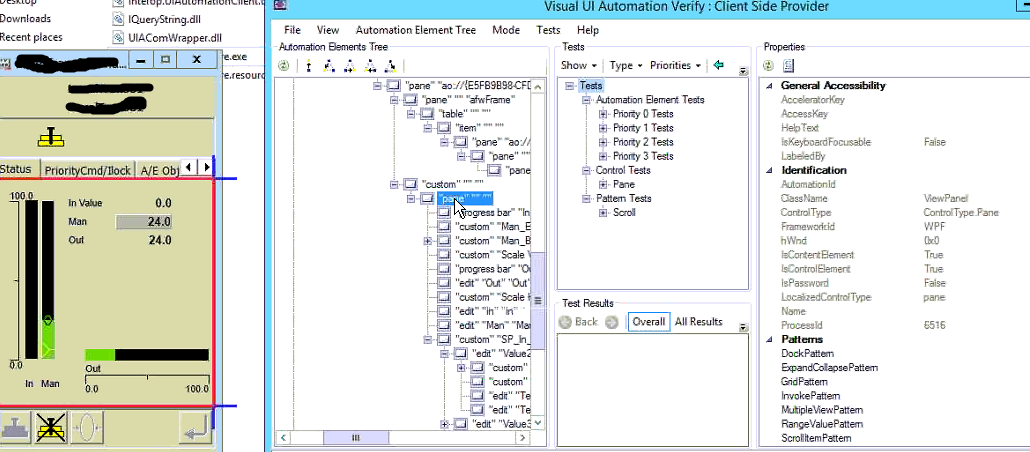
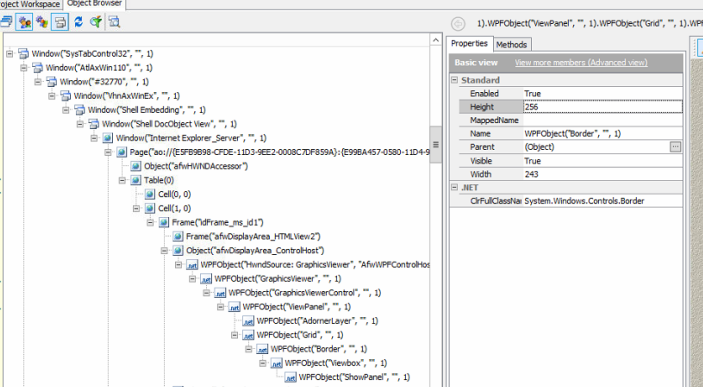
- tristaanogre8 years agoEsteemed Contributor
In your screenshot of the ObjectBrowser info, which item in the tree is the one you're having trouble with? Please make sure that is selected. Also, click the link to expand the Advanced properties.
Just an FYI, I'm working on testing a similarly structured application although, in our case, it's VBObjects instead of WPFObjects.Note, however, that you are using custom classes of objects... this is probably why it's failing. And, as mentioned before, the solution is to make sure that the object classes you want to access are mapped under Object Mapping on your current project properties.
 Ravik8 years agoSuper Contributor
This may help you .
https://support.smartbear.com/testcomplete/docs/app-testing/desktop/wpf/addressing-objects.html