Forum Discussion


Vinod_Gulia
7 years agoNew Contributor
Hi,
Exception is thrown at following line of code: -
Set aInfo1 = ExcelObj.CreateInfo(oExcel, fileName, aSheets)
Call aSheets.Add(vSheet, vSheet) seems correct. Key as Object and Item as Object get added into Dictionary.

Pbleu
7 years agoNew Contributor
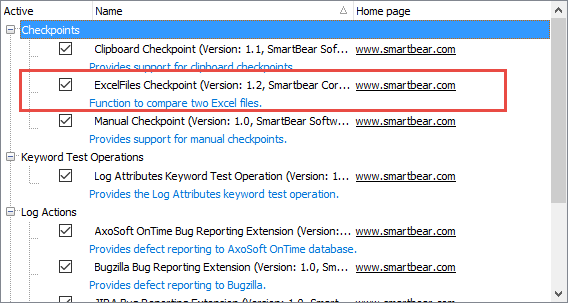
Ensure TestComplete sees the extension and it is enabled (may need to do a "Reload" on the File->Install Script Extension). I downloaded the extension and placed it under <TestComplete xx root>\bin\Extensions\ScriptExtensions for my test. If you have "auto-complete" enabled, the script object will appear in the pop-up when you type "Ex" or after "ExcelObj." you should be able to select either of the two functions. You should also delete the "\" in your filename string, it is not needed (Project.path typically returns a string with an ending "\")