Forum Discussion


marin
12 years agoFrequent Contributor
Hello Tanya,
many thanks for your response, much appreciated.
I like the idea of catching the message before being written to log, but unfortunately it seems as if this particular message level is not being part of the LogParams.
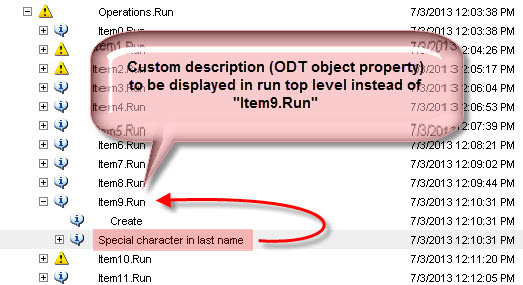
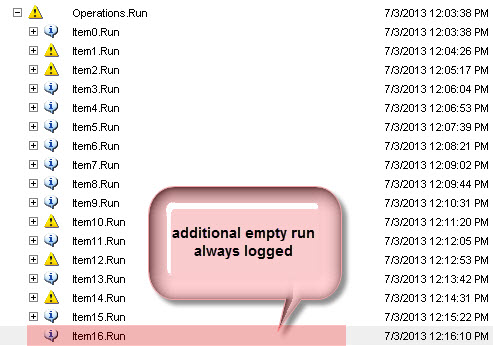
I've implemented the event handler and monitored the LogParams.MessageText property- it will always be only the deeper nested message that is passed there (see screenshot). I can access this level OK and post my own message there already (see blurred line), but I need the access to the "parent" level -> I guess it comes from the ODT object "walker" somehow?
Here script snippet of the part where ODT test object is created (data fetched from an Excel sheet):
Is there any other possibility to catch the ItemX.Run message somehow?
Many thanks again,
Marin
many thanks for your response, much appreciated.
I like the idea of catching the message before being written to log, but unfortunately it seems as if this particular message level is not being part of the LogParams.
I've implemented the event handler and monitored the LogParams.MessageText property- it will always be only the deeper nested message that is passed there (see screenshot). I can access this level OK and post my own message there already (see blurred line), but I need the access to the "parent" level -> I guess it comes from the ODT object "walker" somehow?
Here script snippet of the part where ODT test object is created (data fetched from an Excel sheet):
/*

Function: CreateData()

Creates data for test runs from Excel file

*/

function CreateData()

{

  ODT.Data.Clear();


  // Add a group of data sets to be able to add variables used in the test to this group

  ODT.Data.AddGroup("RCV");


  // Add and customize the variable of the ClsReceiving class

  ODT.Data.RCV.AddVariable("CreateItem", ODT.Classes.ClsReceiving);

  ODT.Data.RCV.CreateItem.ID = "CreateItem";

  ODT.Data.RCV.CreateItem.Methods("Init").IsInit = true;


  var inputODTData = DDT.ExcelDriver(strTestDataExcelFile,"ItemData",true);

  var counter = 0;


  while(!inputODTData.EOF())

  {

      // Add method to enter values

      // Customize operations used to enter values in various controls


      ODT.Data.RCV.CreateItem.Operations.AddItemOfClassType("ClsOperation");

      ODT.Data.RCV.CreateItem.Operations(counter).Methods("CreateItem").Enabled = false;


      ODT.Data.RCV.CreateItem.Operations(counter).ID = inputODTData.Value("Test Case Comment");


      ODT.Data.RCV.CreateItem.Operations(counter).ItemName = inputODTData.Value("Item Name");

      ODT.Data.RCV.CreateItem.Operations(counter).Type = inputODTData.Value("Type");

      ODT.Data.RCV.CreateItem.Operations(counter).ItemNo = inputODTData.Value("Item No");

      ODT.Data.RCV.CreateItem.Operations(counter).ItemGroup = inputODTData.Value("Item Group");


      ODT.Data.RCV.CreateItem.Operations(counter).Methods("CreateItem").Enabled = true;


      inputODTData.Next();

      counter++;


  }


  DDT.CloseDriver(inputODTData.Name);


}
Is there any other possibility to catch the ItemX.Run message somehow?
Many thanks again,
Marin
- DenisMedvedev10 years agoContributor
After installation I can not find Object-Driven Testing sample in the <TestComplete Samples>\Common\Object-Driven Testing path.
You can see a link http://support.smartbear.com/viewarticle/70428/ Information about this sample describes in the end of the topic.
Does anybody know where I can find this project.
I will be grateful for any help, thanks in advance!!!
My email [email protected] Manfred_F10 years agoFrequent Contributor
I also use ODT and really appreciate it.
To enhance the log, I spent much time to
- suppress useless empty nodes and entrys
- handle known errors and suppress technical errors
- add the caption of controsl (buttons, chkbox, listbox entries)
- apply indentation
- add the method name and parameters to routine calls and item nodes
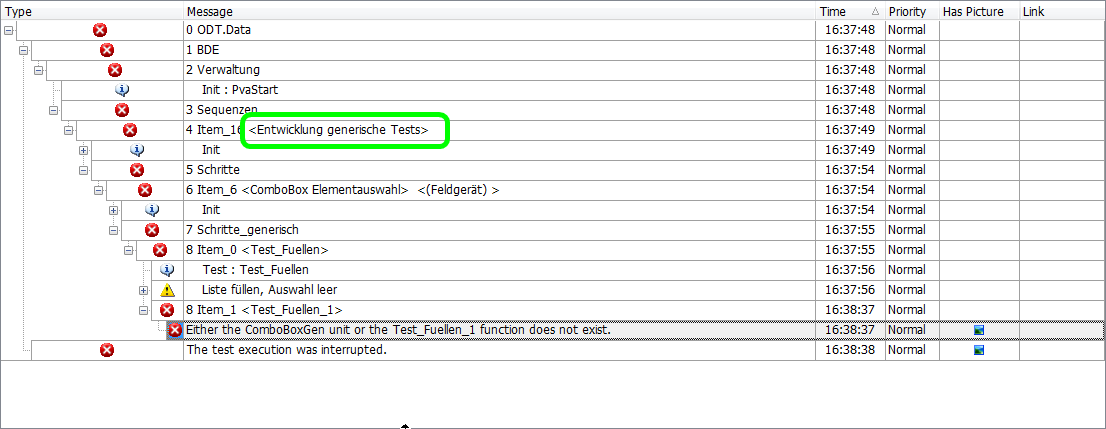
The approach is to use event procedures and to evaluate the ODT tree. For a given log message, the originating ODT node is determined and its data is used to control and enhance the log.
Determining the ODT node was more complicaed than I thought before, as there are errors in the event mechanism:
- using log.LockEvents disturbs OnLogCreateNode/OnLogCloseNode events
- in some cases, OnLogClose messages are missing and have to be simulated
After all, it does work now very well, see screenshot