Forum Discussion

mdn0420's avatar
mdn0420
Occasional Contributor
15 years ago

Problems installing TestComplete

I am having problems installing TC. I had an older demo version running and downloaded the latest version. The first time I ran the new install, I got the blue screen of death.


I restarted and manually uninstalled the older version... then tried installing the latest version.


I am now getting the error shown in attached screenshot.


I am running Windows XP.


Please advise, we are trying to evaluate TC.

8 Replies


  • Hi Minh,


    The mentioned error can occur if TestComplete 8.0 was installed on this computer before and some traces of these versions were not removed completely. Please try to remove them using the Windows Installer CleanUp Utility.


    Once you install the utility, run it, select the product in the window that appears and click Remove. 


    After performing these steps, reboot your computer and try to install TestComplete 8.10 anew.


  • mdn0420's avatar
    mdn0420
    Occasional Contributor
    That helped, thanks!


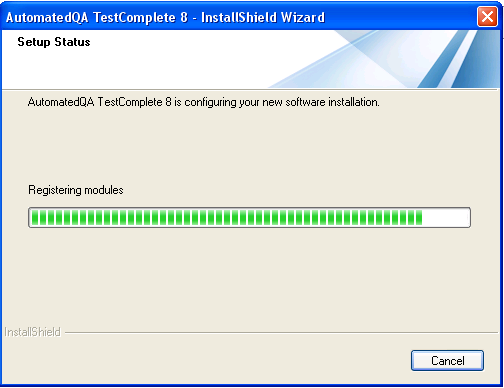
    However, when I'm installing it appears to be stuck at the 'Registering Modules' step. It has been at this step for at least 10 minutes... is this normal?

  • Hi Minh,


    This is quite normal as the time needed to register modules can vary depending on the selected features to be installed.
  • mdn0420's avatar
    mdn0420
    Occasional Contributor
    Unfortunately the installation remains stuck on this step and does not complete. I waited for over an hour before clicking Cancel, the installer locks up and becomes unresponsive after clicking Cancel.

  • Hi Minh,


    We need more details about the situation you are in.

    1. A screenshot demonstrating the list of TestComplete features to be installed.

    2. The processes that cause the highest CPU and memory consumption (you can check this via Task Manager).
  • mdn0420's avatar
    mdn0420
    Occasional Contributor
    Here are the screenshots you requested. For the features to install page, I just deselected MS Visual Studio integration.


    The memory usage shot is during the 'Registering modules' step and doesn't appear to be out of the ordinary. CPU usage is relatively idle so I did not include a screenshot.

  • Hi Minh,


    Please perform the following operations:

    1. Create the C:\Program files\AutomatedQA\TestLog folder and try to install TestComplete. The TC8installog.txt file will be created in this folder. Zip this file and attach to your post.

    2. Launch Registry Editor (type regedit in the command prompt window) and export the HKEY_LOCAL_MACHINE\SOFTWARE\Microsoft\Windows\CurrentVersion\Uninstall registry branch (right-click Uninstall and select Export). Zip the reg file and attach to your post.

    3. Specify the list of extensions you are installing (or post a screenshot with the expanded Extensions node displayed in tc_features.png).


    If you don't want to share the files on the forum, you can send them to us.


  • mdn0420's avatar
    mdn0420
    Occasional Contributor
    Ok, something fixed it. Two things I did:


    1. Created the Program Files/Automated QA/TestLog directory

    2. Deleted some files to increase my HDD free space from ~24GB to 31.3GB


    Thanks for the help.