Printing log information in Jenkins console
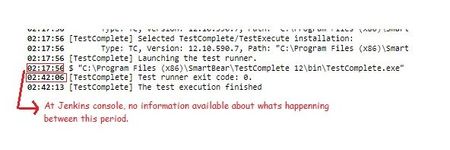


No, currently TestComplete plugin for Jenkins does not provide such functionality, because TestComplete itself provides the log only after the whole test-run has been completed.

The difference between Selenium and TestComplete that makes it possible to do what you want in Selenium is that Selenium is a set of library code units and such that you bring into other IDE's like NetBeans or Visual Studio in which you build what amounts to an application that you execute which you can then write output to the console, etc. TestComplete is both the IDE AND the executable that runs the tests so you aren't going to get the same type of functionality. Jenkins triggers TestComplete execution but has no visibility as to what's going on inside and simply waits for the application to return from the commandline.

Definitely agree your point on how TestComplete and Selenium differs.
But here what I can see is more than the other Selenium libraries, its simple java statement that does the job.
If there is a possibility for TestComplete to communicate with the windows cmd prompt, that might be able to do the same with Jenkins console. I might be wrong, but just curious.
TestComplete doesn't have a console output so even if code is written in TestComplete to write to a console, that console is not visible or accessible externally so there's no access from the Jenkins tool.
Again, consider what Jenkins does to execute the tests...it calls a third party application (TestComplete) as a commandline and waits for the exit code to return. What happens in between there is invisible to Jenkins because it's made the call out to TestComplete.
If you want a status of what's executing, I would recommend building that into your TestComplete project to write out to some sort of external document, file, or database. Our framework operates off of an SQL database where, as tests are executed, we update a status on the test for the current test run of "NOT STARTED", "IN PROGRESS", "FAILED", "PASSED". So, if I run an SQL query while the test is running, I get a real-time view of the test progress. This is our way of doing it and it might not work for you but this is probably going to be your best option.
Thanks for your detailed explanation. I got your point.
And hard to believe there is no way this could be achieved :) Glad to know the answer even before I reach the R&D.
And your suggestion to use external files seems interesting, we will think about it. Thanks a lot.