Forum Discussion


Bobik
9 years agoFrequent Contributor
Try do not use 'Exists' property in NameMapping.
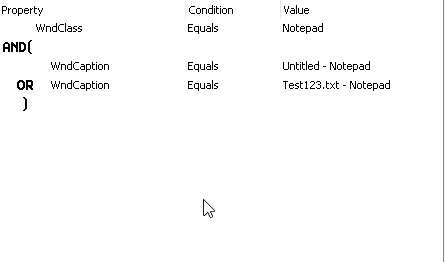
Example of correct mapping attached.
I've tried it with notepad window and it works fine.
 Manfred_F9 years agoRegular Contributor
You've got it.
When I remove the .Exists-Property in conditional mode, it works.
Intresting: trying to re-add the .Exists property Fails. The property is not available in the selection list. When I type the Name instead, I get an error "Invalid property".
Why? Seems to be a BUG
Sadly, I can't avoid using the .Exists poperty in Aliases: my AUT uses to Keep controls of closed Dialogs in the tree, just making them invisible. So, I Need the .Exists to determine, what is real and what is old stuff.
- Bobik9 years agoFrequent Contributor
Why don't you use 'Visible' property?
Also TC11.31 Name mapping can ignore invisible object when there is visible one.
see 'Tools|Options > Engines>NameMapping>Search for visible objects first' option. It could be useful for you.
- Manfred_F9 years agoRegular Contributor
That's because my Framework relies on existing, but invisible controls to be identifiable via .MappedName