Forum Discussion


AlexeyK Alumni
14 years agoAlumniAbdul,
I think Caption is not the property that returns the item's label.
I'd suggest that you explore your application in the Object Browser and use the properties the Object Browser displays.
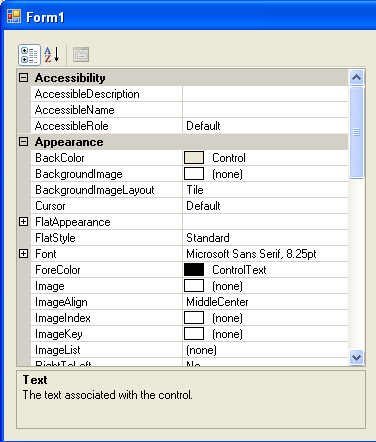
You didn't write what PropertyGrid control you were using, so I tried to reproduce the problem with the standard Microsoft .NET PropertyGrid control (see image 1).
On my computer everything worked fine.
Here is how you can get the caption and value of the BackgroundImageLayout property. I attached screenshots that illustrate each step.
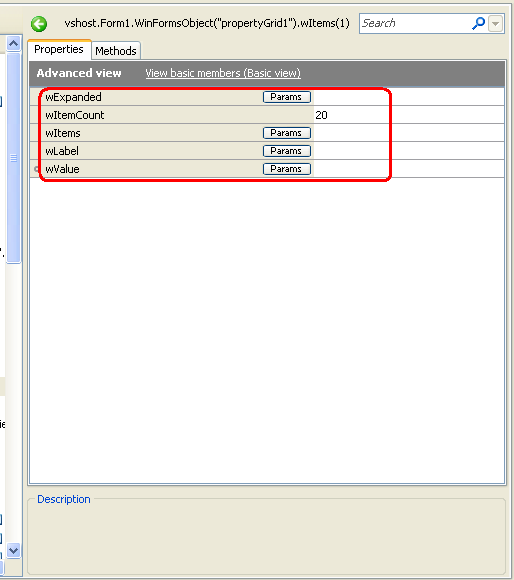
* Launch your application and select the PropertyGrid control in the Object Browser panel. You will see the wItems, wItemCount and other properties on the right (see image 2). As you can see, in my case wItems is 6, which means PropertyGrid has 6 top-level items (Accessibility, Appearance, Behavior, etc.) To get access to the grid's items, use the wItems property.
* Click the Params button of the wItems property and specify the index of the desired item, say 2 (image 3).
TestComplete will display the word (Object) as the wItems property's value. Click the ellipsis button (image 4).
* TestComplete will display properties of an object that provides a test interface to the item data (image 5).
* To get labels (caption) of child items, use the wLabels property. To get values, use wValues. For instance, the BackgroundImageLayout item is the third child of the Appearance item. So, to access it, use index 2 (indexes are zero-based, the first item has index 0, the second - 1, the third - 2, and so on). See image 6.
Hope this helps. :-)