Solved
Forum Discussion


Marsha_R Champion Level 3
10 years agoChampion Level 3What happened when you tried it?
 Mrunal10 years agoContributor
Hi,
My code is
aqFileSystem.CopyFile("KeywordTests.Test1.Variables.DB.Value(A)", "D:\\New folder\\Copy", false)
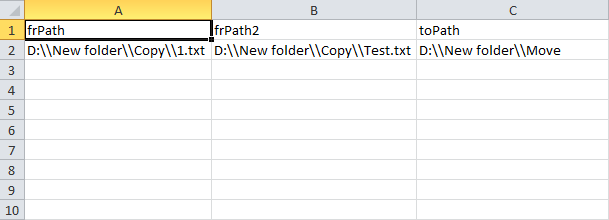
for excel details see attached screenshot.
Error Details :- An error occurred while copying a file (folder). In additional Info it says no file corresponds to - followed by "Test Path".
 joseph_michaud10 years ago
Staff
You probably want to do something like
  from = KeywordTests.Test1.Variables.DB.Value("A");
  to = "D:\\New folder\\Copy";
  aqFileSystem.CopyFile(from, to, false);
If you've set up your DB to use the first row as the column name, then you'll need to use Value("Path") ,
- Mrunal10 years agoContributor
Hi Joseph,
Thanks for quick reply.
By using code suggested by you, I am able to copy/move file from one location to other by using fromPath value from variable.
I want one more help.
I want to take both "from path" and "to path" from variable.
My Code is:-
function Move()
{
var from = KeywordTests.Test1.Variables.DB.Value("frPath");
var to = KeywordTests.Test1.Variables.DB.Value("toPath")Log.Message(aqFileSystem.CopyFile(from, to, false));
}It gives me error as:-
Incorrect path: D:\\New folder\\MoveAttaching my excel sheet here.Thanks in Advance.