Forum Discussion

CByler's avatar
CByler
Contributor
14 years ago

IE 9 Download dialog box, not consistently clicking the Save button on playback

Hello,


I am having a problem with the Save button when attempting to playback downloads in ie9.  I tried adding and enabling the DirectUIHWND entry under MSAA for the project, however, it is not working consistently.  For example, on a keyword test that attempts to download a Dev Express grid in several formats, it may click the save button 2 out of 5 times.  Is there an additional plug-in that is needed to get the MSAA DirectUIHWND to function properly?  For now I have to use a low-level procedure to click the Save button each time, however, this is not ideal as I want the ability to play back on multiple machines with different resolutions.


I'm using Windows 7, IE9, and TestComplete 8.60.665.7


Thanks for any help!

Cherice

5 Replies

  • tristaanogre's avatar
    tristaanogre
    Esteemed Contributor
    Are there error messages in the test log for those failure times?


    My guess, without more information, is that there is a timing problem going on in that the button is attempted to be clicked before it is displayed (knowing that there are times where there is a delay between clicking a link and getting the download dialog).  Have you tried using a "WaitNNN" method (like WaitAliasChild or something) to delay clicking on the save button until it is loaded and enabled?
  • Hi Robert,


    Yes, I tried by adding a Delay of a few seconds and when watching it play back, the Save button was present on the screen.  It clicked it the first time perfectly, however, on the next export, it did not click at all.


    -Cherice
  • tristaanogre's avatar
    tristaanogre
    Esteemed Contributor
    Hardcoded delays are only marginally better in that it is still waiting a fixed amount of time for the object to appear.  "Wait" methods actually have a maximum wait time which you can set sufficiently high to allow for the tested component to appear before you try and click on it.  For example, you could do something like the following: 


    var DownloadBox = Aliases.WaitAliasChild("DownLoadBox", 60000)

    if (DownloadBox.Exists)

    {

        DownloadBox.SaveButton.ClickButton()

    }


    This is assuming you're using name mapping and that the download dialog is mapped as an alias item.  However, the point of it is to demonstrate that the above code will wait up to a full minute for the dialog box to be present.  If the box shows up in less than a minute, say 20 seconds, the code will continue after 20 seconds rather than waiting the full minute.  See http://smartbear.com/support/viewarticle/14496/ for more information on this.


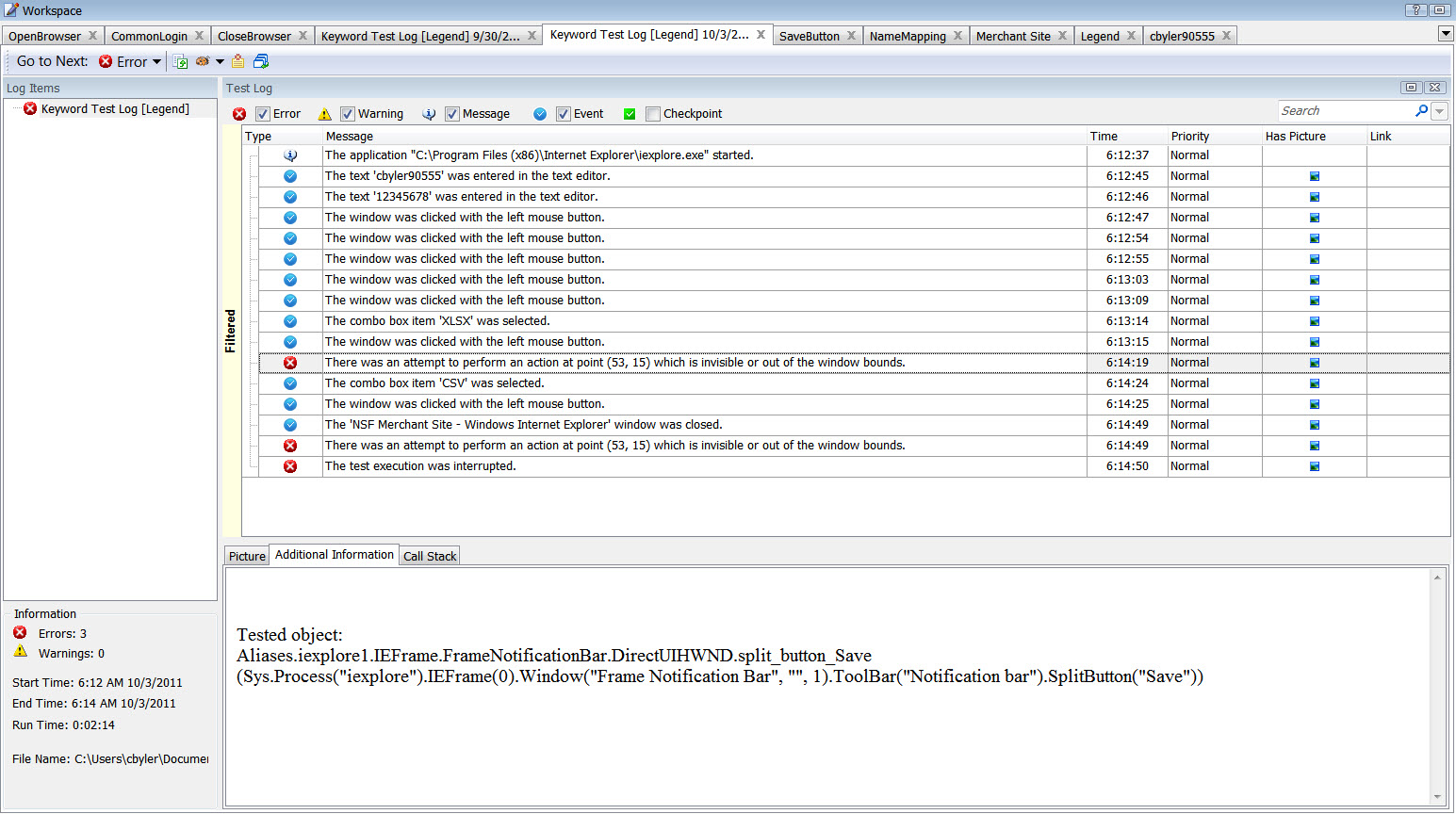
    Again, I'm guessing that this is the cause of your problem.  Can you upload a screen shot of your log file results when the save button does not get properly clicked?  Are there any errors that show up?  If so, what does the "Additional Information" panel of the log have in it?  It could be a completely different problem but without a log file, it's hard to say what exactly is going on and how to "fix" it.
  • Thanks.  I removed the hard-coded delays and added a 60 second wait for the object.  Even though it failed to find the object, the ie9 download dialog bar was on the screen and available.  One of the problems is that when you use object spy, it selects the entire bar.  There is no way to simply identify the Save button that resides on the download bar.  Here are the screenshots of the log and the keyword test for Save.  Thanks again!
  • Hi Cherice,


    The notification bar of IE9 is implemented as the DirectUIHWND wrapper window which causes child control recognition issues for TestComplete (as well as for  other automation tools). Sometimes, these issues can be dodged by exposing the DirectUIHWND class via the MSAA engine or by simulating coordinate clicks. Yet, these workarounds are not always consistent.

    In your case, it is better to initiate the download procedure by selecting "Save target as" from the download link's context menu. This will free you from the need to interact with the notification bar and from possible recognition issues.