Forum Discussion


Bharadwaj
9 years agoContributor
Hi ,
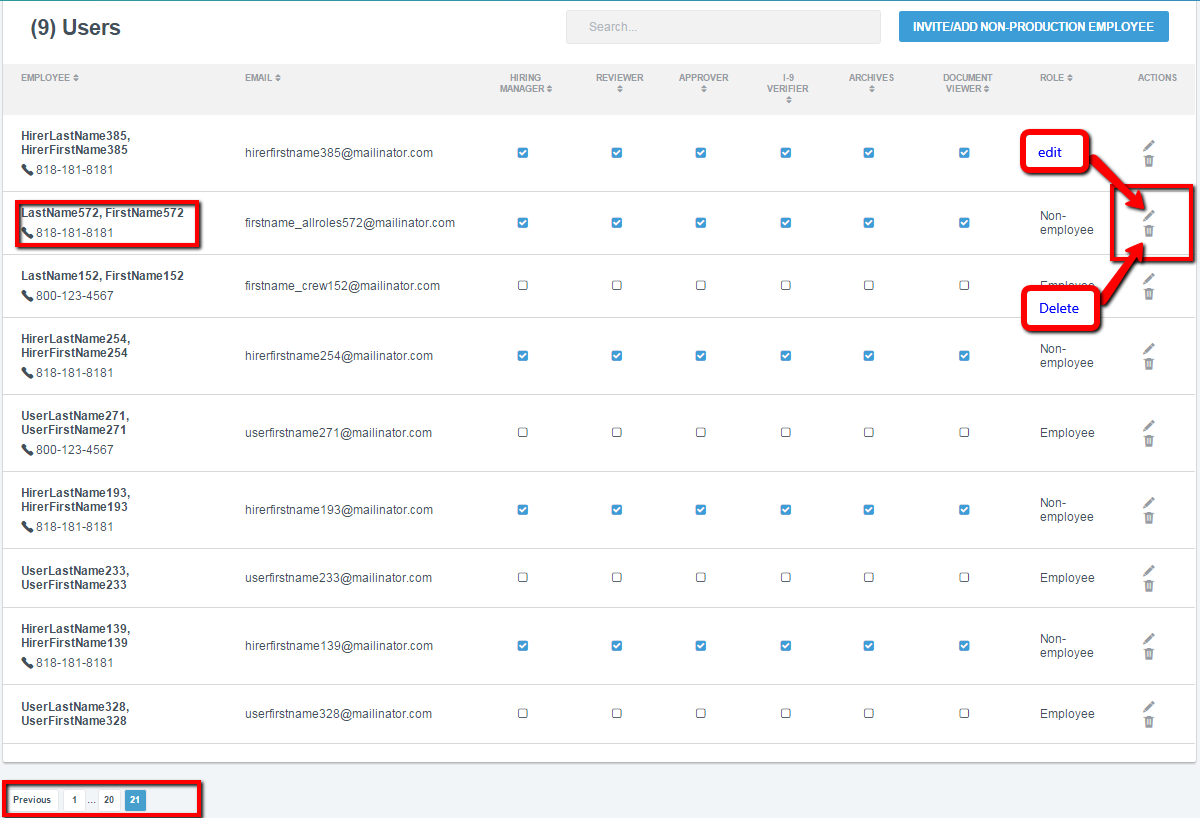
I imagine you actually know the row which you obviously want to edit or delete. So in that case your test case has access to the data of that row. Taking that as granted the following solution actually works for any table control(edit,delete a table row etc)
//in your case ColumnName : Employee
//grid is the object reference of the table you are dealing with
function GetTableColumnIndex(Grid, ColumnName, IsLogOnError: OleVariant = true): integer;
  var ri, i: integer;
  str1,str2:string;
begin
  result := -1;
  str2 := TidyStringL(ColumnName);
  //Log.Message(str2 + ' : ' + VarToStr(Length(str2)));
  for ri := 0 to Grid.RowCount - 1 do
  begin
    for i := 0 to Grid.ColumnCount[i] - 1 do
    begin
      str1 := aqString.Trim(aqString.ToLower(VarToStr(Grid.Cell(ri, i).contentText)));
      if aqString.Compare(str1,str2,false) = 0 then
      begin
        result := i;
        exit;
      end;
    end;
  end;

  if IsLogOnError then
    Log.Error('''' + VarToStr(ColumnName) + ''' column not found on grid ' + VarToStr(Grid.FullName), nil, nil, nil, Grid.Picture);
end;

function GetTableRowNo(Grid, KeyFields, KeyValues): integer;
var
  i, j, colIndex: integer;
  match: boolean;
begin
  result := -1;

  aqString.ListSeparator := ',';

  for i := 0 to Grid.RowCount - 1 do //each row
  begin
    match := true;

    for j := 0 to aqString.GetListLength(KeyFields) - 1 do //each key field
    begin
      colIndex := GetTableColumnIndex(Grid, aqString.GetListItem(KeyFields, j));

      if colIndex < 0 then
        exit;

      //'No data to display' cell
      if Grid.ColumnCount[i] < colIndex then //column count of the row < colIndex
        continue;
       //CompareStringValues is just a comparision function which compares 2 //string and returns true if same else returns false
      match := match and (CompareStringValues(aqString.Trim(aqString.GetListItem(KeyValues, j)), aqString.Trim(Grid.Cell(i, colIndex).contentText)));
    end;

    if match then
    begin
      result := i;
      exit;
    end;
  end;

  Log.Error('Row with enclosed column values not found on grid ' + VarToStr(Grid.FullName), 'Column Names: ' + VarToStr(KeyFields) + #13#10 + 'Column Values: ' + VarToStr(KeyValues), nil, nil, Grid.Picture);
end;

function GetTableRowColumnIndex(Grid, KeyFields, KeyValues, FieldName; var RowNo, ColNo): boolean;
var
  dataGridObj:OleVariant;
begin
  result := false;

  RowNo := GetTableRowNo(Grid, KeyFields, KeyValues);

  if RowNo < 0 then
    exit;

  {
    check to see if the Grid is not a split grid(header and data in different grids)
    if it is then  get the data grid reference o
  }
  if not Grid.exists then exit;

  ColNo := GetTableColumnIndex(Grid, FieldName);

  if ColNo < 0 then
    exit;

  result := true;
end;


{
  locate grid cell and click on it
  ClickObjectType
  - nil: click center of the ClickField cell
  - an ObjectType string: will look for an object of ObjectType = ClickObjectType under ClickField cell then click on it
}
function ClickTableCellControl(Grid, KeyFields, KeyValues, ClickField, ClickObjectType: OleVariant = nil): boolean;
  var rowNo, colIndex: integer;
      o: OleVariant;
begin
  result := false;

  if not GetTableRowColumnIndex(Grid, KeyFields, KeyValues, ClickField, rowNo, colIndex) then exit;

  {
   Get the Datagrid Reference
  }
  if not Grid.exists then exit;

  if IsNullNil(ClickObjectType) then
    Grid.Cell(rowNo, colIndex).Click
  else
  begin
   //GetButtonObjectReference is a custome method which you should develop where the first parameter
   //Grid.Cell(rowNo, colIndex) is the parent where your edit and delete buttons reside
   // the fourth parameter with value 'ObjectType' is name of the property of the button in this case 'ObjectType' and value
   //(in your case you an find the value of the property "ObjectType" for button you want to click uisng object browser
   //this is how you get the reference of the button which you want to click in the grid
    o := GetButtonObjectReference(Grid.Cell(rowNo, colIndex), nil, nil, 'ObjectType', ClickObjectType);

    if not o.exists then
      exit;

    o.Click;
  end;

  result := true;
end;
Implementation
ClickTableCellControl(tblObject,nil,nil,'Employee','LastName572,FirstName572....','Actions','Image')
- tristaanogre9 years agoEsteemed Contributor
NICE code, big Kudos.
If you don't want to go that in depth, start with your web table object, search for the cell that contains the text you're looking for, grab the row number for that cell, use the retrieved row and a "constant" column ID to get to the specific cell you want, "FindChild" the control in that cell, and click it.
OK... so, not much simpler but it's another route to the same solution Bharadwaj give you some much more generic code that can be used to find ANY cell in ANY row in given the text in the column header. Beautiful...The assumption, of course, is that the table actually renders in TC Object Browser as something like Table(0) or whatever... an actual HTML Table tag. If it's some other kind of control, the code may vary. Without seeing the specifics of how TC recognizes the object, Bharadwaj's solution is your best bet.
- tristaanogre9 years agoEsteemed Contributor
Now... as for your second question about the control at the bottom. FindChild is your friend. Identify the unique properties of the control, pass them to FindChild, get your control from that and then parse it out for the values you want.