How to run a specific test item with command line?
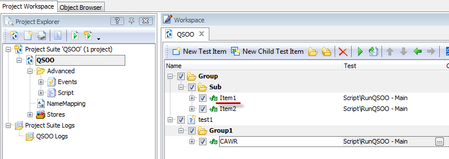


If you send /test: as argument you should use the full name of your test: /test: Script|RunQSOO|Main
Otherwise use - /projectitem: Item1

Thanks for your reply, but it doesn't work for me. :smileysad:
I think mine is test item, but not project item, so /projectitem:Item1 doesn't work for me at all.
All I want is to run specific Test item with command line, seems there isn't a way for that....
/test: Script|RunQSOO|Main, this is not what I want, as I don't want to specific a script unit


Because your test item is in sub-folders, you need to include the full pathing/grouping as per https://support.smartbear.com/testcomplete/docs/working-with/automating/command-line-and-exit-codes/command-line.html#command-line-arguments
So, based upon your screenshot, you should do a command line something like
<program file path>\TestComplete /run /project:QSOO /test:Group|Sub|Item1