How to hide TestComplete window while UserForms is executed?


 Champion Level 3
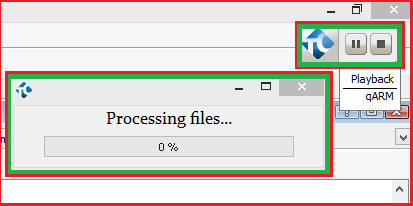
That's the indicator: http://support.smartbear.com/viewarticle/55569/
Use Hide to get rid of it and Show to get it back: http://support.smartbear.com/viewarticle/59046/

Unfortunately I've use not correct screenshot, updated: must be visible only userforms, without TestComplete at backgrioud (except indicator of the test running state)
Champion Level 3Try this then: http://support.smartbear.com/viewarticle/56530

 Alumni
Hi,
You will need to hide the Indicator window as well as the user form window. Marsha_R mentioned the method for Indicator. Here is the method for the UserForm object: http://support.smartbear.com/viewarticle/56742/
@Marsha_R:
Thanks, but this option is already enabled - during my other scripts run hi isn't visible.
I think this is issue in TC - he is appearing visible during UserForms executing right under UserForms objects.
@TanyaGorbunova:
Я может быть непонятно пишу, но не мне надо прятать индикатор, мне надо чтобы во время запущенных UserForms TestComplete был свернут в панели задач, и не тормозил форму. Но при попытке свернуть TC так же и сворачивается UserForms. МБ я что то делаю не так?

I have this same problem where the modal userform is a child of the main TestComplete window and it causes the main TC form to restore. There really needs to be a built in method to hide the main TC form if one does not already exist.
As a workaround I move the TestComplete window off screen and then back.
This is not a perfect solution, but it works for the most part.
 var tcForm = Sys.Process("TestComplete").Window("TfrmTCMainForm", "*");
 //restore form and move off screen
 tcForm.Restore();
 tcForm.Position(10000,10000,tcForm.Width,tcForm.Height);

 //show modal user form
 UserForms.YOURUSERFORM.ShowModal();

 //return tc form to main screen
 tcForm.Position(0,0,tcForm.Width,tcForm.Height);