dhanapal1
14 years agoContributor
How to fetch values from this table?
Hi
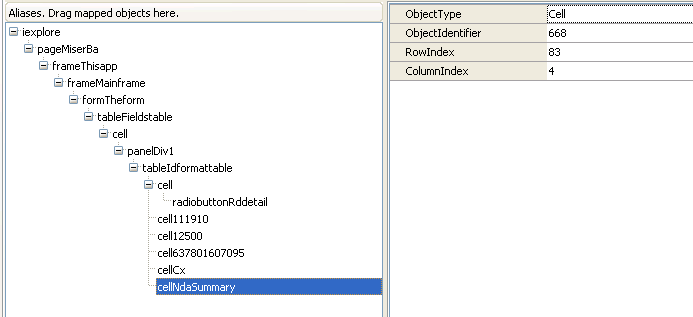
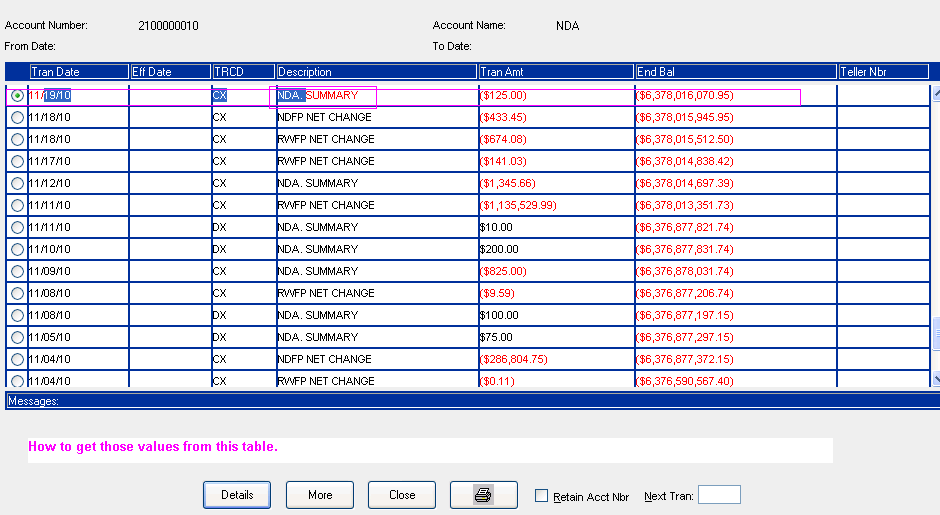
I need to get data from the web table which is dynamic table so, I used FindChild method to get the value from table. I am unable to retrive those values. please see the below code and guide me how to get values from the table. In attachement I have attached namemapping file and table screen shot. How to fetch values from this table?
function Test1()
{
var iexplore;
var panel;
var table;
var proValue, actValue, w;
iexplore = Aliases["iexplore"];
iexplore["ToURL"]("http://ifsmba009/transactor/Content/topPage.htm?*");
panel = iexplore["pageMiserBa"]["frameThisapp"]["frameMainframe"]["formTheform"]["tableFieldstable"]["cell"]["panelDiv1"];
table = panel["tableIdformattable"];
table["cell"]["radiobuttonRddetail"]["Click"]();
table["cell111910"]["Drag"](18, 12, 257, 1);
table["cell12500"]["Click"](35, 13);
table["cell637801607095"]["Click"](28, 10);
//w = new Array();
// Creates arrays of property names and values
proValue = new Array("0bjectType", "innerText", "RowIndex");
actValue = new Array("Cell", "NDA. SUMMARY", 84);
// Searches for the cell then focus that item
w = table["FindChild"](proValue, actValue, 2);
w["focus"]();
Log["Message"]("Message: "+ w["innerText"]); // Object does not exit error is coming.
}
I need to get data from the web table which is dynamic table so, I used FindChild method to get the value from table. I am unable to retrive those values. please see the below code and guide me how to get values from the table. In attachement I have attached namemapping file and table screen shot. How to fetch values from this table?
function Test1()
{
var iexplore;
var panel;
var table;
var proValue, actValue, w;
iexplore = Aliases["iexplore"];
iexplore["ToURL"]("http://ifsmba009/transactor/Content/topPage.htm?*");
panel = iexplore["pageMiserBa"]["frameThisapp"]["frameMainframe"]["formTheform"]["tableFieldstable"]["cell"]["panelDiv1"];
table = panel["tableIdformattable"];
table["cell"]["radiobuttonRddetail"]["Click"]();
table["cell111910"]["Drag"](18, 12, 257, 1);
table["cell12500"]["Click"](35, 13);
table["cell637801607095"]["Click"](28, 10);
//w = new Array();
// Creates arrays of property names and values
proValue = new Array("0bjectType", "innerText", "RowIndex");
actValue = new Array("Cell", "NDA. SUMMARY", 84);
// Searches for the cell then focus that item
w = table["FindChild"](proValue, actValue, 2);
w["focus"]();
Log["Message"]("Message: "+ w["innerText"]); // Object does not exit error is coming.
}