Skip to contentBrand Logo
RegisterSign In
  1. SmartBear Community
  2. TestComplete
  3. TestComplete Questions

Forum Discussion

Ravikaanth's avatar
Ravikaanth
Contributor
2 years ago

Global variables got changed after the latest update
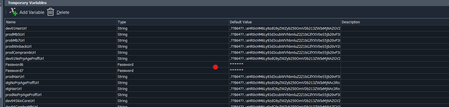
Hi team,   Today, I updated the latest version of TestComplete, and after that, all the global variables changed. Please check the attached screenshot for your reference. Is there any possibility t...
desktop testing
keyword tests
script tests
test run
Variables
web testing
rraghvani's avatar
rraghvani
Icon for Champion Level 3 rankChampion Level 3
2 years ago

It already mentioned in posts, https://community.smartbear.com/t5/TestComplete-Questions/TestComplete-v15-56-software-saving-string-variables-with-Base64/m-p/259130, https://community.smartbear.com/t5/TestComplete-Questions/Bad-characters-in-Temporary-variables/m-p/259445#M112770 and https://community.smartbear.com/t5/TestComplete-Questions/Corrupted-Project-and-Keyword-Test-variables/m-p/259412#M112759.


Open a ticket via TestComplete: New Support Request


@PMularczyk just looping you in on this issue.

Recent Discussions

  • Test Complete compatible with Avalonia?

    13 hours ago
    CBreter
  • page.PagePicture - Screenshot duplication

    20 hours ago
    Mike359
  • capture variable from the popup in Desktop application

    4 days ago
    atulchaudhari32
Related Content
  • Global variable trouble!

    8 years ago
    royd
  • Global variables

    10 years ago
    p_bremm11
  • Global input file and variables

    5 years ago
    jonathon
© 2025 SmartBear Software. All Rights Reserved.
  • Privacy
  • |
  • Terms of Use
  • |
  • Site Map
  • |
  • Website Terms of Use
  • |
  • Security
  • |
  • Community Terms of Service