General Exception raised within Run Browser action


simonaferraradid you ever get a resolution to this? Our ticket has gone no where. Support keeps asking us to try different things as a workaround. I provided my Project Suite so that they could recreated, but from what I understand they have not even tried. Just keep asking me to set up additional script that must be run with Admin permissions that is agains our company security protocols. Before, we were just getting the Exception error every so often. Start yesterday, one of our Project Suite is not generating the Exceptioin error with evern test case. The Exception error is extremely value/no details.
Does any one have any other suggestions?
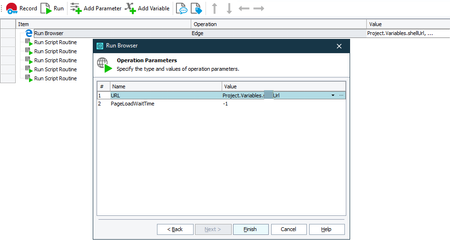
This is how we have the Run Browser configured. The URL is added to the browser from a csv file. We also run a closeBrowser at the beginning of every test case to help clean up any open browsers that might be opened from a previous failed test case.
We run our project suite against a VM using an Azure Pipeline. We have noticed that sever TestExecute process get hung in the background so we have also implemented killing those processes out has well. This same closeBrowser process runs on other web-based project suites in the same manner and we do not have any issues.

Dbowerman1 I'm unfortunately falling still in this issue, even if I close every Edge process with a start test event and at the end of each test.
I hope that technicians will improve the Run Browser action that in my opinion is still buggy.