Forum Discussion

ramakrishnantg's avatar
14 years ago

Flex based AIR Application not detected by TestComplete!

Given below are the steps followed to make TestComplete(TC) recognize a Flex Based AIR application:


1)      A simple AS3Sample.as was created (attached).

2)      Compile using “mxmlc  -load-config+="C:\AdobeAIR\flex_sdk_4.6\frameworks\air-config.xml" -include-libraries+="C:\Program Files\Smartbear\TestComplete 9\Open Apps\Flex\AIRClient4.swc" AS3Sample.as (the command in bold is as per TC’s documentation to include the .swc in order for it to recognize it. Tried AIRClient3.5.swc, AIRClient.swc also) – creates AS3Sample.swf

3)      Create a Windows Installer package thru’ adt -package -storetype pkcs12 -keystore myCert.pfx -target native AS3Sample.exe AS3Sample.xml AS3Sample.swf.

4)      Install the package and run AS3Sample.exe. The application runs fine.

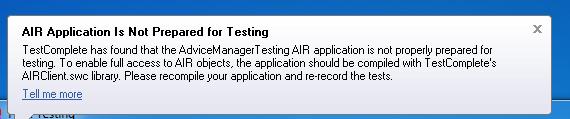
5)      Now launch TC and click “Display Object Spy”, drag & drop it over the AS3Sample.exe. It pops up “AIR Application is not Prepared for Testing” error message.


Environment

·         Flex SDK used: 4.6.0.

·         AIR SDK used (as part of Flex SDK above): 3.1

·         ADOBE AIR 3.5 runtime installed

·         OS: Windows 7 32 bit


Please guide to resolve the issue.

8 Replies

  • jose_pita's avatar
    jose_pita
    Super Contributor
    It is the same thing, you just need to configure the air-config and flex-config files as it is described on the tutorial.


    If you have flash buider installed, close it, insert smartbear libraries on the config files, open flash builer, compile / build / clean your projet and run it , after that you should be able to use your desktop app.


    Mobile does not work.


    if you need more info, shout.

  • Hi Ramki,


    A similar issue was reported to our Support team. Our developers confirmed that this is the problem, and they are trying to investigate it (possibly, there's some AIR restriction that they cannot overcome). As a workaround, you can use the following approach to test your app:


    1. Prepare your system to work with Flex applications according to the "Preparing Flash and Flex Applications for Testing with the Debug Version of Flash Player" article.


    2. Run the application from adl:


    <PathToSDKbin>\adl.exe AS3Sample.xml


  • indu's avatar
    indu
    New Contributor
    We have an Adobe Flash Professional Application compiled and prepared in one machine. Test complete is able to Spy the objects/elements when its XML  descriptor is opened with Air Debug Launcher.

    The same application when copied to a different machine and opened as above, Test complete is unable to spy/detect the elements in the App and shows warning saying the AIR application is not prepared with Test Complete.


    Please let us know the solution as early as possible.


  • Hi Indumathi,


    Please answer the following questions:


    1. Is the version of Adobe AIR the same as on the first computer?


    2. Are you sure that the corresponding AIRClient.swc module is included in your app?


    3. What TC version are you using?


  • I am also getting same issue while running AIR application.


    I have included AIRClient4.swc,FlexClient4.swc files in flex-config.xml file while compiling the application.


    My SDK details:Flex SDK version : C:/Adobe/Adobe Flash Builder 4.5/sdks/4.11.0

    Player version : 11.8.0

    OS : windows 7


    I am not sure why i am getting message like 


    Application Run time message:

    AIR application is not prepared for testing


  • Hi Praveen,


    TestComplete 10 supports Apache Flex v. 4.11. Are you using TestComplete 10?


  • HI SmartBear,


    I have issues while testing of AIR applcation. Occasionally tests are failing due to unseemly loading of  Flex objects. I can clearly see that in Object browser window.


    Please assist me to resolve this aberrent behaviour.


    Environment

    ·         Flex SDK used: 4.6.0.

    ·         AIR SDK used (as part of Flex SDK above): 4.0·        

               ADOBE AIR 4.0 runtime installed

    ·         OS: Windows 2008 Server  64 bit


    Test Complete version: 9.31


    Thanks

    Anudeep
  • Hi,

    Can anyone help me !!


    Does SmartBear Supports .air file desktop application Automation Testing??


    We are more into .air file desktop application (Adobe Flash builder) but I do not found any tuts or links about .air file, all links contains about web based (.swc) flex application.


    Thanks.