Forum Discussion


obaid_shirwani
12 years agoContributor
I am facing the very same problem. All the test cases (Both scripts and Keyword Tests) are not getting executed only on FIREFOX. The work very well on Chrome though. TestComplete's testcase execution log do not show any error message. All the steps seem to be executed perfectly (Colored in green)
I am having Firefox version 32.0.2.
My TestComplete version is 10.30.1145.7
I have the following DLL files in the 'extensions' folder: (C:\Program Files (x86)\SmartBear\TestComplete 10\Bin\Extensions)
tcFF3Hook.dll
tcFF24Hook.dll
tcFF25Hook.dll
tcFF26Hook.dll
tcFF27Hook.dll
tcFF28Hook.dll
tcFF29Hook.dll
tcFF31Hook.dll
tcFF32Hook.dll
I have done all other Firefox settings mentioned here: Preparing Firefox For Web Testing
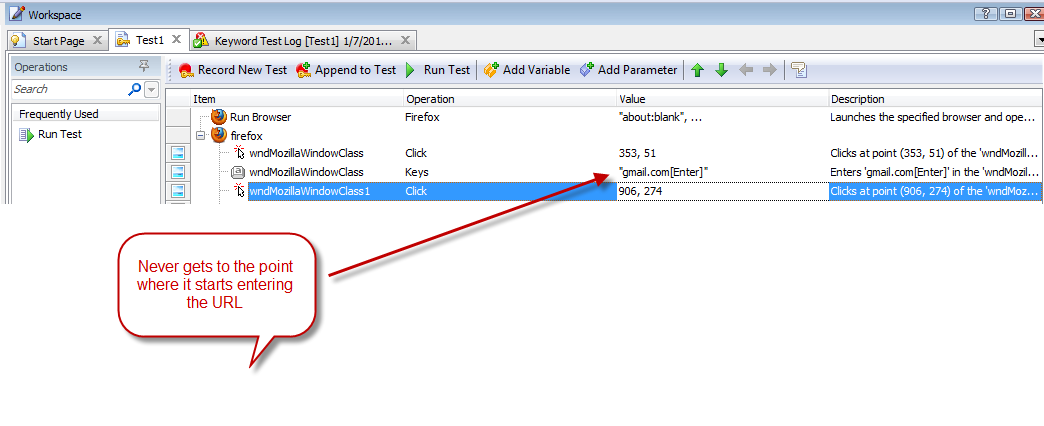
Still I cannot execute a very simple test case. Firefox gets launched but the URL never gets navigated.
I tried the following scripts:
Script Set 1:
function MyApp()
{
//Start a blank FIREFOX page:
Browsers.Item(btFirefox).Run();
//Access MyApp URL:
Browsers.CurrentBrowser.Navigate("http://myapp/Login.aspx");
}
Script Set 2:
function MyApp()
{
//Start a blank FIREFOX page:
Browsers.Item(btFirefox).Run();
//Access MyApp URL:
Browsers.Item(btFirefox).Navigate("http://myapp/Login.aspx");
}
I am having Firefox version 32.0.2.
My TestComplete version is 10.30.1145.7
I have the following DLL files in the 'extensions' folder: (C:\Program Files (x86)\SmartBear\TestComplete 10\Bin\Extensions)
tcFF3Hook.dll
tcFF24Hook.dll
tcFF25Hook.dll
tcFF26Hook.dll
tcFF27Hook.dll
tcFF28Hook.dll
tcFF29Hook.dll
tcFF31Hook.dll
tcFF32Hook.dll
I have done all other Firefox settings mentioned here: Preparing Firefox For Web Testing
Still I cannot execute a very simple test case. Firefox gets launched but the URL never gets navigated.
I tried the following scripts:
Script Set 1:
function MyApp()
{
//Start a blank FIREFOX page:
Browsers.Item(btFirefox).Run();
//Access MyApp URL:
Browsers.CurrentBrowser.Navigate("http://myapp/Login.aspx");
}
Script Set 2:
function MyApp()
{
//Start a blank FIREFOX page:
Browsers.Item(btFirefox).Run();
//Access MyApp URL:
Browsers.Item(btFirefox).Navigate("http://myapp/Login.aspx");
}