peter_rooms
12 years agoNew Contributor
Evaluating TestComplete question about cross-browser testing
Hi,
I'm evaluating Testcomplete as test automation tool for our product in development.
We will use a web based tool using HTML5 and it has to be tested cross-browser.
Now I just wanted to navigate to a simple HTML 5 page and alter something on the page to see how testcomplete behaves and encounterd this strange thing.
The test page I used is : http://html5demos.com/contenteditable
The steps I take are
1) open the browser
2) navigate to the page
3) edit the content
4) hit the "Clear changes" button
When I first recorded the page in IE 11 and again in Chrome 32 (have all patches applied) I noticed the scripts were different. So I went on investigating what the differences were and came up with this.
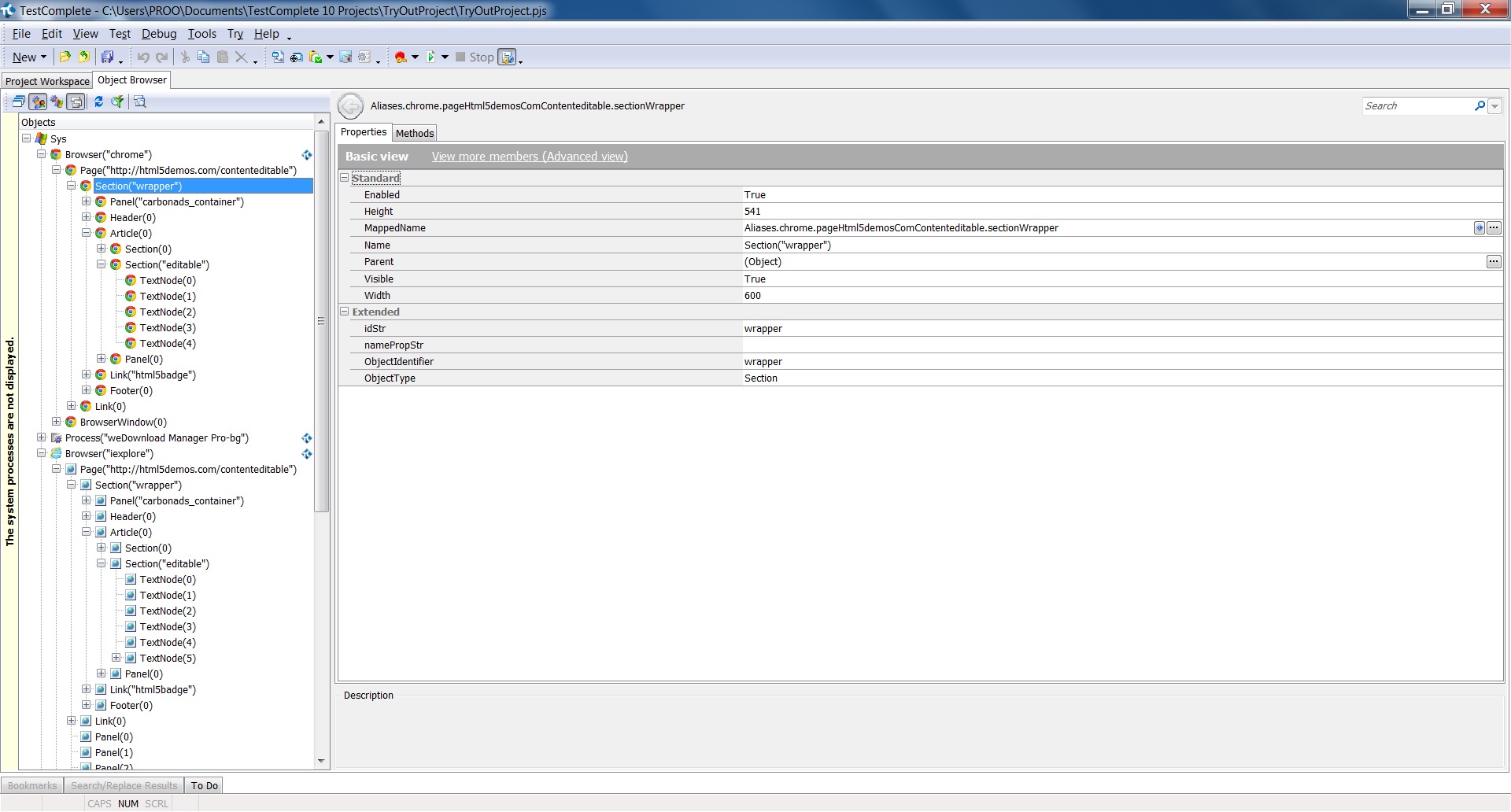
The object mapping was different !!
1) IE mapped all objects on the page where Chrome stopped on the "wrapper" section. I could manually have the child objects mapped to all levels tho, but this is not the way I like it. I expect all objects to be mapped automatically, so I can run my scripts cross browser by only changing the browser. bacause of the non mapping in chrome this will not be possible.
(see attached image)
2) the mapping in itself had different names : (see attached images)
The maping in IE was like :
Aliases.browser.pageHtml5DemoContenteditable.sectionWrapper
The mapping in Chrome was : "Aliases.chrome.pageHtml5demosComContenteditable.sectionWrapper"
You can notice the difference for the same object. This will result in objects not being recognised when running scripts cross browser.
Is there a way to resolve these problems ?
I'm evaluating Testcomplete as test automation tool for our product in development.
We will use a web based tool using HTML5 and it has to be tested cross-browser.
Now I just wanted to navigate to a simple HTML 5 page and alter something on the page to see how testcomplete behaves and encounterd this strange thing.
The test page I used is : http://html5demos.com/contenteditable
The steps I take are
1) open the browser
2) navigate to the page
3) edit the content
4) hit the "Clear changes" button
When I first recorded the page in IE 11 and again in Chrome 32 (have all patches applied) I noticed the scripts were different. So I went on investigating what the differences were and came up with this.
The object mapping was different !!
1) IE mapped all objects on the page where Chrome stopped on the "wrapper" section. I could manually have the child objects mapped to all levels tho, but this is not the way I like it. I expect all objects to be mapped automatically, so I can run my scripts cross browser by only changing the browser. bacause of the non mapping in chrome this will not be possible.
(see attached image)
2) the mapping in itself had different names : (see attached images)
The maping in IE was like :
Aliases.browser.pageHtml5DemoContenteditable.sectionWrapper
The mapping in Chrome was : "Aliases.chrome.pageHtml5demosComContenteditable.sectionWrapper"
You can notice the difference for the same object. This will result in objects not being recognised when running scripts cross browser.
Is there a way to resolve these problems ?