Elements detected, clicked in wrong location with Chrome
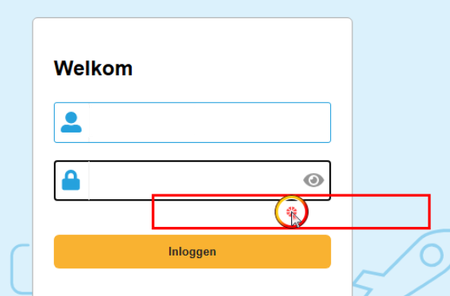


Hello,
⚠️ Update / Erratum: the problem is still present.
Initially I thought the issue was solved, but actually it was only Object Spy that worked temporarily (while staying on the same page).
As soon as the page changes or when the browser window is minimized/restored, Object Spy stops working again and the test execution also fails.
Additional observation:
If Chrome is started manually (with the code Sys.Browser("chrome").Run("https://myurl.com") commented out), Object Spy and clicks work correctly.
The problem only occurs when Chrome is started directly by TestComplete.
Previously I thought I had identified the root cause related to the display resolution:
- External monitor set to 1680 × 1050 → object detected with an offset in Chrome, clicks also offset
- After disconnecting this monitor (remote connection) → issue disappeared
- Replacing it with a 1920 × 1080 monitor → issue also disappeared
So it seemed that 1680 × 1050 caused coordinate offset issues in Chrome, while 1920 × 1080 worked correctly.
However, after further testing the issue still occurs, so the resolution might not be the only factor involved.
Also worth noting: Edge is not affected with the same setup.

Ahh **bleep**, sadly its always been the same resolution for my pc then my remote connections :(