We are upgrading to DevExpress 15 (from 14) and experiencing difficulties with using XPath and radio controls. Specifically, once the control is found there doesn't appear to be a click event. I see...
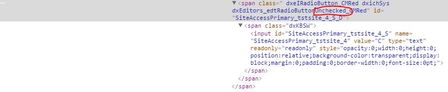
I have determined the height and width are 0 in DevExpress 15 while they were 1 in DevExpress 14. I'm checking with the developers to see if they can explicitly set the values to 1.
function SelectSiteAccess() {
	// retrieves reference to browser
	var page = Sys.Browser().Page("*").Panel("primaryWrapper").Section("primaryContent").Frame("t_cmwebtest_employee_gridproperties_content").Section("actionWrapper").Section("actionContent").Panel(0).Table("splResizing").Cell(0, 2).Panel("splResizing_1_CC").Form("mainForm").Panel("pnlGridPropertiesCallback").Panel("partialProperties").Panel("partialProperties_CC").Panel("partialProperties_C11").Panel(0).Article(0).Panel(0);

	if (Project.Variables.Employees.Value("SiteAccess") == null) { return; }

	// retrieves value from 'SiteAccess' column in spreadsheet
	var SiteAccess = Project.Variables.Employees.Value("SiteAccess").split(",");
	var AccessType = Project.Variables.Employees.Value("AccessType").split(",");

	// iterates through array of Site Access(s) and selects
	for (var i = 0; i < SiteAccess.length; i++) {
		var obj;

		if (0 == aqString.Compare(Sys.Browser().Page("*").Parent.ProcessName, "chrome", false))
		    obj = page.FindChildByXPath("//table[@id='tlEmployeeSiteAccess']//input[@id='SiteAccess" + AccessType[i] + "_" + SiteAccess[i] + "_S']", true);
		else
		    obj = page.FindChildByXPath("//table[@id='tlEmployeeSiteAccess']//span[@id='SiteAccess" + AccessType[i] + "_" + SiteAccess[i] + "_S_D']", true);

		//Delay(15000);
		//Sys.Refresh();

		if (obj != null) {
			//Log.Picture (obj.Picture(), "image");
			//ShowMessage(obj.FullName);
			// clicks radio button
			try {
				obj.Click();

			} catch (e) {
				Log.Error("Error clicking item!");
			}
		}
		else {
			Log.Error("Could not locate Access '" + AccessType[i] + "'" + " for Site '" + SiteAccess[i] + "'");
		}
	}
}
Here's the value of 'obj' after setting obj.
The specific error is:
The window size is (0, 0); the screen rectangle: the left top corner is (1169, 564), the right bottom corner is (1169, 564).

Tested object:
Sys.Browser("chrome").Page("http://localhost/CMWebTest/Go/?p=/CMWebTest/employee/gridproperties").Panel("primaryWrapper").Section("primaryContent").Frame("t_cmwebtest_employee_gridproperties_content").Section("actionWrapper").Section("actionContent").Panel(0).Table("splResizing").Cell(0, 2).Panel("splResizing_1_CC").Form("mainForm").Panel("pnlGridPropertiesCallback").Panel("partialProperties").Panel("partialProperties_CC").Panel("partialProperties_C11").Panel(0).Article(0).Panel(0).Table("tlEmployeeSiteAccess").Cell(0, 0).Table("tlEmployeeSiteAccess_D").Cell(10, 4).Table("SiteAccessPrimary_tstsite_4_ET").Cell(0, 1).Textbox("SiteAccessPrimary_tstsite_4_S")
> Is there a common fix for "The window size is (0, 0);" when attempting to click?
Not sure what fix do you mean...
If you are talking about TestComplete itself, I don't think this requires some fix because from the end-user point of view it is not possible to click the object of zero size.
If you are talking about the fix for DevExpress, I don't know if this an issue from their side or not. Maybe it is possible to contact them and ask a question.
If you are talking about common fix for web applications... Unfortunately, it looks like there is no common fix for this problem, because in web application the element can be of zero size, not visible because of been explicitly hidden, or not visible because of been hidden by css style, or not been visible because some of the parents is hidden. Or, even worse, the element may be visible even if some of its parents are not. So in every case for me it was a kind of investigation specific for the given web application.
> Is there a common fix for "The window size is (0, 0);" when attempting to click?
Not sure what fix do you mean...
If you are talking about TestComplete itself, I don't think this requires some fix because from the end-user point of view it is not possible to click the object of zero size.

 9 years ago

