Michael_St_Pete
15 years agoContributor
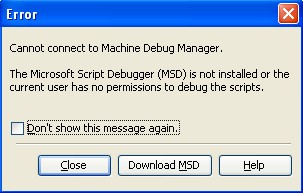
Cannot connect to Machine Debug Manager
I receive the 'Cannot connect to Machine Debug Manager' message when attempting to run scripts. I checked the required 'Launch and Application' settings, and they were what was expected (all users configured had everthing enabled).
What is causing the problem?
Using TC 8.0 under Windows 7. Previously had TC 7 under Windows XP running with no problems.
Additional:
Attempted the MSD install and thought it went okay. However, tried again and received "INF Install failure. Reason: Access is denied." Currently a full administrator (or so I think) to the computer.
Michael St.Peter
What is causing the problem?
Using TC 8.0 under Windows 7. Previously had TC 7 under Windows XP running with no problems.
Additional:
Attempted the MSD install and thought it went okay. However, tried again and received "INF Install failure. Reason: Access is denied." Currently a full administrator (or so I think) to the computer.
Michael St.Peter