C++ application testing with VBScript, got a CString, how to cope with it?
Hello,
I am new on test complete and I am trying to use this product to test our C++ desktop application.
This application uses Stingray grid and I am trying to access to it via VB Scripting.
I got the lib compiled as described in the help page and can see all the fields/methods of the object.
I have a simple grid with two columns, one with labels and one with data.
I tried to access to the cells of this grid using the methods
col = grid.wColumn(nCol)
GetCellValue = grid.wValue(nRow, col)
and it works for the column containing the data but it doesn't with the first column (the one that contains some labels).
So I decided to access to the grid cells using the stingray methods (as well as I do in the c++ code).
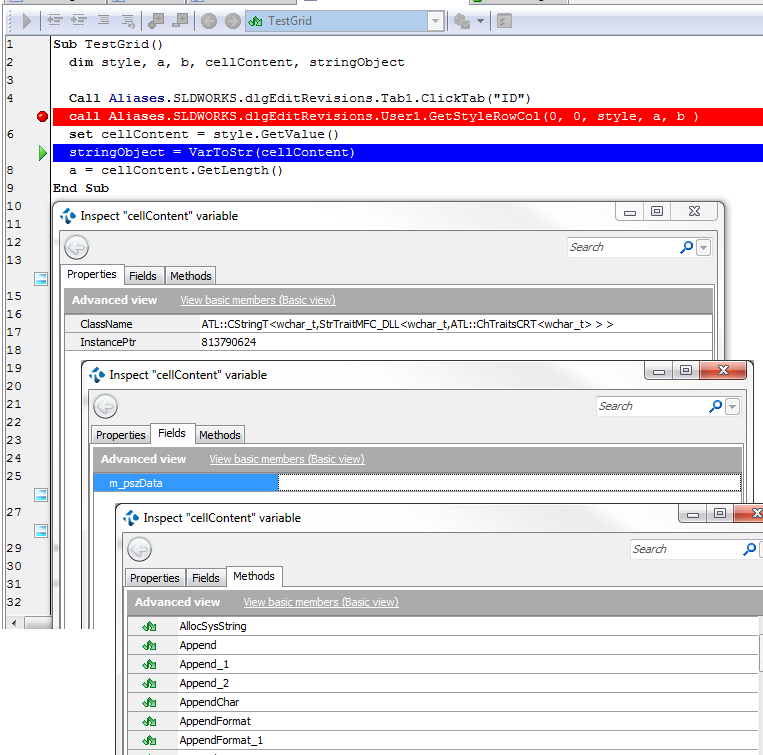
When I try to access to a cell content using the stingray method GetStyleRowCol:
call grid.GetStyleRowCol(nRow, nCol, style, a, b )
set cellContent = style.GetValue()
the variable cellContent is an Object which, if I inspect it, appears to be a CString.
Upon this object I actually cannot call some methods (i.e. GetLength) without getting an error, and still the internal attribute (which should contain the string) is empty.
How can I get the string and also, I need to understand one basic concept: those exposed methods, are fake or it's me that is not using them properly?
Anyone that can help me?
Thank you a lot in advance,
Are you sure that GetStyleRowCol() is the correct method and the parameters are correct? Can you try GetValueRowCol(row, col) with 1-based indexes? It works in the sample app I have. (But I have no experience with Stingray grids, so I don't really know which method is more "correct".)
scambias wrote:
that attribute is unfortunately empty.
Most likely the string is actually empty. Are your method parameters valid?
scambias wrote:
But I know that the variable is still a CString.
How comes the GetLength() called on it gives an error?
There're some limitations on what native methods/properties are available. It might be that the CString::GetLength method is not included in the app's debug info. Is GetLength listed among the methods of your CString when you inspect it?
As an alternative, the Len function should work: Len(cellContent.m_pszData)