Application widget enabled or disabled
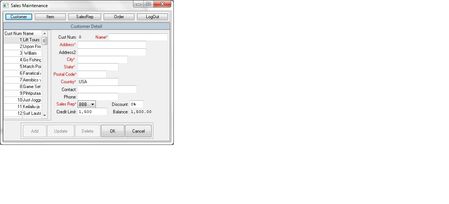


Check your button's property "Enabled" - it should be "True" or "False".

In Script I am using following methods to check enable and disable the buttons.
Call aqObject.CheckProperty(Aliases.prowin.wndProMainWin2.ProClientWin.ProFrame.ProFrame.btnAdd, "Enabled", cmpEqual, False)
Call aqObject.CheckProperty(Aliases.prowin.wndProMainWin2.ProClientWin.ProFrame.ProFrame.btnUpdate, "Enabled", cmpEqual, False)
Call aqObject.CheckProperty(Aliases.prowin.wndProMainWin2.ProClientWin.ProFrame.ProFrame.btnDelete, "Enabled", cmpEqual, False)
Call aqObject.CheckProperty(Aliases.prowin.wndProMainWin2.ProClientWin.ProFrame.ProFrame.btnOK, "Enabled", cmpEqual, True)
But I am using excel file to store test data so What test data should be included in excel files for enable and disable the buttons?
or there would be no test data in excel file for this scenerio?
You can use True and False values in your excel file.