Forum Discussion


NK12
8 years agoOccasional Contributor
Can you guys please help me on this. How to compare multiple JSON Elements with DB elements in one script and capture the result in Excel sheet
as
JSON ELEMENTELEMENT DATA BASE ELEMENT VALUE RESULT
123 123 PASS
1234 456 FAIL
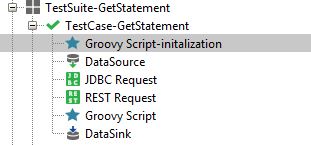
I'm able to compare (Json Response Element vs DB Response) only one element at a time with the below script and capturing the results in excel sheet as above for one element. Attached is the sample screen snippet of my test steps and end result excel sheet
I'm creating a property as Result with Blank
context.testCase.setPropertyValue("Result","")
Groovy Script
import groovy.xml.*
import groovy.json.*
def response = context.expand( '${REST Request#Response#$[\'STMT_BK_ADDR_LINE\'][\'STMT_ADDR_MONETARY_ID\']}' )
log.info response
def responseAsXml = context.expand( '${JDBC Request#ResponseAsXml#//Results[1]/ResultSet[1]/Row[1]/STMT_ADDR_MONETARY_ID[1]}' )
log.info responseAsXml
context.testCase.setPropertyValue("DBResponse",responseAsXml)
context.testCase.setPropertyValue("JsonResponse",response)
if(response.equals(responseAsXml))
{
context.testCase.setPropertyValue("Result","pass")
}
else
{
context.testCase.setPropertyValue("Result","fail")
}


PaulMS
8 years agoSuper Contributor
It is difficult to be precise without example JDBC or REST responses.
Is the JDBC result set expected to contain only 1 row for each Statement ID? My example above was comparing a list with multiple rows.
How many columns do you need to compare, should differences for some columns be ignored if the value is not static?
Are the DB column names different to the JSON response?
One option is to create a testcase property for each column to be tested and setPropertyValue for each in the groovy script using different JSON and XPath expressions as needed.
In Excel results you probably need another column to record the element name.