Forum Discussion


PaulMS
8 years agoSuper Contributor
Yes! The command line argument -F Specifies the format of the reports and -R Specifies the type of the report data.
https://support.smartbear.com/readyapi/docs/soapui/running/automating/cli.html

ManojKumar
8 years agoOccasional Contributor
Hi,
Thank you for your reply.
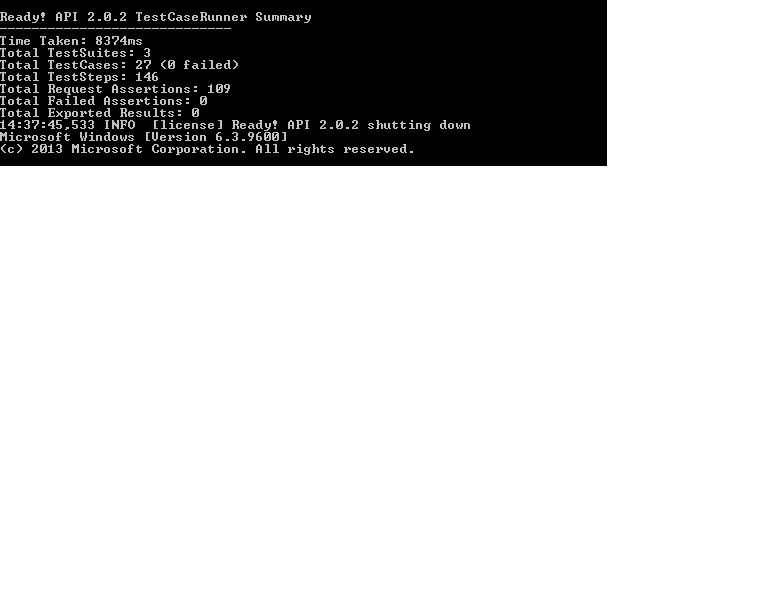
I have attached my batch file which contain the commands I used to generate the report. I have also attached, "what I got" as report and "what I need" as report.
Could you please review and let me know changes that I have to do in my batch file to get the report which contains the content in "What I need" picture.
- PaulMS8 years agoSuper Contributor
Try saving to a text file as mentioned above unless you want to customise the project report.
https://support.smartbear.com/readyapi/docs/testing/reports/customizing.html
The Result Metrics section that you might want is currently on page 13 of your report, so this code is the subreport that you need to keep.
         <subreport isUsingCache="true">
            <reportElement positionType="Float" isPrintRepeatedValues="false" x="0" y="0" width="500" height="30"/>
            <dataSourceExpression>$P{ProjectResultMetrics}</dataSourceExpression>
            <subreportExpression class="java.lang.String">"subreport:MetricsReport"</subreportExpression>
         </subreport>
Make a backup copy of the preconfigured project report then remove the sections that you don't need.
A simple change to <defaultValueExpression>false</defaultValueExpression> for parameters other than "IncludeResults" would hide most of the unnecessary detailed subreports.
 groovyguy8 years agoCommunity Hero
So you want the test case summary generated by the testrunner.bat and output, and not the Reports that can be generated by ReadyAPI.
You can try appending "> report.txt" to the end of your testrunner.bat command to run the tests. That'll pipe all the output to a text file. From there, I am sure you could print it to a pdf?