We are building a new experience for our SmartBear Community.
This site is now read-only. You can still browse and search as usual. Learn More
This site is now read-only. You can still browse and search as usual. Learn More


Hi Alex,
Thanks for all your comments.
I did follow the recommandation for building native c++ projects : I had to change my 52 projects of my application since an option was disabled and AQtime needs it (Function Level Linking). This was a great think since it generates a lot of link errors that were real errors (indeed I don't undestand how the code was working before !). I must say that my application was last converted from VC6 to VS2013 ! So the project file settings were automatically translated from VC6 to VS2013 (+ some manual action)... and those both compilers are REALLY different ! So switch FLL ON was a good thing !
I also set all my project to use /Zi (since all my project can not use /ZI because of /SEshc settings)
I verified and setup the directory to use PDB files (indeed it was good, only vc120.pdb was missing)
I studied your screen shot (that was helpfull regarding the small button !)
I verified the "Project Search Drectories" for source picking.
and I can see the same results as yours.
I don't understand why it is mandatory to create a "class level area" since, by definition, we don't know where are memory leaks ! but I created it and put the DLL into which I create a memory leak (malloc without free).
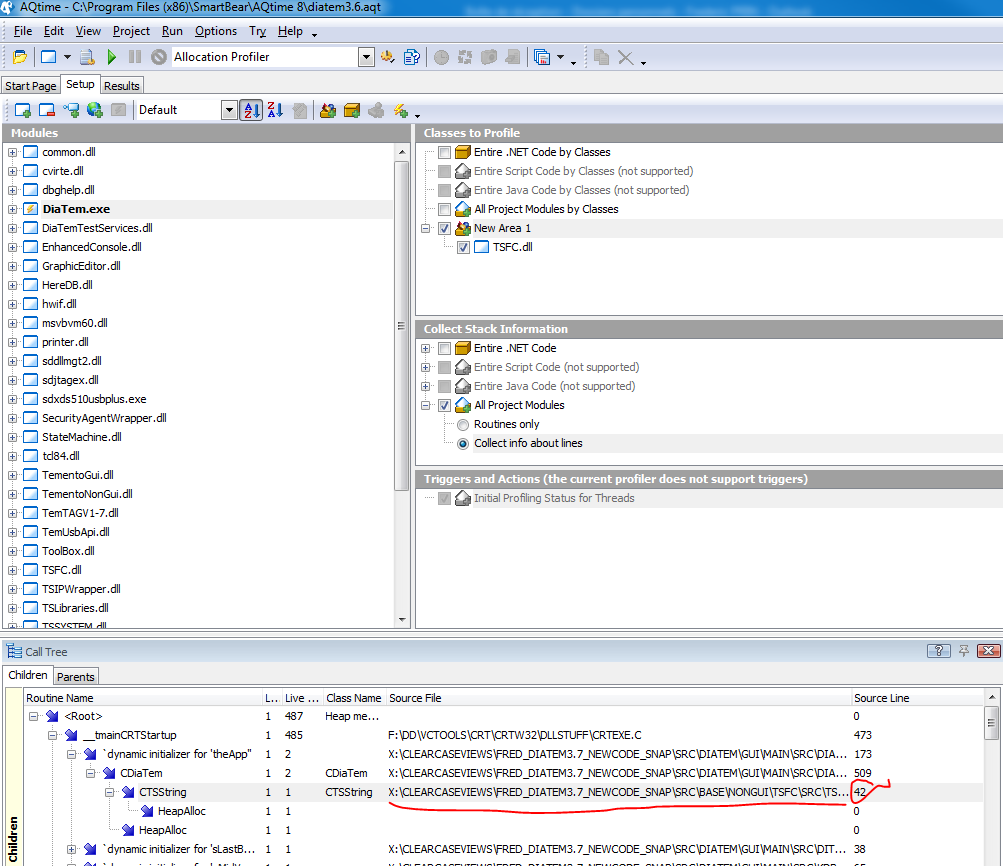
Finally I can see the same results as yours + source file and line number ! (see attached)
BUT still no source code can be viewed when double click on a Call tree CTSString line item....
(no more error message saying that there are no source code available or no debug info)
So, I must really thank you all the time you spent for me. I think there is something abnormal in my application solution that do not please AQTime.
I will know try with a dummy "hello world" like native C++ MFC application build from scratch using the VS2013 wizard and see if the results a re more accurate.
and finally open a support ticket !
Once again, many thanks to you !
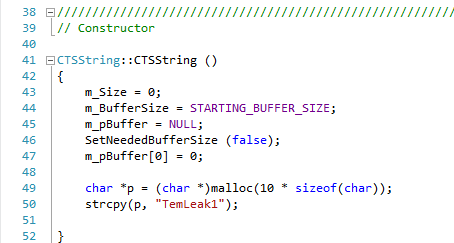
oops : last minute ! I just saw that the line number of leak is really innacurate since it do not point on the malloc but on the ctor opening brace... at line 42 (see attached)
very last minute !
Finally after trying on another mushc smaller app, reading more help, clicking everywhere..; I finally found what I am looking for days :
The "Classes Data" view is not the better place to find leaking code but just if there are leak
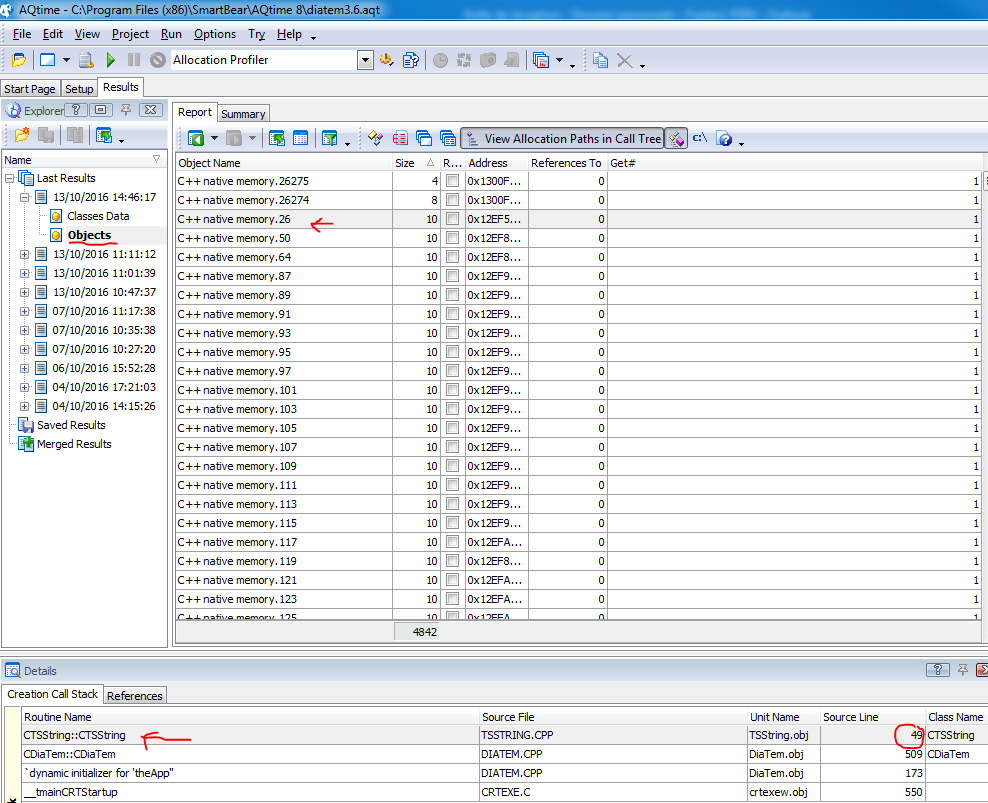
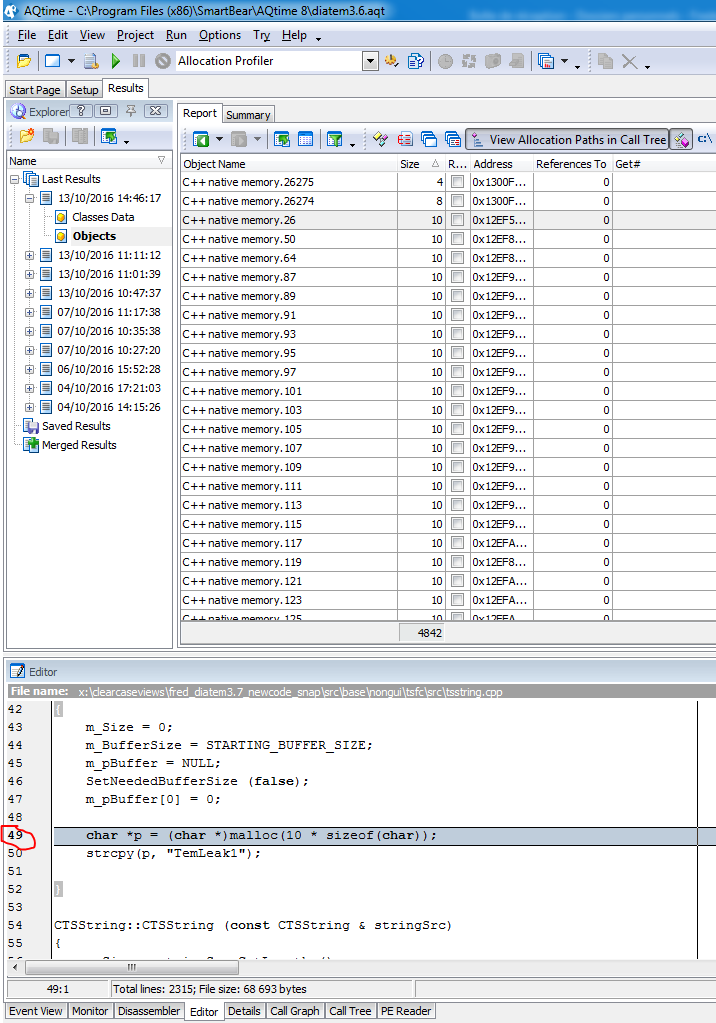
The "Objects" view is better ! Associated with the Details view, Creation Call Stack pane, allow to double-click on a symbol and see the source code ...
BUT this must be used with the "View project class only" button DISABLED ! (so thanks for that !). So now I find my dummy leak (see attached).
My point of view is that having memory leak information is not a straight forward process !
To much information makes real information noisy. (I was thinking that purrify was too verbose... but AQTime is much more graphically noisy!).
Also the "Object Name" column that list "C++ native memory.xxxx" is not really helpful.
I think that a simplified unique view can be done in order to directly point on the memory leak.
Now I can refine my question:
- What is the aim of the magic button "View project class only" ??
It seems strange to disable it in order to see the leak of the class of my project! Is project meaning only the executable ??
why my DLL behing part of my project is not considered as included in my project ??
Anyway, I set this post as Answered.
Thanks again Alex.

Hi,
> So sorry for asking you to solve my issues !
Absolutely not a problem. Guys at Smartbear forums are pretty helpful and for me personally your request was a good stimulus to refresh my AQtime's knowledge. :) You may create a Support ticket via the https://support.smartbear.com/message/?prod=AQtime form. Also there is an online troubleshooter at https://support.smartbear.com/about-troubleshooter/, but it is irrelevant for your case.
> So maybe AQTime needs PDB files to consider it is debug build
Yes, absolutely. I don't know exact implementation, but from the end-user point of view, when you add a module to AQtime's project, AQtime looks for the debug information to be either built-in into the file (e.g. like it can be done for Delphi applications) or to be in the .pdb filelocated in the same folder as the processed file (or in the known folder - https://support.smartbear.com/viewarticle/43347/). If the .pdb file is not found, AQtime considers module as the one without debug info (that is, obviously, correct).
> So I don't understand why the article you sent me tells to use a Release build to add debug info in it since it will be still optimized
Several notes:
a) Yes, I agree that optimized Release build should be used when profiling for performance. Assuming that optimizations done for Release do not introduce new memory leaks when compared to Debug and that extra debug code in the Debug build does not contained leaks either, either Debug or Release builds can be used for the memory leaks profiling;
b) As files with debug info are the supplimentary files for the binaries compiled as Release or Debug, they (debug info files) can be created for both Debug and Release builds;
c) Depending on how well optimizations done for Release can be assosiated with the source code, you may get more or less clear results when profiling on the line level. But I think that on the routines level (that should be done initially as it less loads test system and is more easy for analysis) profiling results should be quite clear.
P.S. https://support.smartbear.com/viewarticle/43136/ section of documentation might appear to be helpful (unless you already have familirized yourself with it).
Hi Alex,
Thanks for all your comments.
I did follow the recommandation for building native c++ projects : I had to change my 52 projects of my application since an option was disabled and AQtime needs it (Function Level Linking). This was a great think since it generates a lot of link errors that were real errors (indeed I don't undestand how the code was working before !). I must say that my application was last converted from VC6 to VS2013 ! So the project file settings were automatically translated from VC6 to VS2013 (+ some manual action)... and those both compilers are REALLY different ! So switch FLL ON was a good thing !
I also set all my project to use /Zi (since all my project can not use /ZI because of /SEshc settings)
I verified and setup the directory to use PDB files (indeed it was good, only vc120.pdb was missing)
I studied your screen shot (that was helpfull regarding the small button !)
I verified the "Project Search Drectories" for source picking.
and I can see the same results as yours.
I don't understand why it is mandatory to create a "class level area" since, by definition, we don't know where are memory leaks ! but I created it and put the DLL into which I create a memory leak (malloc without free).
Finally I can see the same results as yours + source file and line number ! (see attached)
BUT still no source code can be viewed when double click on a Call tree CTSString line item....
(no more error message saying that there are no source code available or no debug info)
So, I must really thank you all the time you spent for me. I think there is something abnormal in my application solution that do not please AQTime.
I will know try with a dummy "hello world" like native C++ MFC application build from scratch using the VS2013 wizard and see if the results a re more accurate.
and finally open a support ticket !
Once again, many thanks to you !
oops : last minute ! I just saw that the line number of leak is really innacurate since it do not point on the malloc but on the ctor opening brace... at line 42 (see attached)
very last minute !
Finally after trying on another mushc smaller app, reading more help, clicking everywhere..; I finally found what I am looking for days :
The "Classes Data" view is not the better place to find leaking code but just if there are leak
The "Objects" view is better ! Associated with the Details view, Creation Call Stack pane, allow to double-click on a symbol and see the source code ...
BUT this must be used with the "View project class only" button DISABLED ! (so thanks for that !). So now I find my dummy leak (see attached).
My point of view is that having memory leak information is not a straight forward process !
To much information makes real information noisy. (I was thinking that purrify was too verbose... but AQTime is much more graphically noisy!).
Also the "Object Name" column that list "C++ native memory.xxxx" is not really helpful.
I think that a simplified unique view can be done in order to directly point on the memory leak.
Now I can refine my question:
- What is the aim of the magic button "View project class only" ??
It seems strange to disable it in order to see the leak of the class of my project! Is project meaning only the executable ??
why my DLL behing part of my project is not considered as included in my project ??
Anyway, I set this post as Answered.
Thanks again Alex.
Hi Fred,
It is good to hear that in general you was able to get what you was looking for and that recommendations from AQTime's documentation helped to improve your code.
> What is the aim of the magic button "View project class only" ??
According to the documentation (https://support.smartbear.com/viewarticle/54501/), this button filters "profiling results for those modules that are added to the Setup panel." Indeed, the leak occurs starting from the msvcr120d.dll and this dll was not included in the AQTime's project. (General AQTime's concept: profiling is done only for the stuff that is added to the Modules list and is included in some Area and is not blocked by some Action or Trigger (see help for more details about these entities).)
What I did: I switched to the PE Reader panel (set of panels in the lower part of AQTime's screen), expanded the node for tsfc.dll, right-clicked on the msvcr120d.dll node and selected Add Module to Project menu command. Then I did another profiling run and the leak was displayed in the Results regardless of the state of the View Project Classes Only button.
Hope, this will make AQTime's behavior more clear.
> I don't understand why it is mandatory to create a "class level area" [...]
Actually, this is not required and you can do a profiling run without any area added but with only All Project Modules by Classes option enabled (in the Classes to Profile pane of the Setup panel). Areas in AQTime are just means to reduce the volume of the collected profiling information in order to lower the load on the test system. https://support.smartbear.com/viewarticle/43495/ topic of the https://support.smartbear.com/viewarticle/42966/ section should explain this better.
> [...] The "Objects" view is better !
https://support.smartbear.com/viewarticle/43467/ and https://support.smartbear.com/viewarticle/43019/ help topics (of https://support.smartbear.com/viewarticle/42965/ section) should explain the difference between those views and also explain why you did not see source information for the Classes Data results view.