Dark Mode for .mht files?
(If what I want is already there, then please accept my apologies and pretty-please tell me how to configure it...) I can view log files within TC in dark mode by setting dark mode in TC itself. When saving logs as .mht files, however, they are only saved in light mode. Furthermore, people have different preferences (dark vs. light). There is currently a W3C standard in which websites can ask the user's browser whether it's configured for light or dark mode, so that the server can adjust CSS accordingly. Edge knows how to respond to this query. What I'd like to see is this mechanism embedded in the .mht file so that the log will display as light or dark according to my Edge settings. A Google search for 'support for dark mode in mhtml files' gives an AI answer claiming that it's possible. (Or course, it's AI, so...)139Views1like7Comments
Test script level summary can save as html when we export execution log file from TestComplete
Currently, after TestComplete execution we are able to export the log file as html which contains only test cases details like execution time execution status etc. but we are unable to see the test script level summary details directly on the main html page. If we click on each test script link then only we are able to see the test script level summary details. So we need to have test script level html file while exporting the execution log will help to validate detailed test step level status.80Views2likes0Comments
Add feature to create Bug/Issue in Azure DevOps from TestComplete
I had check the TestComplete documentation and could not find any feature to Create Bug/Issue in Azure DevOps from TestComplete logs directly. So can you implement this feature in TestComplete as it would be helpful to automate the process of posting bug on failure. As currently I can see it is only possible to create issue in Jira, Bugzilla and QAComplete only.358Views11likes8CommentsMark FAILED file/XML comparison nodes with red instead of a green checkmark
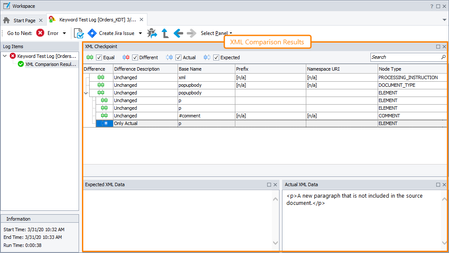
Currently, when a file comparison fails because of a difference higher then the set tolerance, the results are confusing as they are shown with a green checkmark! To say the least this is counter-intuitive, and seems easy to fix. Examples (taken from the TC docs):75Views0likes0Comments
More specific crash detection
Currently the crash detection posts an error to the test log on any crash of any application systemwide. Please make it configurable (project settings, or even better project suite settings) to post only errors of the applications configured in the TestedApps section (all others unnecessarily spoil the test log ;-) ).33Views0likes0CommentsMerging multiple tcLogX file into one tcLogX
I am running tests on GitLab separately with parallel matrix keywords. I want to merge test logs into one and keep them as a test run. Is there a way to merge tcLogX file into one? By this way, I can also share my results on Smartbear server with details and images. Otherwise, it is very difficult to keep track which log belongs to which test. I kindly ask for a new function on TestComplete which It can merge test logs.48Views0likes0CommentsSend test results in email body
I have been able to send test results as zip file, but it is not convenient for non technical people. It would be very good to see the results of the tests in the email body so that my colleagues can directly see the results of the tests every day, and take action even if I'm on leave.99Views0likes1CommentAdd arrows and use the keyboard arrows to navigate between images in the image view screen
Hello, I would like to navigate navigate between the screenshots displayed in the test result log, especially in the "picture's wiever", by using the arrows of the keyboard and/or arrows on the screen. Today, i must be exit the picture, go to the next step, open the picture, etc. It will be more efficient to use arrows to navigate fastely between the screenshots, in order to understant an anomalies for exemple. Regards, Brice72Views0likes0CommentsGithub Copilot Integration
GitHub Copilot suggests code completions as developers type and turns natural language prompts into coding suggestions based on the project's context and style conventions. One new idea would be having a copilot plugin for testcomplete would increase productivity and coding efficiency URL for reference - https://github.com/features/copilot638Views5likes0Comments
Test results columns display order to stick and toggle between sorted and unsorted
TestComplete "Test Log" formatting applies to all projects and is lost on SW updates. The following features would be a great addition: Remember all the formatting between SW updates The order of selected columns to stick, currently columns keep on jumping around Toggle columns from sorted to unsorted, currently when a column is sorted it is hard to remove the sorting41Views0likes0Comments