Proper Way of Creating API Interface Using Script
Hi, I would like to know the proper way of creating an API service using groovy script. I am using the code below, but when creating for a REST Request it seems that the endpoint is not showing even if I pass a value on it. I cannot also add environment and authorization profile to the interface. I also noticed when creating the interface manually the specification is in the form of JSON vs WADL when created via script. Any help is very appreciated, many thanks! Edit I am using version 3.59.0. import com.eviware.soapui.impl.rest.RestServiceFactory import com.eviware.soapui.impl.rest.RestRequestInterface def project = context.testCase.testSuite.project def endpoint = "https://sample.endpoint.com" if (!project.getInterfaceByName("NewRESTService")) { def restService = project.addNewInterface("NewRESTService", RestServiceFactory.REST_TYPE) restService.addEndpoint(endpoint) def resource = restService.addNewResource("NewResource", "/NewResource") def method = resource.addNewMethod("Method 1") method.method = RestRequestInterface.HttpMethod.POST def request = method.addNewRequest("Request 1") request.mediaType = "application/json" // Following line of codes are tested to pass endpoint but to no avail request.setEndpoint(endpoint) request.endpoint = endpoint request.setPropertyValue("Endpoint", endpoint) log.info request.getEndpoint() //---END---// request.authProfile = "BasicAuthProfile" log.info request.getAuthProfile() }134Views0likes1Comment
major automation bug
For the past two months I have been dealing with a weird bug in SoapUI. Just thinking about making a post on this forum gives me headache. TLDR; Sometimes when testcase has multiple soap steps, RawRequest (custom properties) does not contain correct data. It contains previously launched test step's data. Long story, starting with background so you can understand what I'm doing and what I'm trying to achieve. I work for a company which has many internal systems and these systems rely on bunch of web services (in my scope around 10). Each web service has roughly from 10 to 150 web methods. There was an internal project aimed at upgrading systems and my purpose in this process was to assure, that nothing was affected in a bad way. This company has many test environments and for this project, two were allocated. Let's name them T2 and T3. Environment T2 had as-is systems, while T3 had everything upgraded, but the data were the same. My job was to create a comparison between these two environments and make sure, the upgrade did no harm and responses from web methods were identical. My approach For every web method, I created a test case and in this test case were few steps. Mostly Request_T2, Request_T3, sometimes Properties. I created one "main" test suite in which was just one test case with two steps. Init - groovy script that recursively sweeps whole solution, deletes any (old) Verificator and then replaces it with new one, and creates an excel template containing all test cases and test steps. Verificator - groovy script which is placed on last position in every test case. It searches for every soap-type test step that has _T2 suffix in its name. Then searches for its twin, test step with _T3 suffix in its name. It does many internal verifications, writes both _T2 and _T3 requests and responses to a directory structure that resembles how SoapUI test suite structure. These are for future analysis if necessary. It also writes verdict to the excel template that Init created. Sounds good, right? It actually works really well, and the script is very complex as it uses functions and methods not used in groovy scripts very often. The script looks almost like a library for inspiration or a buffet of functions. The problem One day analyst told me, that I saved wrong "REQ" file and that it is not corresponding to "RES" file. Few hours later I was even more confused. As it turned out, RawRequest was containing wrong data! This is a bit complicated, there are some conditions. For example Request_T2 Request_T3 Verificator In this setup, Request_T3 contains RawRequest of Request_T2 (it's a copy, Request_T2 has correct data). When I switched the requests like this: Request_T3 Request_T2 Verificator then everything was OK. How can this be? Well, I found out, it happens only sometimes. And the cause seems to be, that Request_T2 was aimed at a system with enabled security (basic auth, outgoind wss, global http settings). Not only that, but when I launched the test from the test case window, the RawRequest was filled with incorrect data. But then I opened the Request_T3 in a separate window and executed it like that, RawRequest was filled with correct data. This is the only way to get correct data written. Mitigation How to deal with this? I've tried many things. It does not matter how you get the data, whether you use testStep.httpRequest.response.requestContent or context.rawRequest or testStep.getPropertyValue("RawRequest") because you are reading the wrong data. When you open the Custom Properties in SoapUI you can see the behavior for yourself. Execute from test case - wrong data. Execute individually - correct data. What I've done so far was a dilemma between using context.request and context.expand('${Request_T3#Request}'). Since the bug occurs only sometimes and I need a generic Verificator script, I use following setup: I read testStep.httpRequest.response.requestContent and testStep.httpRequest.response.responseContent. I use ${=java.util.UUID.randomUUID()} as messageID in request header, so I use xmlHolder and compare the values of the elements in REQ vs RES. If they match, great, bug did not occur. But when they don't match, it means bug is present. The dilemma is there because context.request is a request with all variables and functions, like the one mentioned above. The context.expand('${Request_T3#Request}') executes all variables and functions again, so ${=java.util.UUID.randomUUID()} is generated again and it does not match the original. BTW I've also tried tweaking the security settings and trying to refresh the Request or SoapUI somehow, but nothing makes SoapUI work correctly. And keep in mind, I'm testing repeatedly hundreds of web methods At this point I'm stuck with something I can barely call a workaround. I cannot use SoapUI for automation if such bugs exist. Actually I'm a bit surprised this hasn't been discovered or addressed yet. Nowhere on the internet have I seen anybody talk about this. Only positive thing about this is that response is always correct.Solved91Views0likes1Comment
Cannot start MockService through Groovy Script
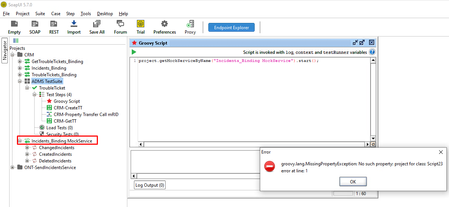
Hello everyone, I have a problem with really simple task. I want to automatize the start-up of MockService using Groovy Script so that when I execute TestCase, Mock services are started, and other steps are executed sequentially. I found a few examples online, but whatever I do, I receive "groovy.lang.MissingPropertyException: No such property:". SoapUI version is 5.7.0, and mock service name is Incidents_Binding MockService Could you please help? I'm attaching a few examples of the script I'm using:Solved97Views0likes1CommentStarting Mock Service from Groovy script
Hello there, Whenever I try getting the mock runner when the project is just loaded I get a null pointer back. I have to navigate the project tree find each mock service and open it in the virtual service editor for it to be loaded correctly and only then does the script run successfully. // small code extract def server = project.getRestMockServiceByName(serverName) def runner = server.getMockRunner() assert runner != null runner.start() What difference does opening the Virtual Service Editor in the GUI make so the mock runner is accessible? And can I simulate this in my script, some tests rely on multiple mock services in different projects, having to manually find and start them would not be ideal? Thanks200Views0likes1Comment
Properties as not Strings?
Hello all I would like to send an object from one test suite to another using a runTestCase step. is it possible to pass an object, like context, into that and then use that object context(non-mapped values) in the testCase as an object and not a string?167Views1like1CommentHow to change the API of a REST test step
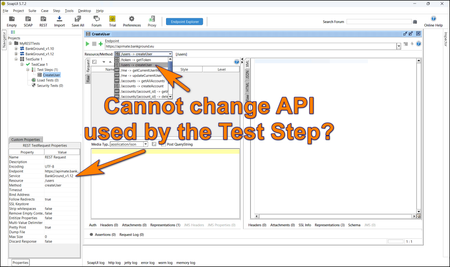
Hi guys, If you test REST APIs in SoapUI, you may encounter an issue where you cannot change the API attached to the REST test step. I am not aware of any standard way to do it, so I prepared a simple Groovy script to change the test step's API programmatically: testRunner.testCase.getTestStepList().each(){ step = it service = step.getService() log.info("TestStep: ${step.getName()}") config = step.getRequestStepConfig() log.info "Before: ${step.getService()}" config.setService("BankGround_v1.12") log.info "After: ${step.getService()}" } I thought this may help those of you who work with REST APIs, which get changed over time (new versions). For a longer story, you can visit the following article: https://www.linkedin.com/pulse/soapui-what-rest-api-changes-karel-husa-7vb2e101Views2likes0CommentsSFTP PUT to remote directory in ReadyAPI
I am trying to figure it out how to do SFTP PUT using Groovy scripts in ReadyAPI but to no avail haven't work for me yet. Have search thru community and found some examples but doesn't work. I am not expert in Groovy scripting nor any programming language. But just wanted to ask here if we have a sample SFTP PUT Groovy script where I can try, notice also that the remote doesn't accept password, it might be encrypted.104Views0likes1Comment
Unable to parse multiple json received in kafka Eventhub
Hi All, I have a Eventhub to receive messages as and when they are published.I may receive multiple json messages.So i parse each of them using the Property-list-data field and try to assert certain fields in all the received jsons. But i am getting a error when i try to access a particular field in the received json. I am trying something like this. import groovy.json.* import groovy.util.* import groovy.json.JsonSlurper //Parse JSON content in the request def data = context.expand( '${Receive Message#data#$[*]}' ) def json=new JsonSlurper().parseText(data) assert json.eventID=='1234546' || '1234545'-----This works fine def i=1 while(i!=0) { def data2 = context.expand( '${Receive Message#data}' ) def json2=new JsonSlurper().parseText( data2) log.info json2[i] if (json6[i].eventID=='1234546')--------------This gives Error -Error is mentioned at the bottom of this post. { i=0; log.info "Test Success" }else{ i=i+1 } } Error : groovy.lang.MissingPropertyException: No such property: eventID for class: java.lang.String error at line: 20 Json that is received is as .I receive multiple such json in the same format. { "eventID" : "1234546", "eventTimeStamp" : "2017-07-21T17:32:28Z", "eventType" : "EVENT_PUB", "Identifier1" : "", "Identifier2" : "", "shipinfo" : { "InfoNumber" : "123456", "originLoc" : "IND", "destLoc" : "IND", }, } Please help .What am i missing here.Solved137Views1like1CommentGroovy To Extract Comma Separated List Into Separate Properties
Hi, So this is on the end of one of my previous posts - nmrao spoonfed me until I got there (so all cred to him) - this is the next step. I have a string of comma separated values stored as a custom testSuite level property. I want to extract the individual values from the single property into multiple separate properties for later use. I've managed to do it - but it's shockingly bad groovy - so I'm wondering if anyone can guide me into a way of doing it more efficiently The testSuite level 'MY_SUBLIST' property has the value of: 3K684,3K686,3K688,3U3750 As stated above, I want to separate out each comma separated value into it's own testSuite level property. As stated above - I've managed it - but it's poor groovy. Please see as follows: //get the comma separated list in my testSuite level property entitled MY_SUBLIST and save it to the mySubListToString variable def mySubListToString = context.testCase.testSuite.getPropertyValue('MY_SUBLIST') log.info mySubListToString // log response was --> Thu May 23 00:20:30 BST 2024: INFO: 3K684,3K686,3K688,3U3750 //use split() to extract the first route_code value and save this value to the splitString1 property def splitString1 = mySubListToString.split(',')[0].toString() log.info(splitString1) //log response was --> Thu May 23 00:20:30 BST 2024: INFO: 3K684 //save splitString1 value to a new testSuite level property entitled splitString1 testRunner.testCase.testSuite.setPropertyValue( "splitString1", splitString1) //use split() to extract the second route_code value and save this value to the splitString2 property def splitString2 = mySubListToString.split(',')[1].toString() log.info(splitString2) //log response was --> Thu May 23 00:20:30 BST 2024: INFO: 3K686 //save splitString2 value to a new testSuite level property entitled splitString2 testRunner.testCase.testSuite.setPropertyValue( "splitString2", splitString2) //use split() to extract the third route_code value and save this value to the splitString3 property def splitString3 = mySubListToString.split(',')[2].toString() log.info(splitString3) //log response was --> Thu May 23 00:20:30 BST 2024: INFO: 3K688 //save splitString3 value to a new testSuite level property entitled splitString3 testRunner.testCase.testSuite.setPropertyValue( "splitString3", splitString3) //use split() to extract the fourth route_code value and save this value to the splitString4 property def splitString4 = mySubListToString.split(',')[3].toString() log.info(splitString4) //log response was --> Thu May 23 00:20:30 BST 2024: INFO: 3U3750 //save splitString4 value to a new testSuite level property entitled splitString4 testRunner.testCase.testSuite.setPropertyValue( "splitString4", splitString4) As you can see - I'm not going to win any awards with the code above. Can anyone advise on a more efficient/effective way of doing it? It's rubbish to have to explicitly define a variable and a new property for each comma separated value - so I'd welcome if anyone has a more efficient way I can do this. As you can see - what I've done gets the job done - but it's a shonky way of doing it! Cheers! rich686Views0likes2CommentsGroovyScript - Extract specific number of attribute values from variable content response
Hey! I've checked my groovy script notes which contains essentially all the groovy script snippets people have ever helped me with over the years - mostly from nmrao if I'm being honest - but I haven't got an example of what I need - sometimes I can expand the examples I already have to do what I need, but not this time. I have a GET response JSON payload that can have 1 or many records in the response. Each record in the response will have an 'id' attribute value (JSONPATH --> x.data[0].id) The 'data' array can have 1 or many records, so JSONPATH for the id attribute value for first record this would be x.data[0].id, but there could be 50 records or more (50 records, the JSONPATH of the id associated with the 50th record would be x.data[49].id) I won't need to save all 50, or 100, or however many records there will be. I'd like to be able to specify the number of id values I save for later. I want to save these 'id' values at TestSuite level for later. I'm not sure how many 'id' values I'll need - maybe only 5 or maybe 10 - I don't know yet, so I'd like to be able to specify how many 'id' values I extract and save on the TestSuite. This is the groovy script so far - as I say above - it's all courtesy of nmrao //Script Assertion def json = new groovy.json.JsonSlurper().parseText(context.response) //find all 'id' attribute values def id_list = json.data.'id'.findAll() //List the 'id' attribute item count log.info id_list.size //Iterate thru each id, then stick them in a map, then once they're in a map, grab X instances of the 'id' values and split the map out and save them at TestSuite level id_list.each { id -> And that's as far as I've got. I'm guessing I need to count the number of records so I don't try and grab more 'id' attribute values than actually exist causing the script to fail. I think I need a map and I've been googling - but it's beyond me - all the groovy script with maps I've got examples of, mix multiple methods together and I've never been able to read exactly what's occurring in those lines of the groovy. I know the groovy to save off a single property to TestSuite level for later use - but I don't know how to save off a variable sized number of attributes into separate properties for later use - especially as I'd like to grab a certain number of 'id' values from the total available - maybe from the first 10 records out of X returned. I've attached the response payload that includes just a single record Can anyone give me a steer please? As always - I genuinely appreciate all/any help anyone can give me! Cheers, RichSolved969Views0likes10Comments