Issues with Running TestExecute in Powershell
I'm trying to run TestExecute using powershell, and it seems to startup, but then it returns to the command input shortly after without running my test suite. I've tried running it on command line, and it seems to work just fine, so I feel like there is something that is not being transferred correctly in the powershell format: Start-Process -FilePath $testExecutePath -ArgumentList $pjsFilePath, "/run", "/project:$projectName", "/test:$TestGroupName", "/ErrorLog:.\ErrorLog.log", "/SilentMode", "/exit", "/AccessKey:$accessKey" -Wait I've tried running different versions from related community support posts with not much success.105Views0likes3Comments
Test Execute exit code -1
HI, I'm running text execute in silent mode from Jenkins and all tests pass but i get a return code of -1 and the Jenkins build is marked as failure. In the silent log i see 17/02/2026 17:37:29:791 Tried to open the Save dialog. The default value: YES." 16:43:41 Started by upstream project "Ace/Platform/Build-3.14" build number 298 16:43:41 originally caused by: 16:43:41 Started by user 16:43:41 Running as SYSTEM 16:43:41 [EnvInject] - Loading node environment variables. 16:43:41 Building remotely on ACE Agent (smoketest) in workspace E:\jenkins\workspace\Ace\Test Complete Smoke Tests\ACE Platform Smoke Test 16:43:41 No emails were triggered. 16:43:41 [ACE Platform Smoke Test] $ cmd /c call C:\Users\TEST_R~1\AppData\Local\Temp\jenkins17618320814231844395.bat 16:43:41 16:43:41 E:\jenkins\workspace\Ace\Test Complete Smoke Tests\ACE Platform Smoke Test>del /Q "E:\jenkins\workspace\Ace\Test Complete Smoke Tests\ACE Platform Smoke Test\TestComplete_Logs\Log_*.mht" 2>nul 16:43:41 16:43:41 E:\jenkins\workspace\Ace\Test Complete Smoke Tests\ACE Platform Smoke Test>exit 0 16:43:41 16:43:41 [TestComplete] The test execution started (ACE 3 Smoke Tests). 16:43:41 [TestComplete] Found TestComplete/TestExecute installations: 16:43:41 Type: TC, Version: 15.79.5.7, Path: "C:\Program Files (x86)\SmartBear\TestComplete 15\x64\bin\TestComplete.exe" 16:43:41 Type: TE, Version: 15.80.1.11, Path: "C:\Program Files (x86)\SmartBear\TestExecute 15\x64\bin\TestExecute.exe" 16:43:41 Type: TELite, Version: 15.80.1.50, Path: "C:\Program Files (x86)\SmartBear\TestExecuteLite 15\x64\bin\TestExecuteLite.exe" 16:43:41 [TestComplete] Selected TestComplete/TestExecute installation: 16:43:41 Type: TE, Version: 15.80.1.11, Path: "C:\Program Files (x86)\SmartBear\TestExecute 15\x64\bin\TestExecute.exe" 16:43:41 [TestComplete] [WARNING] The node is connected via Java Web Start (JNLP). In this mode, the "Run interactive user session" property of the TestComplete Test step is ignored. TestComplete (or TestExecute) will work in the current user session. 16:43:41 [TestComplete] Launching the test runner. 16:43:41 $ '"C:\Program Files (x86)\SmartBear\TestExecute 15\x64\bin\SessionCreator.exe"' ExecuteProcess '/c:""C:\Program Files (x86)\SmartBear\TestExecute 15\x64\bin\TestExecute.exe"" ""E:\jenkins\workspace\Ace\Test Complete Smoke Tests\ACE Platform Smoke Test\ACE 3 Smoke Tests.pjs"" /run /SilentMode /ForceConversion /ns /exit ""/ExportLog:E:\jenkins\workspace\Ace\Test Complete Smoke Tests\ACE Platform Smoke Test\1771346621277.tclogx"" ""/ExportLog:E:\jenkins\workspace\Ace\Test Complete Smoke Tests\ACE Platform Smoke Test\1771346621277.htmlx"" ""/ErrorLog:E:\jenkins\workspace\Ace\Test Complete Smoke Tests\ACE Platform Smoke Test\1771346621277.txt"" /Timeout:3800 /DoNotShowLog ""/ExportLog:E:\jenkins\workspace\Ace\Test Complete Smoke Tests\ACE Platform Smoke Test\TestComplete_Logs\Log_187.mht"" /JenkinsTCPluginVersion:2.9.2' 17:37:36 [TestComplete] Test runner exit code: -1. 17:37:37 [TestComplete] [WARNING] Errors occurred during the test execution. 17:37:37 [TestComplete] Marking the build as UNSTABLE. 17:37:37 [TestComplete] The test execution finished (ACE 3 Smoke Tests). 17:37:37 Build step 'TestComplete Test' changed build result to UNSTABLE 17:37:37 [ACE Platform Smoke Test] $ powershell.exe -NonInteractive -ExecutionPolicy Bypass -File C:\Users\TEST_R~1\AppData\Local\Temp\jenkins7100129622043842865.ps1 17:37:37 Renamed log to: E:\jenkins\workspace\Ace\Test Complete Smoke Tests\ACE Platform Smoke Test\TestComplete_Logs\Log_Build-187_Installer_v3.2.14.6_and_Platform_3.14.23.11.mht 17:37:38 Archiving artifacts 17:37:39 [Office365connector] Matched status 'UNSTABLE' for webhook with name 'ACE Smoke Test'. 17:37:39 Email was triggered for: Unstable (Test Failures) 17:37:39 Sending email for trigger: Unstable (Test Failures) 17:37:39 Sending email to: 17:37:42 Finished: UNSTABLE143Views0likes2CommentsHow to use /tags or /test with Jenkins ?
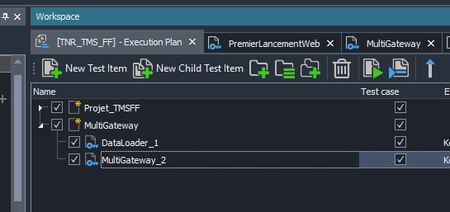
I use Jenkins to launch my test campaign but I have trouble focusing on a part of my test with either Tags or test focusing. First I tried with Tags in my script and in the command line, but I think testExecute v15 doesn't support Tags. So I created a new "Test Item" named 'MultiGateway', and puted my test inside, separeted from the rest of the project : Here is a part of my pipeline, I added the "/test:MultiGateway" in my argumentLine AND in the parameter before but my whole project is launched everytime" : steps { script { testcompletetest credentialsId: 'jenkins-execute', suite: 'E:\\TestComplete\\TMSFF\\TNR_TMS_FF.pjs', accessKeyId:'AccessKeyTestExecute', sessionScreenResolution: '1920x1080', commandLineArguments: '/PSVar:ServeurVM=****** /PrjVar:PRJ_USER_NAME=**** /PrjVar:PRJ_USER_MDP=***** /test:"MultiGateway" /PrjVar:"defaultWebUrl=http://***********" /PrjVar:"LOGIN_DELAY=85000"', useTCService: true } } Anyone has any or help ? I'm not expert in either Jenkins or TestExecute and i'm all out of options to trie Thanks in advanceSolved275Views0likes6Comments
Installing Test Execute using Ansible
I am currently working on automating the Test Execute installation using Ansible cloud platform, want to check with this group to see if any one has done this before. Also want to understand if there is any documentation on installing Test execute in silent mode without manual intervention using ansible.builtin.win_package Appreciate your suggestions and guidance on this.Solved106Views0likes2CommentsTestComplete Installation in Silent Mode
I have a doubt about installing TestComplete software in silent mode. We currently have an SLM ID license with us, and we are able to install TestComplete in silent mode using command-line arguments. However, after installation, TestComplete prompts us to enter a SmartBear ID (email and password) to activate the license. Is it expected behavior for TestComplete to prompt the user for a SmartBear ID after installing in silent mode? Is there any other way to pass the SmartBear ID in command-line arguments?Solved131Views0likes2Comments
Running tests by tag name in specific order
Hello, I will be running my suite of tests in a CI/CD pipeline (Jenkins) but I realized from the documentation that running tests by tag name (following the CLI commands) does not guarantee the tests will be run in a certain order. (Note: The tests that match the specified tag will be run in an arbitrary order.) While trying to find a workaround to this inconvenience, I realized that it does indeed follow a specific order. The order is given by how the test files are sorted in the file script.tcscript. So, for whoever needs to run their tests using tag names, and also wants to run a "pre-step test" or something like that, all you have to do is open that file on any text editor, and move the row where your test file is, up to the place first place, or at whichever place you want it to be executed. Example: # Assuming all tests have the tag "@Smoke" <folder name="MaiGroup"> <folder name="Group1"> <child name="TestMethod1" key="ZZZZ-YYYYY-VVVVV}" path="File1.js" /> <child name="TestMethod2" key="ZZZZ-YYYYY-VVVVV}" path="File2.js" /> <child name="TestMethod3" key="ZZZZ-YYYYY-VVVVV}" path="File3.js" /> </folder> </folder> # Test run for the @Smoke tag will look like: TestMethod1 TestMethod2 TestMethod3 ----------------------------------------------------------- # Now, if we want to run TestMethod3 first, all we have to do is open the script.tcscript file and move the TestMethod3 to the first place: <folder name="MaiGroup"> <folder name="Group1"> <child name="TestMethod3" key="ZZZZ-YYYYY-VVVVV}" path="File3.js" /> <child name="TestMethod1" key="ZZZZ-YYYYY-VVVVV}" path="File1.js" /> <child name="TestMethod2" key="ZZZZ-YYYYY-VVVVV}" path="File2.js" /> </folder> </folder> # And now, the test run for the @Smoke tag will look like: TestMethod3 TestMethod1 TestMethod2 ----------------------------------------------------------- Hope this helps someone, and maybe the TestComplete team can now update the documentation. Regards.745Views2likes1Comment
Session Creator commandline arguments goes lenghty
In my current setup to execute tests from CICD on dedicated VDi machine, we are using session creator utility. I am able to run it using powershell command. However when it comes to maintenance the command line to trigger session creator utility with all the arguments it becomes very lengthy and i don't have success in concatenating all the arguments into one and use it in command line. & $TC_SessionCreatorPath RunTest /UserName:$TestAccountUser /Password:$TestAccountPassword /UseActiveSession /ScreenResolution:$TC_ScreenResolution /ProjectPath:$TC_ProjectPath /p:$TC_ProjectName /tags:$Tags /arg:/pv:browser=$TC_Browser /arg:/pv:update_zephyr=$Zephyr_flag /arg:/pv:zephyrscale_token=$Zephyr_Token /AccessKey:$AccessKey there are still lot more arguments i need to include in the commadline. My ask is how do i put all the arguments into a variable and pass the variable in the command line after 'RunTest'Solved177Views0likes3Comments
SessionCreator Execution Logs
Hi there, Does SessionCreator.exe output any execution or operational logs? I'm running it on Azure on nodes in a pool. For some reason I can't figure out, one of the tasks times out, because (I think) SessionCreator/TE has crashed. When I connect to the node myself, I can see the last test that was ran from a log I am writing to during project suite execution, but I can't see why it stopped/crashed, as there has been no mht log produced. The Event Viewer also has no information at the time that the last test ran, which is around where I am expecting SessionCreator/TE to have crashed. Thanks! :)172Views0likes3Comments
Problem using TestExecute in dynamic CI pipeline runner using id-based authentication
Hello. We only have smartbear ids, and no access keys. The CI process spawns new test vms, installs our product, and installs TestExecute with the -SLM flag. If I install and log into TestComplete on one of these dynamically created vms I can use testexecute to run our tests. However, I'm having a really hard time getting those tests to run with just TestExecute on the dynamically created runner vms from our Jenkins Controller. I have TestComplete installed and logged in on the Jenkins controller, but neither the TestComplete Support plugin nor a batch script running TestExecute works without installing TestComplete on the ci runner. I've tried SessionCreator, but again it needs TestComplete installed and logged-in on for a specific user on the remote runner for that to work. How are you supposed to use TestExecute on dynamic runners with id-based authentication without installing TestComplete on the runners as well?258Views0likes3CommentsDisable the TextComplete\TestExecute update dialoge automatically (without GUI interaction)
Dear Community, I would like to install TestComplete\TestExecute automatically and then call it via the command line to test certain things. The problem I have is the update dialogue. This appears later and interrupts my test. Dialogues can be suppressed with the /SilentMode parameter, but unfortunately, the following call does not work for me with the latest 15.x.x but worked with latest version of 14.x.x with the following parameters. "C:\Program Files (x86)\SmartBear\TestComplete 15\x64\Bin\TestComplete.exe" "C:\TestCompleteProjects\my_solution.pjs" /run /p:Clone_Me /t: "KeywordTests|Main" /SilentMode /ForceConversion /exit Without the "/SilentMode" parameter, everything works perfectly, but the update dialogue appears later. My questions are: - Can I automatically (without disabling it manually in the settings) deactivate the update check without the /SilentMode parameter? - Is it possible to update automatically without the update dialogue appearing? - Why does my call with the /SilentMode parameter not work? Many thanks in advance. Andreas310Views1like3Comments