Mail invitation is not found
Good afternoon, I am trying to invite a new user from my company to use the tool, but they aren't receiving the invitation. We even tried triggering a password reset, but the email still isn't arriving. I’m not sure how to resolve this so they can use the tool for a critical project we have underway. Could someone please help me with this? Thanks5Views0likes0Comments
Unable to press numpad. Unable to scroll down
Hi, I am unable to press on numpad and also unable to scroll down when trying automation in java code. (Java, server side appium) I have tried these after searching online but does not work for me. Numpad //wd.pressKey(new KeyEvent(AndroidKey.DIGIT_0)); //wd.findElement(MobileBy.AndroidUIAutomator("new UiSelector().text(\"1\")")).click(); //wd.pressKeyCode(8); //wd.pressKey(new KeyEvent(AndroidKey.NUMPAD_1)); Scroll down //String targetText = "Measurements"; //wd.findElementByAndroidUIAutomator("new UiScrollable(new UiSelector().scrollable(true).instance(0)).scrollIntoView(new UiSelector().textContains(\""+targetText+"\").instance(0))");)); Thank you.66Views0likes1Comment
How can I grand permission to edit shared device groups
I have device group created and shared to my fellow teams, I want them to add or remove devices based on their requirement. But they couldn't modify the device group. They get "No permission to modify device group" error message. How can I grant them permission to edit the shared device groupsSolved149Views1like1Comment"Unable to connect to remote device with requested capabilities".
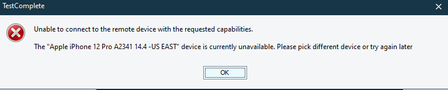
Hi Team I was trying to execute tests in remote devices present in bitbar cloud from testcomplete and I get the error that " The device is unavailable'. however I can see that all the devices that throw the unavailable error are fully available in bitbar cloud and I'am able to do the testing directly from bitbar cloud.But when I try to connect the device to testcomplete, it throws error as below: Can someone assist on this issue ?240Views0likes3Comments
Bitbar Run-in-Cloud Plugin not working
I have a CICD where I need to test native app. I'm running Appium server side test, to integrate with plugin as mentioned in the document I have used Run-in-Cloud plugin syntax, but Unfortunately, I'm getting Framework requires test file with extension: apk eventhough I have uploaded apk file Below is my runInCloud script runInCloud( cloudUrl: "https://cloud.bitbar.com", credentialsId: "bitbar-api-key", projectId: "207321147", deviceGroupId: "14", appPath: "universal_qa.apk", testPath: "test-package_android.zip", frameworkId: 252, biometricInstrumentation: false, // Wait for results! waitForResultsBlock: [ downloadScreenshots: true, resultsPath: 'results', testRunStateCheckMethod: 'API_CALL' ] ) Above is my script, After jenkins run, I can see respective apk and zip files are uploaded into the bitbar (verified manually). but It is not running the test case. below is my jenkins log 17:17:38 WARNING: Unknown parameter(s) found for class type 'com.testdroid.****.PipelineCloudStep': waitForResults 17:17:38 Run test in Bitbar Cloud process started... 17:17:38 Using login details from the credentials manager, which overrides basic username/password specified in settings. 17:17:39 Uploading new application file universal_dev.apk 17:17:44 Uploading new instrumentation file test-package_android.zip 17:17:45 Waiting for uploaded files to be scanned 17:18:19 Running tests 17:18:19 Using test run configuration: 17:18:19 Bitbar Cloud URL: https://cloud.bitbar.com Version: 3.25-master-20231129-151806 17:18:19 Using credentials with ID: bitbar-api-key 17:18:19 Device Group Name: Trial Android devices ID: 14 17:18:19 OsType: ANDROID 17:18:19 Framework ID: 252 17:18:19 Locale: en_US 17:18:19 Scheduler: PARALLEL 17:18:19 Timeout: 1800 17:18:19 Problem with the Bitbar API. Please check credentials or contact [email protected]: Framework requires test file with extension: apk I don't know why I'm getting above error, eventhough there is an .apk file. Any help would be great, stuck here for couple of days139Views0likes1Comment
Unable to connect Appium Inspector to session with Bitbar device
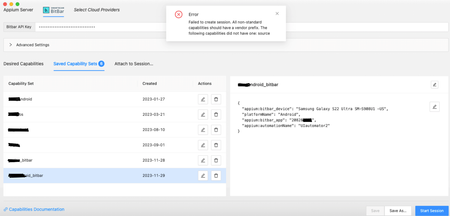
Hello, I'm trying to connect Appium Inspector to a device on Bitbar, but it always returns an error: "Failed to create session. Request timed out" or "Failed to create session. All non-standard capabilities should have a vendor prefix. The following capabilities did not have one: source". Am I passing some wrong parameter, or missing something? Caps: { "appium:bitbar_device": "Apple iPhone 12 Pro Max A2411 16.0", "platformName": "iOS", "appium:bitbar_app": "201000000", "appium:bundleId": "br", "appium:newCommandTimeout": "8000", "appium:automationName": "XCUITest", "appium:autoGrantPermissions": "true", "appium:autoDismissAlerts": "true", "appium:bitbar_frameworkId": "900", "appium:bitbar_testTimeout": "8000" } Can anyone help me?Solved840Views0likes1CommentTimeout issue in Bitbar
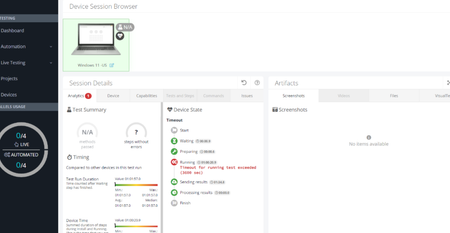
Trying to execute the scripts in bitbar and added timeout capability "bitbar_testTimeout" : "5000", but if the time limit exceeds 3600 I am getting the timeout error in Bitbar. Could you please confirm is the maximum time limit is 3600 seconds? Please check the below screenshot618Views0likes1Comment