Add AI-Driven Capabilities that automatically detect API definition changes
Add an AI-Driven capabilities in ReadyAPI that automatically detect API definition Changes and: Updates services, resources and operations from the latest API definition Automatically updates impacted assertions to match the new contract, including Status code assertions Schema Assertions JSON/XML path and header assertions Preserves user intent and flags assertions that require manual review Provides a clear preview of API and assertion changes before applying them Value: Reduce manual test maintence Prevents false failures from outdate assertions keeps test aligned with evolving API's and CI/CD pipelines90Views0likes0Comments
how to plugin properties file while running testrunner.sh using github actions
hello, we are trying to use Github Actions as our CI/CD tool and where we wanted to execute all our readyapi scripts using github workflow (using testrunner.sh). we uses properties file to use all properties while running the test scripts! how can i use properties from property file while running github workflow using testrunner.sh command - appreciated the help!66Views0likes0Comments
How to return the results or log files, from the testrunner.bat command line
Hi, The Test Suite seems to run successfully, but the expected result isn't happening, but more importantly (for the purpose of this thread) it's not sending any log files to the folder specified in the f parameter. On the command line, we get validations that the command seems to have been run successfully Assertion [SOAP Response] has status VALID The only Warning (not an error) is that it can't delete a temp folder. https://www.soapui.org/docs/test-automation/running-from-command-line/functional-tests/ Here's the command line, which I obtained from executing "Launch TestRunner" in the menu. testrunner.bat -sCorpExtract_20240916 -cCorpExtract_20240916 -GReportID=17224 -f"c:\Infrastructure_Group\SOAP\OPENXX\CorpExtract" c:\MyOrg\Projects\OpenXXScripts\PROD-Ph-OpenXXService-20240912c-soapui-project.xml Also, do I have the variable override written correctly, as -GReportID=17224 above? In the Test Step xml, this comes from <tem:RegenerateReportRequest> <tem:ReportID>?</tem:ReportID> </tem:RegenerateReportRequest>138Views0likes1Comment
Introducing Darshan Hiranandani
It's a pleasure to join this esteemed community! My name is Darshan Hiranandani, and I'm excited to contribute my expertise as a developer to our discussions. With a background deeply rooted in software development, I've cultivated a diverse skill set over the years. From crafting robust backend systems to optimizing database performance, I'm enthusiastic about tackling challenges head-on. But beyond the code, what truly drives me is the opportunity to collaborate and innovate. I believe in the power of teamwork and am always eager to learn from and share insights with fellow developers. I'm here to engage, learn, and grow together with all of you. Whether it's exploring new technologies, troubleshooting coding dilemmas, or simply exchanging ideas, I'm looking forward to being an active part of this dynamic community. Let's connect and embark on this exciting journey of discovery and development!78Views2likes0CommentsAutomation script in ReadyAPI for Authentication
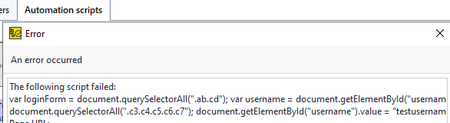
Hi, I am new to Ready API. I am trying to authenticate the user credentials and set it up as the script inside Auth Manager so that we can run the ready API test suites from the pipeline automatically. Manual set up for authentication is working fine and we are able to call the APIs and get results. We use Oauth2.0 authentication. The automation script that I have is not working. I am not sure what I am missing. This is what I tried referring to this document: https://support.smartbear.com/readyapi/docs/requests/auth/types/oauth2/automate/index.html var loginForm = document.querySelectorAll(".ab.cd"); var username = document.getElementById("username").value; var password = document.getElementById("password").value; var loginBtnForm = document.querySelector(".c2"); var loginBtn = document.querySelectorAll(".c3.c4.c5.c6.c7"); document.getElementById("username").value = "testusername"; document.getElementById("password").value = "testpassword"; loginBtn.click();Solved497Views1like6CommentsMigrating Ready API SOAP tests to Rest based Test
We are in the process of transitioning our platform, which was originally built using SOAP services, to REST-based services. Currently, we have over 1000 ReadyAPI automation scripts designed for SOAP services. Are there any straightforward methods or tools available to facilitate the migration of these tests to work seamlessly with REST services? We appreciate any guidance or assistance. Thank you in advance. Note: No change in the functionality related to existing services.348Views0likes5CommentsProtocol family unavailable error using Github action
Hi, I'm facing a strange issue with the java HttpClient used by SoapUI. I run tests using the Soapui maven plugin to interact with an IPv6 webserver. Tests are performed in a Linux-based Github runner. IPv6 is well configured on that runner. The issue "protocol family unavailable" is raised by the httpClient when trying to connect to the webserver, but this appears only when Github starts and executes the workflow. If I manually run the tests on the runner through SSH, it perfectly works. I compared maven debug logs between the working and not-working tests, the jdk used is the same. I also tried to add options through the MAVEN_OPTS env variable as: java.net.preferIPv6Addresses=true jdk.httpclient.HttpClient.log=all (to enable more logs from the httpclient, but no result) but still the problem occurs. Do you have any clues on that topic? Thanks for help PS: proxy is disabled, see the attach settings file we use. The full backtrace is available in soapui-errors.log file maven soapui plugin version: 5.0.0 / Apache Maven: 3.6.3 / Httpclient version: 4.1.1105Views3likes0CommentsCommand Line Runner - Set HTTPSettings encoded urls
We are running ReadyAPI within our CI/CD Pipelines using the command line runner. What would be an appropriate way to set the encoded URL option within the HTTPSettings using the command line arguments? We would like to forego needing to define a complete custom readyapi-settings.xml. If however necessary, is it possible to construct a minimal readyapi-settings.xml? If so, do templates exist?127Views0likes2CommentsWhy readyAPI does not let me have multiple file content to create a file as an output?
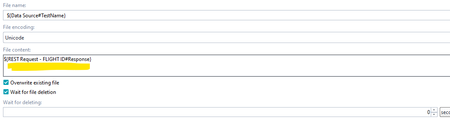
Hello all, After running my test steps, I want to create a file (adding another test step) with the previous test steps request and results as an output, but in the file content it does not let me have more than one data source from my test steps using 'get data'. It automatically rewrites the previous data if I want to add an additional data source to create the file as an output. But if I copy the data sources individually and paste it on a word document, and then copy the whole thing and paste it there( in the file content) ; then it keeps the sources but after running the test it keeps on giving me an error saying ' (The file name, directory name, or volume label syntax is incorrect) Appreciating your assistance in advance.Solved181Views0likes2Comments