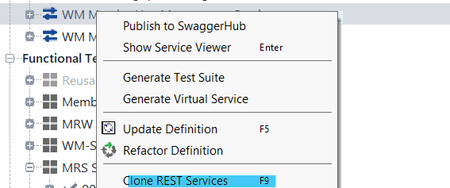
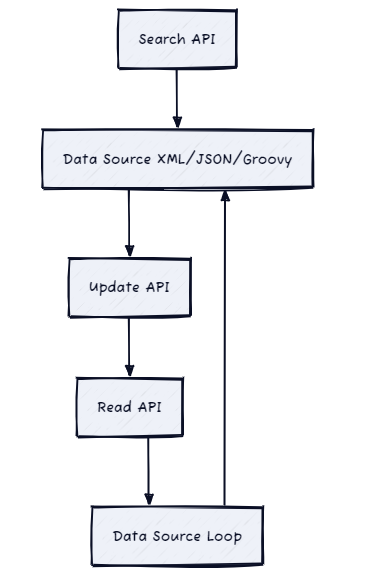
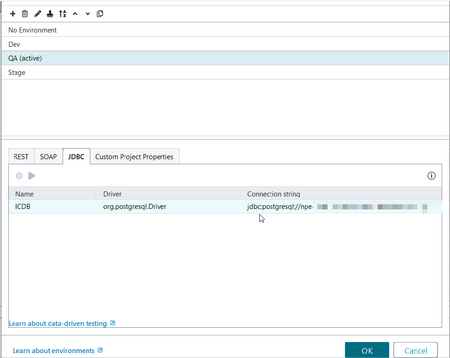
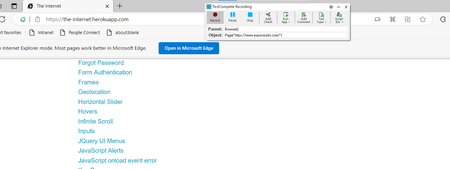
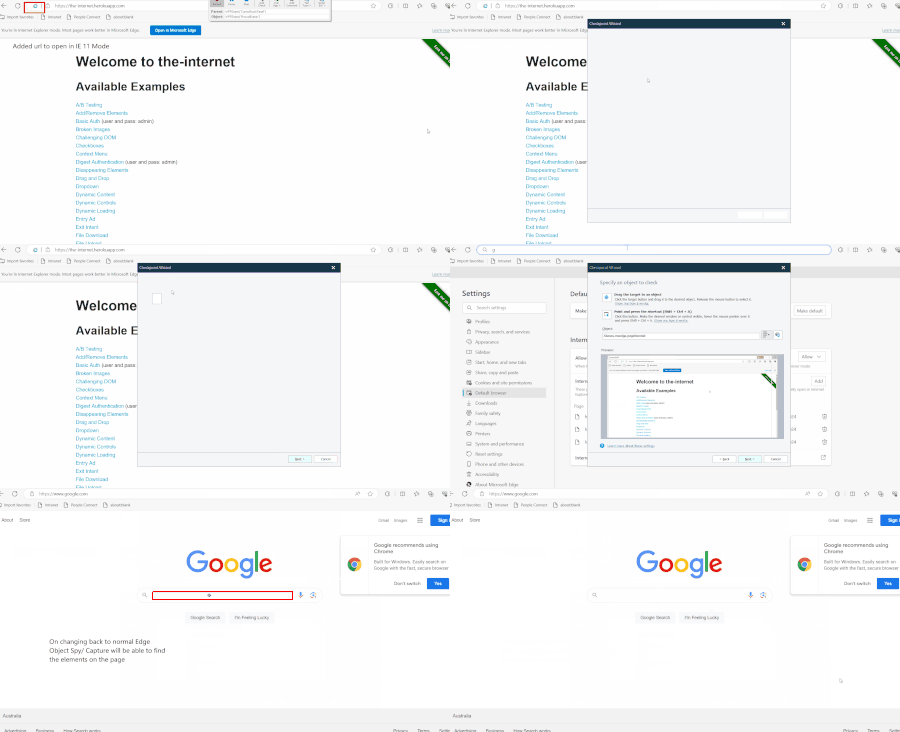
ContributionsMost RecentMost LikesSolutionsRe: How to create Identical GET request with different parameters in same project hey richie you can clone the same Request into the same project FYI I found you have mentioned something similar here in an older post as an answer which I feel is exactly what you are after in this situation Unable to have different parameter types for the same param in the same service | SmartBear Community Re: How to hit update service multiple time with different data set. After the Search API Step, you can create a Data Source Test Step for either XML or JSON (or scripted with Groovy) https://support.smartbear.com/readyapi/docs/testing/data-driven/types/xml.html https://support.smartbear.com/readyapi/docs/testing/data-driven/types/json.html https://support.smartbear.com/readyapi/docs/testing/data-driven/types/groovy.html you will have to map the fields from your Search API to this step and once the Search Step is completed, it will fetch all the necessary nodes from and create them as data rows you will then have your Update API request and for each of the request parameters use the GetData function to read the Data source you can then perform a Read to assert on that the Update was valid. Then Create a Data Source Loop Step using the Data Source Test Step and the Update API as the step to start the loop on Re: Parameterising JDBC Connection Settings..Can you do it? hi richie I was a bit confused with which Test Step was being used but I had trialed creating a 'JDBC Request' Test Step out on my end with my current SQL JDBC setup and it works as I expect so hopefully the same would work on your end. So I use the Environments feature of ReadyAPI to change the DB connection configuration of a PostgreSQL DB connection (and prior I had done it for a MS-SQL DB connection) for various Data Source Test steps (which was what I have always used my DB connections within ReadyAPI) Here is a screenshot of my JDBC connection section in ReadyAPI Environments section In the gif (ReadyAPI Environment DB Connection.gif) you can see that I have the configuration for 2 separate DB environments and then within the Data Source Test Step using JDBC, when I change the environment it changes the connection but the greyed out section does not change to the new values. My hypothesis is that the greyed out section is from the Default No Environment connection. But this way of configuring allows us to change the config per environment under test (the team using MS-SQL DB has 7 environment configs for their DB connection used in the Data source Test Step) I also created a dummy JDBC Test Request step and I could see that it was working correctly with the JDBC connection I had created in my project. Although I note that the connection string does change to the string for the environment in the JDBC request, so not sure why the behaviour is different to the Data Source Test Step. (gif attached ReadyAPI JDBC Test Step using Environment.gif) Try and see if this setup with Environments works for you. ReadyAPI OAuth 2.0 Auth Automation Script for multiple user profiles Hi there, I would like some help with setting up the Auth Repository for an API suite we have to test so the test API is a customer facing API where we first authenticate the end user and then use the token in subsequent calls for that user. I have created the 1 Oauth Profile and set up the configuration for the client ID, secret as well as set up the Automation flow. so this works correctly for 1 end user. Now here are some of my doubts. 1) If I have to test multiple end users (we would want to test with 10 users having different access controls on those profiles) is there anyway to do this without having to duplicate the full auth profile with all the configurations and automation code into each profile separately? 2) I have to test this in 2 different environments. So with my requirements of needing 10 users, would I have to set up 20 different profiles for this? Is there anyway to use some of the Environment Variables to change the information as required? 3) I cant find anything in the documentation or the ReadyAPI right click option, but is it possible to get the Project related Variables within the Oauth Automation Script? eg in Groovy scripts we can use context.expand( '${#Project#VarUserMember}' ); I am mainly trying to remove a lot of unnecessary code duplication within our repo for these requirements. Any guidance would be greatly appreciated. Re: Running Edge in IE mode not seeing elements Ok on looking at the screenshot you provided of the TestComplete Object Browser it seems like it maps the page as a browserWindow rather than a page So trying to using the TestRecorder plugin to click and record a test is actually useless in this situation as it will show what was the previous visible Browser Page Screenshot below shows that I am on the site "The Internet (the-internet.herokuapp.com)" in IE mode yet the Object recorder Spy marks that the Page being viewed is the previously opened page before the Edge Browser opens IE mode so for the case of recording in Edge IE Mode, you have to having the TestComplete Extension to view Edge in the TestComplete Object Browser Open the Page under test in IE Mode enter TestComplete and open the Object Browser Tab Expand the Browser("edge") node and keep traversing down to the Frame and Tab that has the website now you can view the elements of the page within the Object but you cannot record a Keyword test or a Script Test. you will have to manually add the object from the Object Browser to your Name Mapping and then script it out accordingly so a Browser test that would normally go from browser --> page --> element will have to go to the Alias of the shell object viewer which has the view of the page. def Test1(): browser = Aliases.browser browserWindow = browser.BrowserWindow Browsers.Item[btEdge].Navigate("https://the-internet.herokuapp.com/") Aliases.browser.BrowserWindow.Chrome_WidgetWin_2.BrowserWindow.FrameTab.tabpage.ShellDocObjectView.browser.pageTheInternet.linkBrokenImages.click() Re: Running Edge in IE mode not seeing elements As mentioned in my post I have already tried the extensions for v15.59 https://microsoftedge.microsoft.com/addons/detail/smartbear-test-extension/hlicljijpmhapnbjeddcmimplcalfkic when i used Version: 15.48.6.7 x64, TestComplete pushed me to use the V14 of the extension microsoftedge.microsoft.com/addons/detail/smartbear-test-extension/dnboadgmjeggdengfhphcmlclboenlco In my gif you can see the red capture box when the page is loaded in normal edge chromium rendering. Not sure what else you have installed to get yours working. Can you provide the extension link from your edge instance that ran for your testcomplete. What is your version of edge that got it to work on your end? The other thing I notice in your screenshot is the missing right-hand side sidebar so I might try and disable that and redo the check *Edited to confirm the version of the Edge Extension used per version of TestComplete Re: Running Edge in IE mode not seeing elements It didn't really matter what version I had tried...didn't get it to work 15.59 was first tried, then I did the update to 15.60 cause it came thru as an auto update. then deleted that version and downloaded 15.48. Running Edge in IE mode not seeing elements Hi , I saw this mentioned a few times, but I didnt see any resolution as such. (https://community.smartbear.com/discussions/testcomplete-questions/running-edge-in-ie-mode/260427) Currently I have a Web App under test, that is opened up in Edge using IE mode. I have tried the TestComplete v15 Edge Plugin as well as the chrome Edge plug in and it does view the element on the Edge Chromium page, when Edge is opened normally. However when I have tried to open the web application in Edge IE mode, at this point TestComplete cannot capture or view any components Version of TestComplete tried 15.60.44.7 Plug-ins tried https://microsoftedge.microsoft.com/addons/detail/smartbear-test-extension/hlicljijpmhapnbjeddcmimplcalfkic <-- v15 Trying chrome plugin https://chromewebstore.google.com/detail/smartbear-test-extension/phbpiacnjjgjkdnemiaakobckdigehbp <-- v15 the app is already mentioned in my Allowed sites for IE mode as per https://support.microsoft.com/en-us/microsoft-edge/internet-explorer-mode-in-microsoft-edge-6604162f-e38a-48b2-acd2-682dbac6f0de Note: I have found a hacky way to get Internet Explorer 11 to open, but unsure how long this hack would work. Using this way the page was viewable by the object spy within the actual IE 11 window (iexplore.exe). however when I then tried to change the browser in the scrpit to Edge and run the test it would then not execute Browsers.Item[btEdge].Run("UrlofbadinternalapprunninginIE11mode") any suggestions on what to change on my machine for this to work? SolvedRe: importing of python module for simple-salesforce (Continued as the Community post Editor kept failing to publish my word dump) Another of my mistake was downgrading to the wrong version of Python 3.11 i had just done an install using Chocolatey for 3.11 however that has installed v3.11.6. and TestComplete currently only supports 3.11.5...great. so as as 09/01/2024, use 3.11.5 as per current documentation, for TestComplete v15.59 i have put my verson of python to 3.11.5 https://support.smartbear.com/testcomplete/docs/scripting/specifics/python.html? after installing the right compatible version of python for TestComplete i then installed the package using pip copied all the folders across from the packages in python to TestComplete so i FINALLY got the module to work in my code. it ran nicely for the first time i ran the TestComplete program with the script def SfLogin(): username = Project.Variables.sfusername password = Project.Variables.sfpassword token = Project.Variables.sftoken sf = simple_salesforce.Salesforce(username=username, password=password, security_token=token, domain='test') session_id, instance = simple_salesforce.SalesforceLogin( username=username, password=password, security_token=token, domain='test') Browsers.Item[btEdge].Navigate(f"{instance}/secur/frontdoor.jsp?sid={session_id}") Browsers.Item[btEdge].Navigate(f"{instance}/lightning/r/Contact/003Bo00000GPAFtIAP/view") Delay(7000) all dandy.. I felt powerful.. I can now trial out more fancy function, HOWEVER, on trying to run it a second time, i get the following error Python runtime error. SystemError: initialization of md__mypyc did not return an extension module only after closing and reopening TestComplete, does it work again. And only for the first run. the second run onwards will fail...soooo I dont know what to do now. TestComplete doesn't seem to be able to run the Test as expected on subsequent run and I have run out of days on my TestComplete trial to spend any more effort to figure out any ways to fix this up. please also note that i have also trialed and downloaded and installed the testcomplete salesforce extension, https://github.com/SmartBear/testcomplete-salesforce-extension however this a very basic salesforce api implementation and has not been updated for over 3 years and hence i would prefer to use a more current module importing of python module for simple-salesforce Just documenting some painful process that TestComplete makes you do and hopefully others can learn from my mistakes. Tl;dr: importing complex python module into TestComplete is unfortunately a waste of your time and you would be advised to use another product if you require to use packaged modules more easier without assistance i have tried to import a python module for simple-salesforce which unfortunately for us has loads of other mandatory modules. lets go thru some mistakes.. first mistake was to use whatever Python was present on the machine. I had installed Python quite some time back and didnt make note of it and performed a install on the python simple-salesforce package. this was a mistake as I got errors with the module lxml where etree was failing Python runtime error. ImportError: cannot import name 'etree' from 'lxml' (C:\Program Files (x86)\SmartBear\TestComplete 15\x64\Bin\Extensions\Python\Python311\Lib\lxml\__init__.py) this was highly likely due to being on Python 3.12, so i downgraded my Python version. next mistake was thinking i could copy the module folders one by one...nope dont do that. that is just a painstaking waste of your day. dont do me and copy one by one…go to your Python site-packages location, and copy everything except for any of the .dist-info folders into the Local TestComplete location when i was trying to copy copy the modules one my one, it would initially say what module was missing so would copy them after each error, but I was them stuck with the following error occuring and not knowing what to do Python runtime error. TypeError: NoneType takes no arguments hence why i just copied all the modules across