HenrikHLFrequent ContributorJoined 5 years ago81 Posts24 LikesLikes received1 SolutionView All Badges
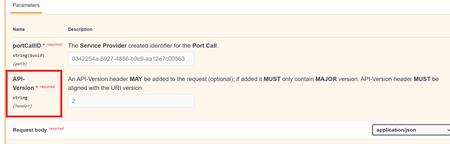
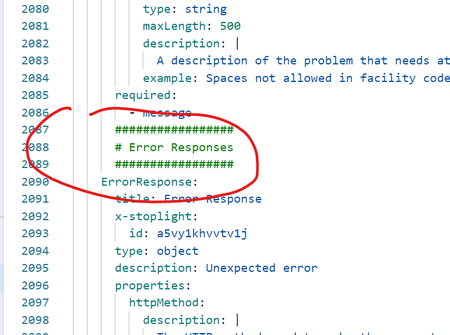
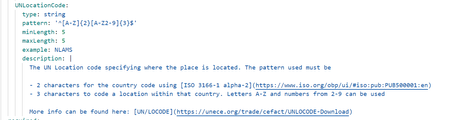
ContributionsMost RecentMost LikesSolutionsRe: It does not seem like setting a header in a response as required makes any difference Hi Tom_S , Thank you for the prompt reply :-) When you write: However, for headers, even though they can be defined as required (required: true), Swagger UI does not display a red asterisk or similar indicator for them. This is by design and not an issue with the tool. The required header will still be enforced during validation. I assume you mean required fields on headers in responses - because it works fine for headers in requests: It does not seem like setting a header in a response as required makes any difference I would expect a little red `*` to appear next to the header-name when I specify the header as a required-header. Here is an example As can be seen - no required "red star" next to the `API Version` header. Is this a bug or just not possible? (According to the schema of a header it should be possible) Re: StopLight "auto"-modifies files I am not quite sure I understand why I should mark it as solved? In my PoV the problem is still there - if SmartBear decides to fix it - then I would be happy to mark it as resolved :-) Re: StopLight "auto"-modifies files Hi again Humashankar I don't think the issue you are linking to is related to what I write above. The issue you are linking to is about code blocks. Also the issue you link to is resolved - my problem still exists :-( Re: StopLight "auto"-modifies files Hi Humashankar No worries - I have already done so. The response from Support is "that is just the way it is" - I was sort of hoping other people also find this annoying and SmartBear could prioritize to fix this... In my PoV it should be an option to turn on/off - whoever wants this can turn it on - and I could turn it off :-) Re: StopLight "auto"-modifies files Here is an example of StopLight removing newlines and re-indents comments to (in my point of view) a wrong indention: This is how it originally looked (before the push): As you can see the comment has been indented extra to align with line 2086 - but the comment is for the "ErrorResponse" so it makes more sense it is aligned with this... Also annoying that newlines are removed as it makes it easier to read... Re: StopLight "auto"-modifies files Hi Humashankar Yes - that is one of the things (sometimes it is only replaced with ">"). When I insert newlines (to separate objects definitions) - the newlines are removed again by StopLight. Inserted comments get re-indented and makes it look weird StopLight "auto"-modifies files Is it just me or does anyone else find it super annoying that StopLight modifies files when pushing to GitHub. If I have a spec that looks like this: StopLight "automodifies" it to: It also removes newlines that I have deliberately added and changes indention for comments Anybody knows where this can be disabled? Re: Ctrl+z - undo typing? CTRL + Z is working again (at least for me) Re: The use of oneOf or anyOf in arrays chichepo no worries - I understood the example 😉 With the autogenerated examples I would assume that: anyOf would generate: "animals": [ { "name": "string", "legs": 0 }, { "name": "string", "owner": "string" } ] and oneOf would generate: "animals": [ { "name": "string", "legs": 0 }, { "name": "string", "legs": 0 } ] (Here the first item in the oneOf would just be repeated twice...) Where in the specifications does it specify that the oneOf or anyOf applies to the entire list and not to each item in the list? My assumption was that below the keyword "items" - the structure for each item in the list is specified. This could be a type:string - in which case all items in the list would have to be of type string. In case it is a oneOf - then each item in the list would be a oneOf... Again - this is just my (maybe wrongly) assumption - it would be great to read an official specification for the use of oneOf and/or anyOf in combination with an array (items field) 🙂