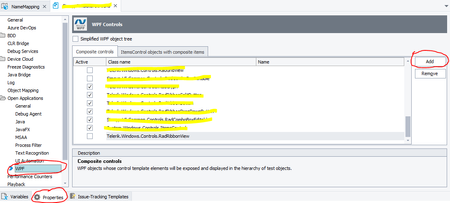
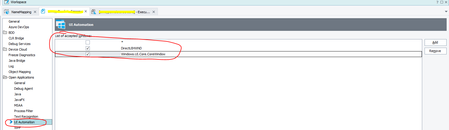
ContributionsMost RecentMost LikesSolutionsRe: HELP!!!TestComplete not able to recognize the TreeView for a Desktop Application. I'm not sure if this would help either but my List of accepted windows shows as above, perhaps that's where you need the window type. Re: HELP!!!TestComplete not able to recognize the TreeView for a Desktop Application. In your Project>Properties>Open Applications>WPF screen as above, if you add the ClrFullClassName of the object that you want to have a tree view of, then you should be able to display all the children of that property type. Re: ClickItem only works once per test Would someone be able to confirm that this issue is fixed in B15.54? I have reverted my build back to 15.50 as we are having so many issues with our tests and I would like to know if this is working in the latest build first before I update my version. Thank you. Re: Find Usages Does Not Return Usages in Keyword Tests Inside a Group Confirmed with SmartBear support that there is a bug. Find Usages should be able to return uses of scripts in the Keyword Test Editor even if it is indented as part of a group. Find Usages Does Not Return Usages in Keyword Tests Inside a Group Hi, I am trying to refactor code I have written in the Script editor and used in the testcases written in Keyword Test Editor but I am unable to find the keyword tests that use these scripts when they are part of a group within the keyword test case. I can only seem to find then if they are in a keyword action and indented or part of a group. Is there a setting somewhere I can change so that I can also find scripts used in a group? Thanks SolvedCan we get performance counters when running via TestExecute? I was able to add performance counters in my local version of test complete logs but we are running our nightly builds using TestExecute in a virtual machine. Is it possible to add performance counters to the logs that TestExecute produces? Solved