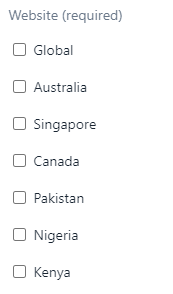
ContributionsMost RecentMost LikesSolutionsRe: Is it possible to extract data(Google Analytics data) from Chrome's console? sonya_m , I'm yet to try it . Will keep you posted once I get resume it. Thank you. -Jeb Re: Which is the best way to parameterize check box controls.(Delay in clicking checkboxes ) Hi, sonya_m . I am currently using FindElement instead of FindChildByXpath just to retain the existing xpath structure and the execution time pretty fast. Thank you Marsha_R for the suggestion. Regards, -Jeb Is it possible to extract data(Google Analytics data) from Chrome's console? I am trying to extract data that deals with google analytics from google's console as seen below . Is it possible for me to achieve the same from testcomplete. If so how? Thanks, -Jeb SolvedWhich is the best way to parameterize check box controls.(Delay in clicking checkboxes ) As seen in the above image, I need to parameterize the check box dynamically from an excel. Currently I am using a combination of both keyword tests(to extract values from the excel) and scripts to dynamically find the element on the page using the previously read value. PFB the code for clicking the check box. Issue:- It takes atleast 2 mins for this check box to get clicked. the other steps are pretty fast except for this one. 1) Is there any other way to parameterize the check box controls ? 2) Why is the script slowing down at this step? Thanks in advance. -Jeb SolvedRe: Can we use regular expressions other than (*) with browser URLs on page's name mapping url Thank you Alex Re: Can we use regular expressions other than (*) with browser URLs on page's name mapping url Thank you Alex, I guess I should've check the box asking to enable cross browser testing by mistake. Is there a setting available to disable the cross browser testing option?? I tried checking in the Current and Default Project properties and was not able to locate any properties. Thanks in advance, -Jeb Re: Can we use regular expressions other than (*) with browser URLs on page's name mapping url Thanks for your suggestion tristaanogre . I am not able to find the Conditional mode button upon editing the name mapping item for some of the fields. PFB screen shot. Am I missing something here? Thanks in Advance, -Jeb Can we use regular expressions other than (*) with browser URLs on page's name mapping url I am trying to automate a country specific site with similar web elements on different sites. Currently I am using * as a wild card to reuse the same scripts across multiple pages which also consolidates the elements of multiple pages into one page. For example if I use https://siteName*.com/* to wildcard on the below URLs, I am getting the about page's objects getting mapped to the home page. Can I define a separation between the two using any other approach such as REGEX. stage home -> https://siteName.stg.xyz.com/ stage about-> https://siteName.stg.xyz.com/about Solved