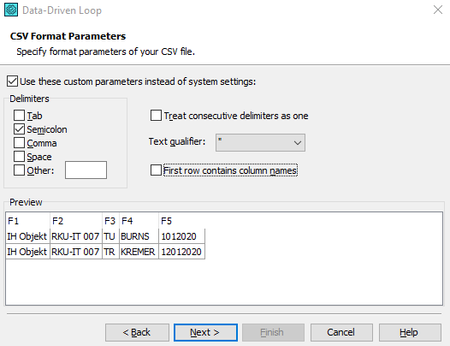
ContributionsMost RecentMost LikesSolutionsSAP environment Hey there, im trying to use testcomplete in the SAP environment but it is not working for me. Some fields couldn’t be detected via OCR or normal testing. I tried the image-based testing but that’s not perfect for me because the “pictures” could change and then I have to start the recording from beginning. So I tried to use the SAP scripting. But there I got two new Problems. I’m scripting in javascript and SAP scripting is in vbscript. I have to use javascript because some expressions only work in javascript. How can I run the SAP scripting from Testcomplete? I don’t get this simple script working… ************ If Not IsObject(application) Then Set SapGuiAuto = GetObject("SAPGUI") Set application = SapGuiAuto.GetScriptingEngine End If If Not IsObject(connection) Then Set connection = application.Children(0) End If If Not IsObject(session) Then Set session = connection.Children(0) End If If IsObject(WScript) Then WScript.ConnectObject session, "on" WScript.ConnectObject application, "on" End If session.findById("wnd[0]").maximize session.findById("wnd[0]/usr/tabsTABSTRIP_600/tabpBUT2").select session.findById("wnd[0]/usr/tabsTABSTRIP_600/tabpBUT3").select session.findById("wnd[0]/usr/tabsTABSTRIP_600/tabpBUT4").select session.findById("wnd[0]/usr/tabsTABSTRIP_600/tabpBUT1").select session.findById("wnd[0]/usr/tabsTABSTRIP_600/tabpBUT1/ssubAREA_FOR_601:SAPMKAUF:0601/subAREA1:SAPMKAUF:0315/ctxtCOAS-KOSTV").setFocus session.findById("wnd[0]/usr/tabsTABSTRIP_600/tabpBUT1/ssubAREA_FOR_601:SAPMKAUF:0601/subAREA1:SAPMKAUF:0315/ctxtCOAS-KOSTV").caretPosition = 4 ******* Thanks for your help! SolvedRe: Import Dates with data loop and CSV I made a small Workaround now and my Problem is done with it. function Excel_Loop() { //Runs the "EXCEL" tested application. TestedApps.EXCEL.Run(1, true); Project.Variables.csv2207.Reset(); for(; !Project.Variables.csv2207.IsEOF();) { csvimporttest = Project.Variables.csv2207.Value("F5"); test123 = String(Project.Variables.csv2207.Value("F5")); laengecsv = test123.length; if (laengecsv < 8 { csvimporttest = "kleiner 8" + " 0" + Project.Variables.csv2207.Value("F5") + " " + laengecsv } else { csvimporttest = "größer 7" + " " + Project.Variables.csv2207.Value("F5") + " " + laengecsv } //csvimporttest = Project.Variables.csv2207.Value("F5") + " " + laengecsv //csvimporttest = "Test123" + Project.Variables.csv2207.Value("F5") Aliases.EXCEL.wndXLMAIN.XLDESK.Mappe1.Keys(csvimporttest); Aliases.EXCEL.wndXLMAIN.XLDESK.EXCEL6.Keys("[Enter]"); Project.Variables.csv2207.Next(); } } I imported the data as before but then i watched at the length of the importet value and added a leading 0 when the length is 7. Thanks for your Replys Re: Import Dates with data loop and CSV Hey, thanks for the respond but this is not working for me because the data is converted while Import. As you can see in the Field F5 the Dates are converted to numbers. The normal data is: 01.01.2020 12.01.2020 Thanks Import Dates with data loop and CSV Hey there, I'm trying to figure out how to Import Dates from a CSV file into Testcomplete. I got a huge Problem when the Date has a starting "0" because I think Testcomplete is importing the Date as a Number. I'm from Germany and I must use the following Date Format in the tested program. (DD.MM.YYYY) For example: CSV-File Imported 01.01.2020 1012020 12.01.2020 12012020 ’01.01.2020’ ’01.01.2020’ I need: 01.01.2020 01.01.2020 or 01012020 I already tried the Schema.ini file but it's not working for me. I hope you can help me. Greetings Solved