simonaferraraFrequent ContributorJoined 5 years ago138 Posts31 LikesLikes received2 SolutionsView All Badges
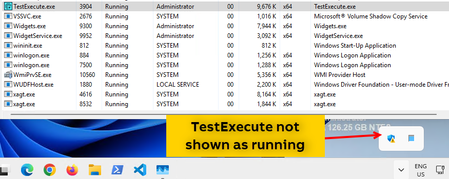
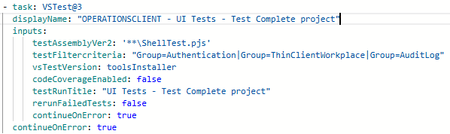
ContributionsMost RecentMost LikesSolutionsParallel testing for web tests Hi, is there a way to execute Test Complete web tests in parallel within the same machine, by opening the needed browser instances and execute in each one the needed test? For example, I've got test_1 and test_2, both developed for Edge browser, and they're indipendent one from each other from functionality point of view, that is: I could execute them in parallel without any disturbance between both. Is there a way that I can execute test_1 and test_2 with 2 browser instances in the same time? The scope is to save time by half for tests' execution. I'm available to try a solution both through AzureDevOps release pipeline changes or test project changes. I've searched for documentation within Test Complete but I've found for now only information regarding executing parallel tests within different machines, but it is not my scope, since I need to execute them within the same machine. Thanks and regards, Simona SolvedOpen log downloaded from AzureDevOps release pipeline Hi all, every time I download my automatic test's log from AzureDevOps release pipeline, I cannot immediately see it with any browser, since it sounds like empty, and there is this error within browser console: I've found a workaround to this issue by set to true "Unblock" within the file Security property, that is by default set to false: When I set "Unblock" to true, then I can correctly open the log: Do you experience this issue also? Do you have a trick to be applied to avoid the need to manually unblock every downloaded file to have the possibility to open it? Thanks! Regards, Simona Re: Windows 11 O.S. - Test Execute not correctly running Marsha_R I've installed the same TestExecute version: 15.66.7.11 x64 , and automatic tests are developed with the same TestComplete version: 15.66.7.11 x64 but I'm still falling within the same issue. Re: Windows 11 O.S. - Test Execute not correctly running Marsha_Rdid you have further suggestions? Re: Windows 11 O.S. - Test Execute not correctly running Hi, TestExecute in not runned in silent mode. As per issue description, the issue happens also by running manually TestExecute, and not only through a release pipeline. Windows 11 configuration is not hiding the system tray icon for TestExecute. The same account is used for everything. The machine has got only an account. UAC is disabled. Regards, Simona Re: Windows 11 O.S. - Test Execute not correctly running I think that the /exit parameter will not solve anyway, since the issue happens on TestExecute activation action, not at closure action. Re: Windows 11 O.S. - Test Execute not correctly running I've got only TestExecute version installed on that machine (no TestComplete installed) and it is the following: 15.68.8.11 x64 . Re: Windows 11 O.S. - Test Execute not correctly running From release pipeline, I'm using VSTest task, as this example: If I run it manually (and the issue is replicated also manually), I simply double click TestExecute.exe by running it as administrator. Windows 11 O.S. - Test Execute not correctly running Hi, with Windows 11 O.S. I'm falling within some issues for the Azure DevOps release pipeline execution, that randomically fails with an "Unable to connect to TestExecute error". This error happens when TestExecute is sometimes not correctly started, that is: it is shown within the Task Manager but is not appearing within the running programs: The issue can be resolved after several attempts, by trying to kill the process and then rerun it but, in the meanwhile, the automatic tests within the release pipeline cannot be executed since the "Unable to connect" error is raised. Note that the machine contains only the Administrator user, so there are no other users connected. This issue had never happened by using Windows 10. Has anyone encountered this issue and how do you have resolved it? Thanks! Simona Re: test results for a test case with a count greater than 1 in an Azure pipeline Hi, I've not got this scenario. I suggest you to contact the support if no one within the community is able to help you. Regards, Simona