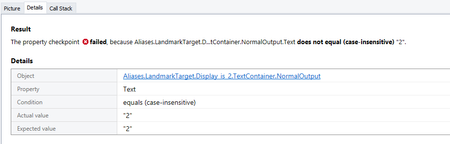
ContributionsMost RecentMost LikesSolutionsRe: The OCR service failed to process the document. We're also seeing this problem. Re: Basic CheckProperty issue Ah, it's got some deep unicode formatting characters on either side of it that need to be split off. It's not brilliant, but I've added a function to do it: def strip_unprintable_characters(input_string) return "".join([i if ord(i) < 128 else '' for i in input_string]).strip() Highlight variables separately in Python f-strings Since Python 3.6, string interpolation has been available in the form of f-strings. These allow you to add variables directly into a string making it clearer to understand when reviewing code. i.e. output = f"Test failed. Expected {expected_response}, but received {actual_response}" Currently Test Complete highlights the entire string, including the variables as the same colour. It would be nicer if there was different highlighting on the variable colours to the string so that they stand out more. Re: Basic CheckProperty issue Ah, it appears 8237 is ascii for the right-to-left override, and 8236 is ascii for pop directional formatting, so it's a problem of string formatting. What fun. Re: Basic CheckProperty issue Unfortunately not. I've tried both if aqString.Trim(Aliases.LandmarkTarget.Display_is_2.TextContainer.NormalOutput.Text) != 2: and if aqString.Trim(Aliases.LandmarkTarget.Display_is_2.TextContainer.NormalOutput.Text) != "2": and they're both returning the same error. By adding a function to convert the output to ascii, I can see that the return from the calculator is '8237508236' which translates an 'R%2R$', which is weird, but attempting to match that string also fails. Basic CheckProperty issue I'm just getting started with TestComplete so I was playing around with it and the Windows Calculator. I've created a basic python script to confirm that 1+1=2. def basic_test(): Calculator = Sys.Process("Microsoft.WindowsCalculator") LandmarkTarget = Calculator.UIAObject("Calculator").UIAObject("LandmarkTarget") if not Calculator.Exists: TestedApps.calc.Run(1, True) # Confirm one plus one equals two LandmarkTarget.Number_pad.One.Click() LandmarkTarget.Standard_operators.Plus.Click() LandmarkTarget.Number_pad.One.Click() LandmarkTarget.Standard_operators.Equals.Click() aqObject.CheckProperty( LandmarkTarget.Display_is_2.TextContainer.NormalOutput, "Text", cmpEqual, "<u+202d>2", False ) if Calculator.Exists: Calculator.Close() The only problem is the CheckProperty fails and when I check the details... apparently it's got "2", but was expecting "2".lculato I assume I'm missing something obvious?ails an Solved